
LVGL学习记录
之前经常使用还有移植LVGL到单片机上,但是始终没有系统学习过,目前仍属于皮毛状态,所以打算系统学习一下LVGL,但也没有那么系统,怎么说呢,看我学吧,你也能学会。
环境搭建
之前使用开发板学习LVGL,但是学习体验有点难受,编译时间太长,不好看效果,不同硬件学习时需要考虑适配,比如stm32h7系列有LTDC和DMA2D,可以驱动RGB屏幕,但是有些单片机就没有,不同硬件的适配以及最佳开发方式不同,后面单开一个系列。
所以我使用LVGL模拟器,需要下载Visual Studio 2026,使用git clone --recurse-submodules https://github.com/lvgl/lv_port_pc_visual_studio.git获取LVGL官方适配的LVGL模拟器。在此处可以查看模拟器使用的LVGL版本: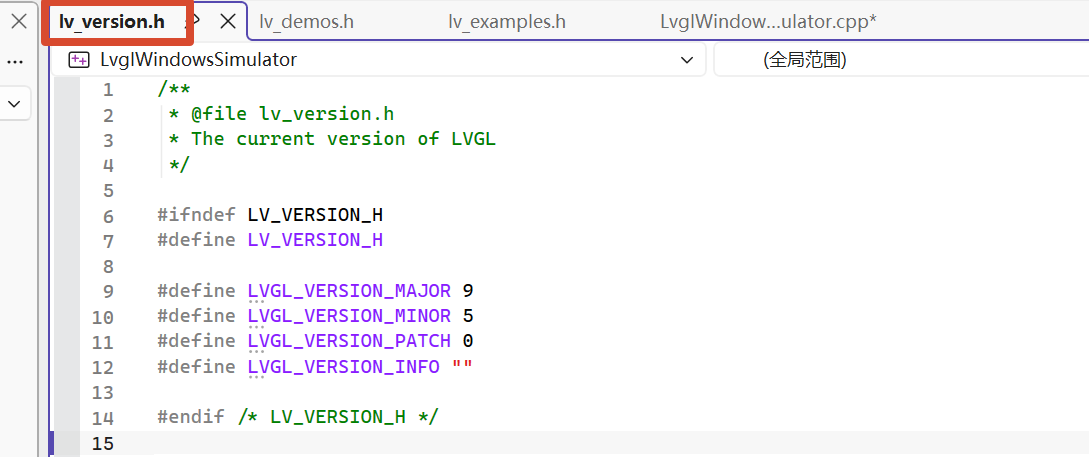
还是打算呢先使用高版本的,高版本的在性能差的帧率较低,但是考虑到后面会在linux相关开发板使用,还是学习最新的LVGL。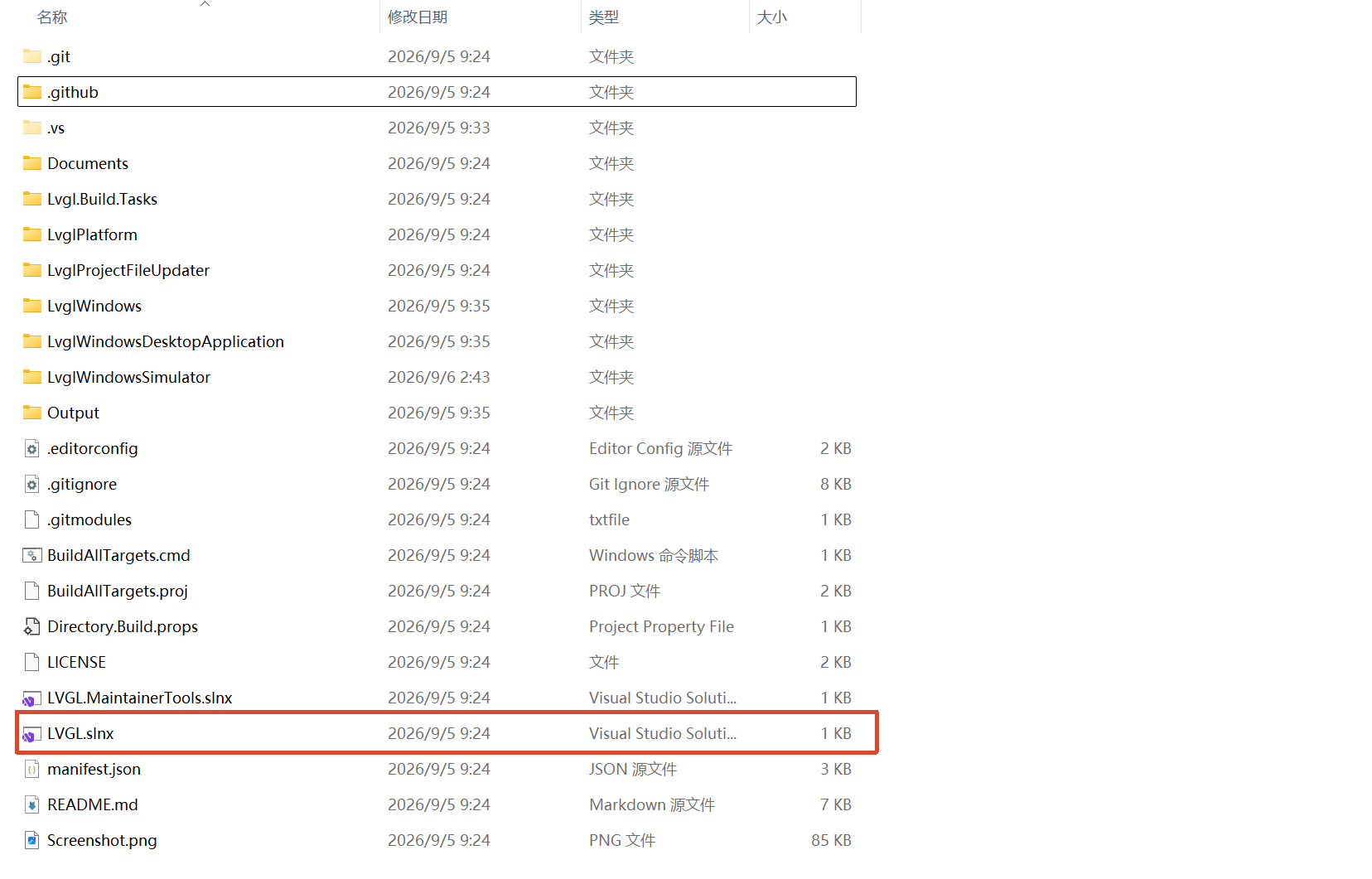
双击或者通过Visual Studio打开这个LVGL.sin文件,sin文件是Visual Studio的项目文件,通过这个文件进入项目。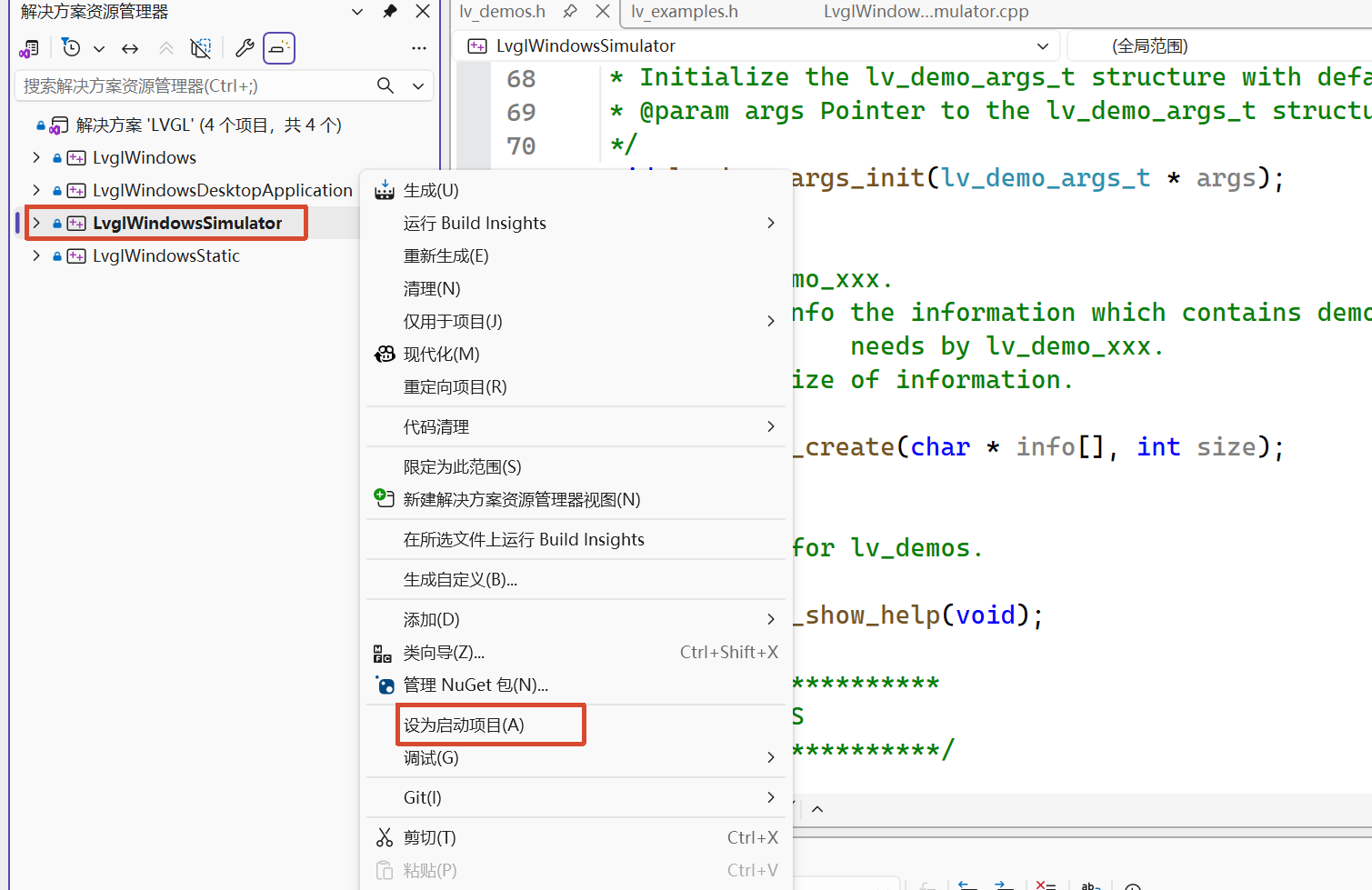
将第三个设为工作项目,后面点击调试或者运行,执行就是第三个。
- 第一个是驱动库,为windows使用lvgl提供驱动文件
- 第二个是真实在windows上可运行使用的程序,可以像其他应用程序自由缩放窗口,可以使用键盘在LVGL程序上打字,像原生运行在windows上一样。
- 第三个是模拟的,屏幕大小固定,且不能使用电脑键盘输入,只能使用鼠标
- 第四个是处理静态库的,定义了如何将 LVGL 及其 Windows 驱动编译成静态链接库(.lib)
后面全部以第三个作为讲解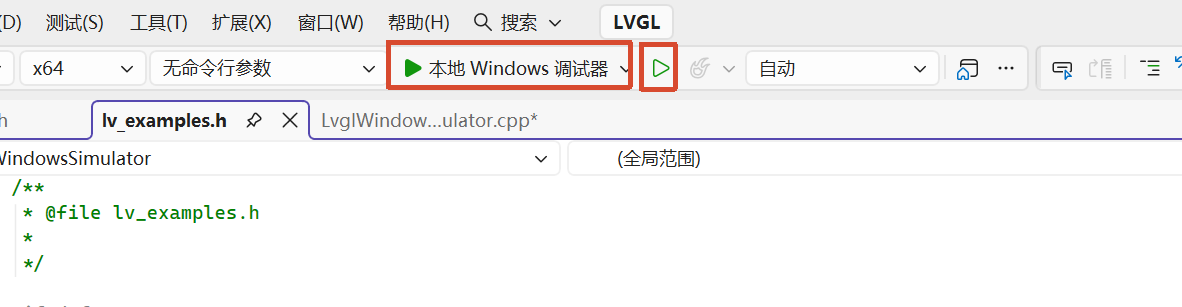
这两个按钮一个是调试,一个是运行,按哪个都可以,但是后面需要打断点调试时需要用到第一个
学习前的铺垫
学习LVLG就是学习如何设计UI以实现你想要的效果。主要侧重于如何利用已有的API设计出画面,而不是学习如何使用API,是学习如何成为设计师而不是只会调库。
lvgl官网:https://lvgl.io/,在此处查看文档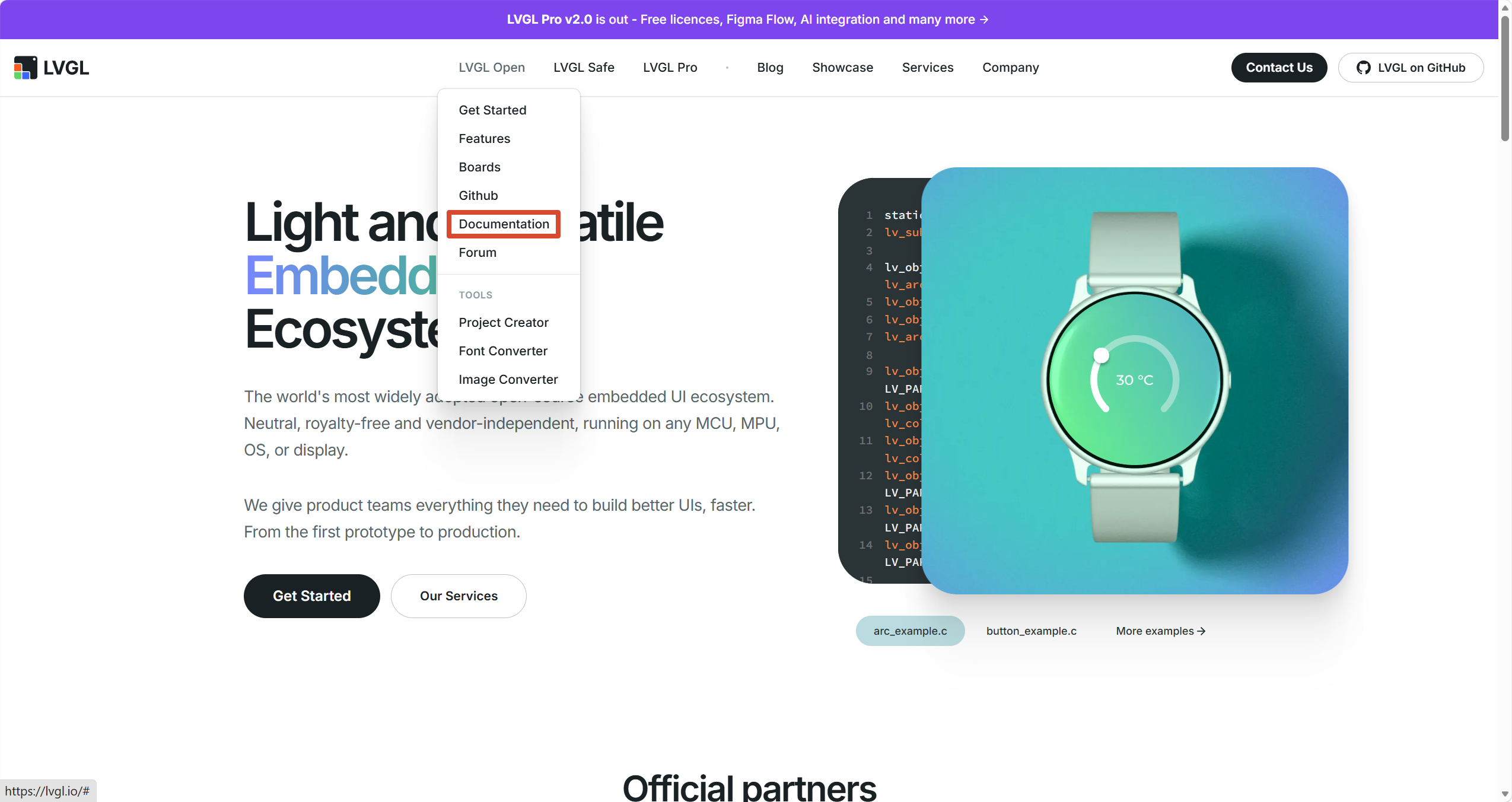
左侧选择LVGL的文档版本,右侧可以使用百叶网做的中文版,但是不建议看,长期不更新,版本较低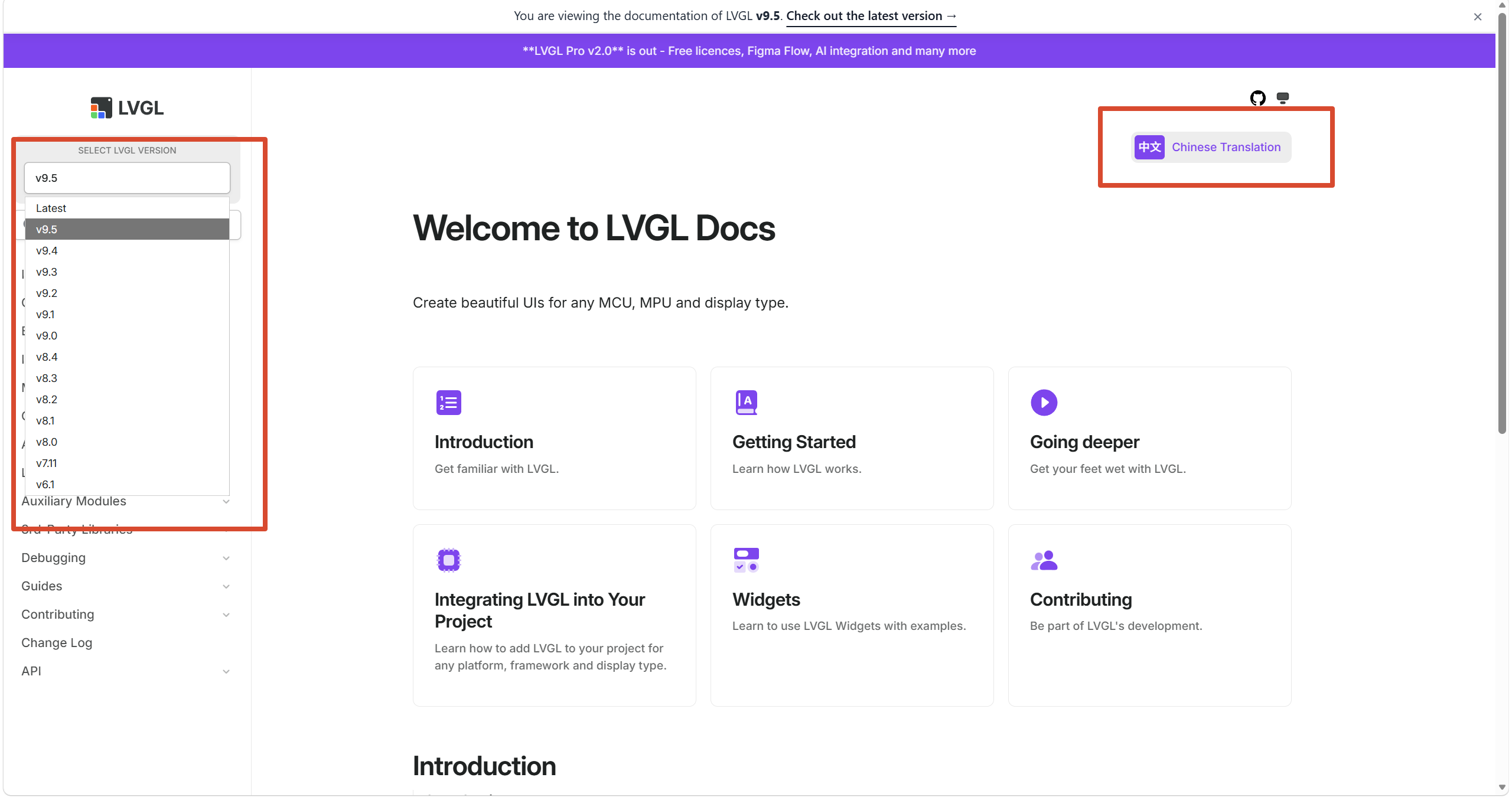
这个文件相当于main.c,里面有main函数,从此文件开始分析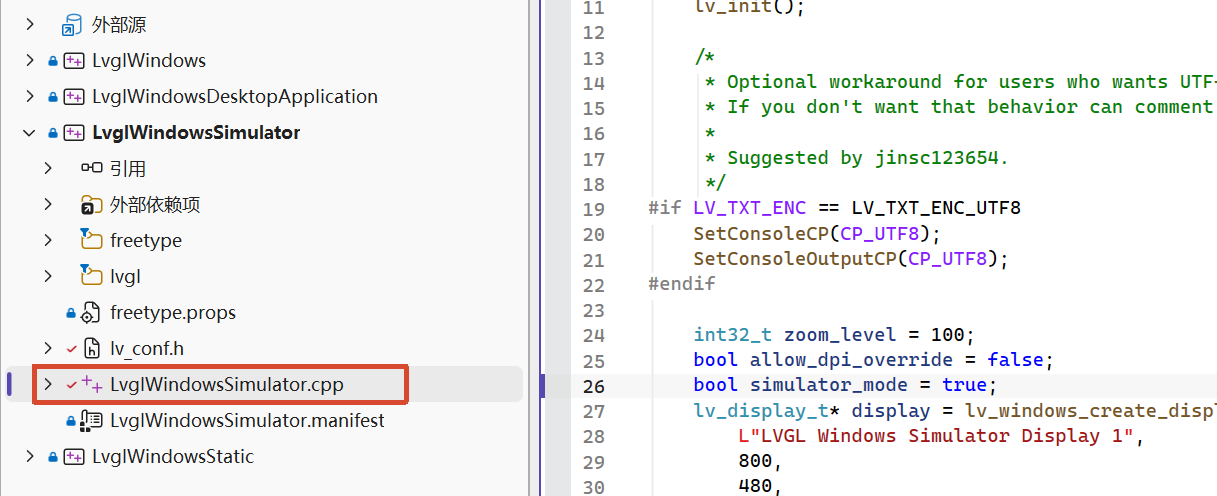
例程学习
通过官方写的例程代码是最容易学习的方式。例程演示几乎所有的API和控件的使用.
project's defuclt example run the effect, the examle can show almost weiget. we frist ti learni it.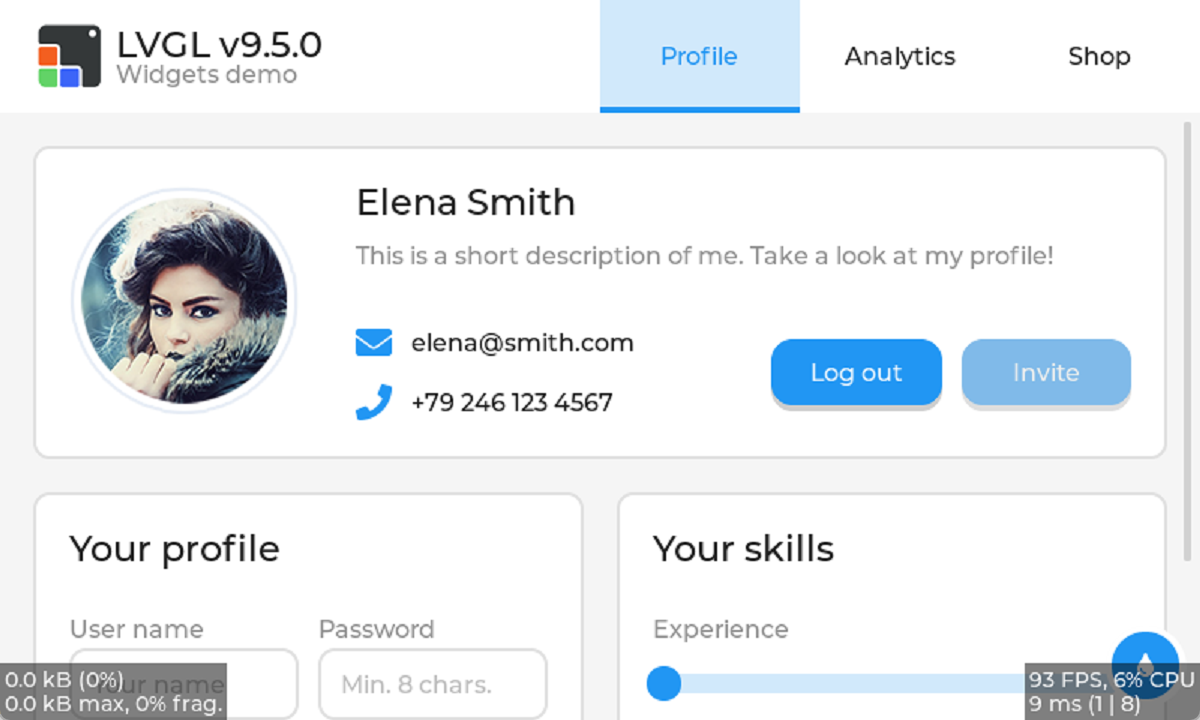
example code's entry function as following:
void lv_demo_widgets(void)
{
    lv_demo_args_t args;
    lv_demo_args_init(&args);
    lv_demo_widgets_with_args(&args);
}
At the first line, it inits a args for the example use, this is convenient to manage the example code.At the scrend line, to give the args the specific value.At the thire and last line, it will create the widget with args.
In the function:lv_demo_widgets_with_args,it will set font by arg and so on. after tis,it will create a tabview,and all weigts in the tabview.by lv_tabview_add_tab create 3 tabs.
In the top of tabview, it set a image and some text. we mainly learn how to create an layout.
void lv_demo_widgets_with_args(const lv_demo_args_t * args)
{
    LV_ASSERT_NULL(args);

    lv_demo_widgets_components_init();
    tv = lv_tabview_create(args->parent);
    lv_tabview_set_tab_bar_size(tv, disp_size == DISP_LARGE ? 75 : 45);
    lv_obj_add_event_cb(tv, tabview_delete_event_cb, LV_EVENT_DELETE, NULL);


    lv_obj_t * t1 = lv_tabview_add_tab(tv, "Profile");
    lv_obj_t * t2 = lv_tabview_add_tab(tv, "Analytics");
    lv_obj_t * t3 = lv_tabview_add_tab(tv, "Shop");

    if(disp_size == DISP_LARGE) {
        lv_obj_t * tab_bar = lv_tabview_get_tab_bar(tv);
        lv_obj_set_style_pad_left(tab_bar, LV_HOR_RES / 2, 0);
        lv_obj_t * logo = lv_image_create(tab_bar);             // creating a image widget in the tar.
        lv_obj_add_flag(logo, LV_OBJ_FLAG_IGNORE_LAYOUT);       // avoiding was move by auto layout
        LV_IMAGE_DECLARE(img_lvgl_logo);                        // declarating the image data exist.
        lv_image_set_src(logo, &img_lvgl_logo);                 // set loge's context to img_lvgl_logo
        lv_obj_align(logo, LV_ALIGN_LEFT_MID, -LV_HOR_RES / 2 + 25, 0);     // layout for it alone

        lv_obj_t * label = lv_demo_widgets_title_create(tab_bar, "");
        lv_obj_add_flag(label, LV_OBJ_FLAG_IGNORE_LAYOUT);
        lv_label_set_text_fmt(label, "LVGL v%d.%d.%d", lv_version_major(), lv_version_minor(), lv_version_patch());
        lv_obj_align_to(label, logo, LV_ALIGN_OUT_RIGHT_TOP, 10, 0);

        label = lv_label_create(tab_bar);
        lv_label_set_text_static(label, "Widgets demo");
        lv_obj_add_flag(label, LV_OBJ_FLAG_IGNORE_LAYOUT);
        lv_obj_add_style(label, &style_text_muted, 0);          // Setting the label's style, the mean of '0' is 'LV_PART_MAIN | LV_STATE_DEFAULT'
        lv_obj_align_to(label, logo, LV_ALIGN_OUT_RIGHT_BOTTOM, 10, 0);
    }

    lv_demo_widgets_profile_create(t1);
    lv_demo_widgets_analytics_create(t2);
    lv_demo_widgets_shop_create(t3);

    color_changer_create(tv);
}
by lv_obj_t * tab_bar = lv_tabview_get_tab_bar(tv); get the tabview's tab_bar. lv_obj_set_style_pad_left is used to set target widget's left padding, if set it as 0, it is as following. the three tabs will fill total screen, so we must get some blank to place the image and text.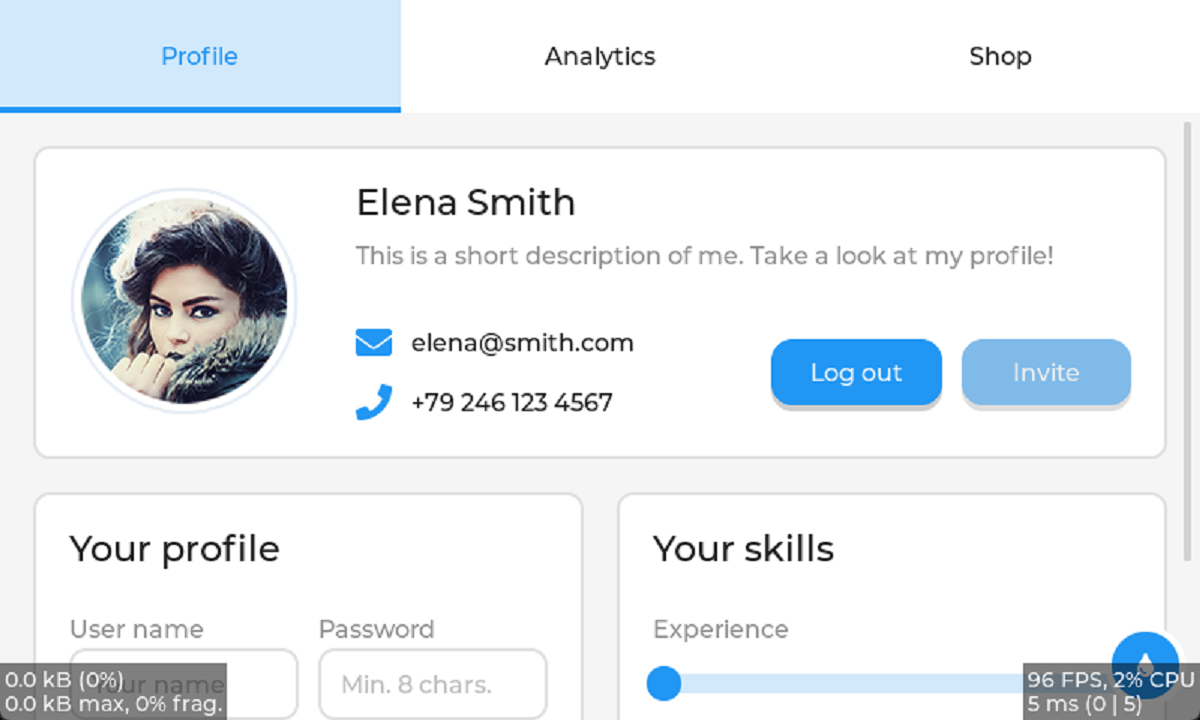
As we all know, the LVGL lib can auto layout your widgets, but, how can do it if you don't want a widget was moved by auto layout, you can uselv_obj_add_flag(logo, LV_OBJ_FLAG_IGNORE_LAYOUT);, so it can show a fixed position relative its parent and was not moved by auto layout.
Next up is creating widget in three tab.First is t1, my explanation will write in the code
void lv_demo_widgets_profile_create(lv_obj_t * parent)
{

    lv_obj_t * panel1 = lv_obj_create(parent);
    lv_obj_set_height(panel1, LV_SIZE_CONTENT);

    LV_IMAGE_DECLARE(img_demo_widgets_avatar);
    lv_obj_t * avatar = lv_image_create(panel1);
    lv_image_set_src(avatar, &img_demo_widgets_avatar);     //设置图片源

    lv_obj_t * name = lv_demo_widgets_title_create(panel1, "Elena Smith");

    lv_obj_t * dsc = lv_label_create(panel1);   // dsc 描述
    lv_obj_add_style(dsc, &style_text_muted, 0);
    lv_label_set_text_static(dsc, "This is a short description of me. Take a look at my profile!");
    lv_label_set_long_mode(dsc, LV_LABEL_LONG_MODE_WRAP);

    lv_obj_t * email_icn = lv_label_create(panel1);
    lv_obj_add_style(email_icn, &style_icon, 0);
    lv_label_set_text_static(email_icn, LV_SYMBOL_ENVELOPE);
    lv_obj_t * email_label = lv_label_create(panel1);
    lv_label_set_text_static(email_label, "elena@smith.com");

    lv_obj_t * call_icn = lv_label_create(panel1);
    lv_obj_add_style(call_icn, &style_icon, 0);
    lv_label_set_text_static(call_icn, LV_SYMBOL_CALL);
    lv_obj_t * call_label = lv_label_create(panel1);
    lv_label_set_text_static(call_label, "+79 246 123 4567");

    lv_obj_t * log_out_btn = lv_button_create(panel1);
    lv_obj_set_height(log_out_btn, LV_SIZE_CONTENT);
    lv_obj_t * label = lv_label_create(log_out_btn);
    lv_label_set_text_static(label, "Log out");
    lv_obj_center(label);

    lv_obj_t * invite_btn = lv_button_create(panel1);
    lv_obj_add_state(invite_btn, LV_STATE_DISABLED);
    lv_obj_set_height(invite_btn, LV_SIZE_CONTENT);
    label = lv_label_create(invite_btn);
    lv_label_set_text_static(label, "Invite");
    lv_obj_center(label);

    /*Create a keyboard*/
    lv_obj_t * kb = lv_keyboard_create(lv_screen_active());
    lv_obj_add_flag(kb, LV_OBJ_FLAG_HIDDEN);

    /*Create the second panel*/
    lv_obj_t * panel2 = lv_obj_create(parent);
    lv_obj_set_height(panel2, LV_SIZE_CONTENT);

    lv_obj_t * panel2_title = lv_demo_widgets_title_create(panel2, "Your profile");

    lv_obj_t * user_name_label = lv_label_create(panel2);
    lv_label_set_text_static(user_name_label, "User name");
    lv_obj_add_style(user_name_label, &style_text_muted, 0);

    lv_obj_t * user_name = lv_textarea_create(panel2);
    lv_textarea_set_one_line(user_name, true);
    lv_textarea_set_placeholder_text(user_name, "Your name");
    lv_obj_add_event_cb(user_name, ta_event_cb, LV_EVENT_ALL, kb);

    lv_obj_t * password_label = lv_label_create(panel2);
    lv_label_set_text_static(password_label, "Password");
    lv_obj_add_style(password_label, &style_text_muted, 0);

    lv_obj_t * password = lv_textarea_create(panel2);
    lv_textarea_set_one_line(password, true);
    lv_textarea_set_password_mode(password, true);
    lv_textarea_set_placeholder_text(password, "Min. 8 chars.");
    lv_obj_add_event_cb(password, ta_event_cb, LV_EVENT_ALL, kb);

    lv_obj_t * gender_label = lv_label_create(panel2);
    lv_label_set_text_static(gender_label, "Gender");
    lv_obj_add_style(gender_label, &style_text_muted, 0);

    lv_obj_t * gender = lv_dropdown_create(panel2);
    lv_dropdown_set_options_static(gender, "Male\nFemale\nOther");

    lv_obj_t * birthday_label = lv_label_create(panel2);
    lv_label_set_text_static(birthday_label, "Birthday");
    lv_obj_add_style(birthday_label, &style_text_muted, 0);

    lv_obj_t * birthdate = lv_textarea_create(panel2);
    lv_textarea_set_one_line(birthdate, true);
    lv_obj_add_event_cb(birthdate, birthday_event_cb, LV_EVENT_ALL, NULL);

    /*Create the third panel*/
    lv_obj_t * panel3 = lv_obj_create(parent);
    lv_obj_t * panel3_title = lv_demo_widgets_title_create(panel3, "Your skills");

    lv_obj_t * experience_label = lv_label_create(panel3);
    lv_label_set_text_static(experience_label, "Experience");
    lv_obj_add_style(experience_label, &style_text_muted, 0);

    lv_obj_t * slider1 = lv_slider_create(panel3);
    lv_obj_set_width(slider1, LV_PCT(95));
    lv_obj_add_event_cb(slider1, slider_event_cb, LV_EVENT_ALL, NULL);
    lv_obj_add_flag(slider1, LV_OBJ_FLAG_SEND_DRAW_TASK_EVENTS);
    lv_obj_refresh_ext_draw_size(slider1);

    lv_obj_t * team_player_label = lv_label_create(panel3);
    lv_label_set_text_static(team_player_label, "Team player");
    lv_obj_add_style(team_player_label, &style_text_muted, 0);

    lv_obj_t * sw1 = lv_switch_create(panel3);

    lv_obj_t * hard_working_label = lv_label_create(panel3);
    lv_label_set_text_static(hard_working_label, "Hard-working");
    lv_obj_add_style(hard_working_label, &style_text_muted, 0);

    lv_obj_t * sw2 = lv_switch_create(panel3);

    if(disp_size == DISP_LARGE) {
        static int32_t grid_main_col_dsc[] = {LV_GRID_FR(1), LV_GRID_FR(1), LV_GRID_TEMPLATE_LAST};
        static int32_t grid_main_row_dsc[] = {LV_GRID_CONTENT, LV_GRID_CONTENT, LV_GRID_TEMPLATE_LAST};

        /*Create the top panel*/
        static int32_t grid_1_col_dsc[] = {LV_GRID_CONTENT, 5, LV_GRID_CONTENT, LV_GRID_FR(2), LV_GRID_FR(1), LV_GRID_FR(1), LV_GRID_TEMPLATE_LAST};
        static int32_t grid_1_row_dsc[] = {LV_GRID_CONTENT, LV_GRID_CONTENT, 10, LV_GRID_CONTENT, LV_GRID_CONTENT, LV_GRID_TEMPLATE_LAST};

        static int32_t grid_2_col_dsc[] = {LV_GRID_FR(1), LV_GRID_FR(1), LV_GRID_TEMPLATE_LAST};
        static int32_t grid_2_row_dsc[] = {
            LV_GRID_CONTENT,  /*Title*/
            5,                /*Separator*/
            LV_GRID_CONTENT,  /*Box title*/
            30,               /*Boxes*/
            5,                /*Separator*/
            LV_GRID_CONTENT,  /*Box title*/
            30,               /*Boxes*/
            LV_GRID_TEMPLATE_LAST
        };
        lv_obj_set_grid_dsc_array(parent, grid_main_col_dsc, grid_main_row_dsc);
        lv_obj_set_grid_cell(panel1, LV_GRID_ALIGN_STRETCH, 0, 2, LV_GRID_ALIGN_CENTER, 0, 1);
        lv_obj_set_grid_dsc_array(panel1, grid_1_col_dsc, grid_1_row_dsc);
        lv_obj_set_grid_cell(avatar, LV_GRID_ALIGN_CENTER, 0, 1, LV_GRID_ALIGN_CENTER, 0, 5);
        lv_obj_set_grid_cell(name, LV_GRID_ALIGN_START, 2, 2, LV_GRID_ALIGN_CENTER, 0, 1);
        lv_obj_set_grid_cell(dsc, LV_GRID_ALIGN_STRETCH, 2, 4, LV_GRID_ALIGN_START, 1, 1);
        lv_obj_set_grid_cell(email_icn, LV_GRID_ALIGN_CENTER, 2, 1, LV_GRID_ALIGN_CENTER, 3, 1);
        lv_obj_set_grid_cell(email_label, LV_GRID_ALIGN_START, 3, 1, LV_GRID_ALIGN_CENTER, 3, 1);
        lv_obj_set_grid_cell(call_icn, LV_GRID_ALIGN_CENTER, 2, 1, LV_GRID_ALIGN_CENTER, 4, 1);
        lv_obj_set_grid_cell(call_label, LV_GRID_ALIGN_START, 3, 1, LV_GRID_ALIGN_CENTER, 4, 1);
        lv_obj_set_grid_cell(log_out_btn, LV_GRID_ALIGN_STRETCH, 4, 1, LV_GRID_ALIGN_CENTER, 3, 2);
        lv_obj_set_grid_cell(invite_btn, LV_GRID_ALIGN_STRETCH, 5, 1, LV_GRID_ALIGN_CENTER, 3, 2);

        lv_obj_set_grid_cell(panel2, LV_GRID_ALIGN_STRETCH, 0, 1, LV_GRID_ALIGN_START, 1, 1);
        lv_obj_set_grid_dsc_array(panel2, grid_2_col_dsc, grid_2_row_dsc);
        lv_obj_set_grid_cell(panel2_title, LV_GRID_ALIGN_START, 0, 2, LV_GRID_ALIGN_CENTER, 0, 1);
        lv_obj_set_grid_cell(user_name, LV_GRID_ALIGN_STRETCH, 0, 1, LV_GRID_ALIGN_CENTER, 3, 1);
        lv_obj_set_grid_cell(user_name_label, LV_GRID_ALIGN_START, 0, 1, LV_GRID_ALIGN_START, 2, 1);
        lv_obj_set_grid_cell(password, LV_GRID_ALIGN_STRETCH, 1, 1, LV_GRID_ALIGN_CENTER, 3, 1);
        lv_obj_set_grid_cell(password_label, LV_GRID_ALIGN_START, 1, 1, LV_GRID_ALIGN_START, 2, 1);
        lv_obj_set_grid_cell(birthdate, LV_GRID_ALIGN_STRETCH, 1, 1, LV_GRID_ALIGN_CENTER, 6, 1);
        lv_obj_set_grid_cell(birthday_label, LV_GRID_ALIGN_START, 1, 1, LV_GRID_ALIGN_START, 5, 1);
        lv_obj_set_grid_cell(gender, LV_GRID_ALIGN_STRETCH, 0, 1, LV_GRID_ALIGN_CENTER, 6, 1);
        lv_obj_set_grid_cell(gender_label, LV_GRID_ALIGN_START, 0, 1, LV_GRID_ALIGN_START, 5, 1);

        lv_obj_set_grid_cell(panel3, LV_GRID_ALIGN_STRETCH, 1, 1, LV_GRID_ALIGN_STRETCH, 1, 1);
        lv_obj_set_grid_dsc_array(panel3, grid_2_col_dsc, grid_2_row_dsc);
        lv_obj_set_grid_cell(panel3_title, LV_GRID_ALIGN_START, 0, 2, LV_GRID_ALIGN_CENTER, 0, 1);
        lv_obj_set_grid_cell(slider1, LV_GRID_ALIGN_CENTER, 0, 2, LV_GRID_ALIGN_CENTER, 3, 1);
        lv_obj_set_grid_cell(experience_label, LV_GRID_ALIGN_START, 0, 1, LV_GRID_ALIGN_START, 2, 1);
        lv_obj_set_grid_cell(sw2, LV_GRID_ALIGN_START, 1, 1, LV_GRID_ALIGN_CENTER, 6, 1);
        lv_obj_set_grid_cell(hard_working_label, LV_GRID_ALIGN_START, 0, 1, LV_GRID_ALIGN_START, 5, 1);
        lv_obj_set_grid_cell(sw1, LV_GRID_ALIGN_START, 0, 1, LV_GRID_ALIGN_CENTER, 6, 1);
        lv_obj_set_grid_cell(team_player_label, LV_GRID_ALIGN_START, 1, 1, LV_GRID_ALIGN_START, 5, 1);
    }
    else if(disp_size == DISP_MEDIUM) {
        static int32_t grid_main_col_dsc[] = {LV_GRID_FR(1), LV_GRID_FR(1), LV_GRID_TEMPLATE_LAST};
        static int32_t grid_main_row_dsc[] = {LV_GRID_CONTENT, LV_GRID_CONTENT, LV_GRID_TEMPLATE_LAST};

        /*Create the top panel*/
        static int32_t grid_1_col_dsc[] = {LV_GRID_CONTENT, 1, LV_GRID_CONTENT, LV_GRID_FR(1), LV_GRID_TEMPLATE_LAST};
        static int32_t grid_1_row_dsc[] = {
            LV_GRID_CONTENT, /*Name*/
            LV_GRID_CONTENT, /*Description*/
            LV_GRID_CONTENT, /*Email*/
            -20,
            LV_GRID_CONTENT, /*Phone*/
            LV_GRID_CONTENT, /*Buttons*/
            LV_GRID_TEMPLATE_LAST
        };

        static int32_t grid_2_col_dsc[] = {LV_GRID_FR(1), LV_GRID_FR(1), LV_GRID_TEMPLATE_LAST};
        static int32_t grid_2_row_dsc[] = {
            LV_GRID_CONTENT,  /*Title*/
            5,                /*Separator*/
            LV_GRID_CONTENT,  /*Box title*/
            40,               /*Box*/
            LV_GRID_CONTENT,  /*Box title*/
            40,               /*Box*/
            LV_GRID_CONTENT,  /*Box title*/
            40,               /*Box*/
            LV_GRID_CONTENT,  /*Box title*/
            40,               /*Box*/
            LV_GRID_TEMPLATE_LAST
        };

        lv_obj_set_grid_dsc_array(parent, grid_main_col_dsc, grid_main_row_dsc);
        lv_obj_set_grid_cell(panel1, LV_GRID_ALIGN_STRETCH, 0, 2, LV_GRID_ALIGN_CENTER, 0, 1);

        lv_obj_set_width(log_out_btn, 110);
        lv_obj_set_width(invite_btn, 110);

        lv_obj_set_grid_dsc_array(panel1, grid_1_col_dsc, grid_1_row_dsc);
        lv_obj_set_grid_cell(avatar, LV_GRID_ALIGN_CENTER, 0, 1, LV_GRID_ALIGN_START, 0, 4);
        lv_obj_set_grid_cell(name, LV_GRID_ALIGN_START, 2, 2, LV_GRID_ALIGN_CENTER, 0, 1);
        lv_obj_set_grid_cell(dsc, LV_GRID_ALIGN_STRETCH, 2, 2, LV_GRID_ALIGN_START, 1, 1);
        lv_obj_set_grid_cell(email_label, LV_GRID_ALIGN_START, 3, 1, LV_GRID_ALIGN_CENTER, 2, 1);
        lv_obj_set_grid_cell(email_icn, LV_GRID_ALIGN_CENTER, 2, 1, LV_GRID_ALIGN_CENTER, 2, 1);
        lv_obj_set_grid_cell(call_icn, LV_GRID_ALIGN_CENTER, 2, 1, LV_GRID_ALIGN_CENTER, 4, 1);
        lv_obj_set_grid_cell(call_label, LV_GRID_ALIGN_START, 3, 1, LV_GRID_ALIGN_CENTER, 4, 1);
        lv_obj_set_grid_cell(log_out_btn, LV_GRID_ALIGN_START, 1, 1, LV_GRID_ALIGN_CENTER, 5, 1);
        lv_obj_set_grid_cell(invite_btn, LV_GRID_ALIGN_END, 3, 1, LV_GRID_ALIGN_CENTER, 5, 1);

        lv_obj_set_grid_cell(panel2, LV_GRID_ALIGN_STRETCH, 0, 1, LV_GRID_ALIGN_START, 1, 1);
        lv_obj_set_grid_dsc_array(panel2, grid_2_col_dsc, grid_2_row_dsc);
        lv_obj_set_grid_cell(panel2_title, LV_GRID_ALIGN_START, 0, 2, LV_GRID_ALIGN_CENTER, 0, 1);
        lv_obj_set_grid_cell(user_name_label, LV_GRID_ALIGN_START, 0, 2, LV_GRID_ALIGN_START, 2, 1);
        lv_obj_set_grid_cell(user_name, LV_GRID_ALIGN_STRETCH, 0, 2, LV_GRID_ALIGN_START, 3, 1);
        lv_obj_set_grid_cell(password_label, LV_GRID_ALIGN_START, 0, 2, LV_GRID_ALIGN_START, 4, 1);
        lv_obj_set_grid_cell(password, LV_GRID_ALIGN_STRETCH, 0, 2, LV_GRID_ALIGN_START, 5, 1);
        lv_obj_set_grid_cell(birthday_label, LV_GRID_ALIGN_START, 0, 2, LV_GRID_ALIGN_START, 6, 1);
        lv_obj_set_grid_cell(birthdate, LV_GRID_ALIGN_STRETCH, 0, 2, LV_GRID_ALIGN_START, 7, 1);
        lv_obj_set_grid_cell(gender_label, LV_GRID_ALIGN_START, 0, 2, LV_GRID_ALIGN_START, 8, 1);
        lv_obj_set_grid_cell(gender, LV_GRID_ALIGN_STRETCH, 0, 2, LV_GRID_ALIGN_START, 9, 1);

        lv_obj_set_grid_cell(panel3, LV_GRID_ALIGN_STRETCH, 1, 1, LV_GRID_ALIGN_STRETCH, 1, 1);
        lv_obj_set_grid_dsc_array(panel3, grid_2_col_dsc, grid_2_row_dsc);
        lv_obj_set_grid_cell(panel3_title, LV_GRID_ALIGN_START, 0, 2, LV_GRID_ALIGN_CENTER, 0, 1);
        lv_obj_set_grid_cell(slider1, LV_GRID_ALIGN_CENTER, 0, 2, LV_GRID_ALIGN_CENTER, 3, 1);
        lv_obj_set_grid_cell(experience_label, LV_GRID_ALIGN_START, 0, 1, LV_GRID_ALIGN_START, 2, 1);
        lv_obj_set_grid_cell(hard_working_label, LV_GRID_ALIGN_START, 0, 1, LV_GRID_ALIGN_START, 4, 1);
        lv_obj_set_grid_cell(sw2, LV_GRID_ALIGN_START, 0, 1, LV_GRID_ALIGN_START, 5, 1);
        lv_obj_set_grid_cell(team_player_label, LV_GRID_ALIGN_START, 0, 1, LV_GRID_ALIGN_START, 6, 1);
        lv_obj_set_grid_cell(sw1, LV_GRID_ALIGN_START, 0, 1, LV_GRID_ALIGN_START, 7, 1);
    }
    else if(disp_size == DISP_SMALL) {
        static int32_t grid_main_col_dsc[] = {LV_GRID_FR(1), LV_GRID_TEMPLATE_LAST};
        static int32_t grid_main_row_dsc[] = {LV_GRID_CONTENT, LV_GRID_CONTENT, LV_GRID_CONTENT, LV_GRID_TEMPLATE_LAST};
        lv_obj_set_grid_dsc_array(parent, grid_main_col_dsc, grid_main_row_dsc);

        /*Create the top panel*/
        static int32_t grid_1_col_dsc[] = {LV_GRID_CONTENT, LV_GRID_FR(1), LV_GRID_TEMPLATE_LAST};
        static int32_t grid_1_row_dsc[] = {LV_GRID_CONTENT, /*Avatar*/
                                           LV_GRID_CONTENT, /*Name*/
                                           LV_GRID_CONTENT, /*Description*/
                                           LV_GRID_CONTENT, /*Email*/
                                           LV_GRID_CONTENT, /*Phone number*/
                                           LV_GRID_CONTENT, /*Button1*/
                                           LV_GRID_CONTENT, /*Button2*/
                                           LV_GRID_TEMPLATE_LAST
                                          };

        lv_obj_set_grid_dsc_array(panel1, grid_1_col_dsc, grid_1_row_dsc);

        static int32_t grid_2_col_dsc[] = {LV_GRID_FR(1), LV_GRID_FR(1), LV_GRID_TEMPLATE_LAST};
        static int32_t grid_2_row_dsc[] = {
            LV_GRID_CONTENT,  /*Title*/
            5,                /*Separator*/
            LV_GRID_CONTENT,  /*Box title*/
            40,               /*Box*/
            LV_GRID_CONTENT,  /*Box title*/
            40,               /*Box*/
            LV_GRID_CONTENT,  /*Box title*/
            40,               /*Box*/
            LV_GRID_CONTENT,  /*Box title*/
            40, LV_GRID_TEMPLATE_LAST               /*Box*/
        };

        lv_obj_set_grid_dsc_array(panel2, grid_2_col_dsc, grid_2_row_dsc);
        lv_obj_set_grid_dsc_array(panel3, grid_2_col_dsc, grid_2_row_dsc);

        lv_obj_set_grid_cell(panel1, LV_GRID_ALIGN_STRETCH, 0, 1, LV_GRID_ALIGN_CENTER, 0, 1);

        lv_obj_set_style_text_align(dsc, LV_TEXT_ALIGN_CENTER, 0);

        lv_obj_set_grid_cell(avatar, LV_GRID_ALIGN_CENTER, 0, 2, LV_GRID_ALIGN_CENTER, 0, 1);
        lv_obj_set_grid_cell(name, LV_GRID_ALIGN_CENTER, 0, 2, LV_GRID_ALIGN_CENTER, 1, 1);
        lv_obj_set_grid_cell(dsc, LV_GRID_ALIGN_STRETCH, 0, 2, LV_GRID_ALIGN_START, 2, 1);
        lv_obj_set_grid_cell(email_icn, LV_GRID_ALIGN_CENTER, 0, 1, LV_GRID_ALIGN_CENTER, 3, 1);
        lv_obj_set_grid_cell(email_label, LV_GRID_ALIGN_START, 1, 1, LV_GRID_ALIGN_CENTER, 3, 1);
        lv_obj_set_grid_cell(call_icn, LV_GRID_ALIGN_CENTER, 0, 1, LV_GRID_ALIGN_CENTER, 4, 1);
        lv_obj_set_grid_cell(call_label, LV_GRID_ALIGN_START, 1, 1, LV_GRID_ALIGN_CENTER, 4, 1);
        lv_obj_set_grid_cell(log_out_btn, LV_GRID_ALIGN_STRETCH, 0, 2, LV_GRID_ALIGN_CENTER, 5, 1);
        lv_obj_set_grid_cell(invite_btn, LV_GRID_ALIGN_STRETCH, 0, 2, LV_GRID_ALIGN_CENTER, 6, 1);

        lv_obj_set_grid_cell(panel2, LV_GRID_ALIGN_STRETCH, 0, 1, LV_GRID_ALIGN_START, 1, 1);
        lv_obj_set_grid_cell(panel2_title, LV_GRID_ALIGN_START, 0, 2, LV_GRID_ALIGN_CENTER, 0, 1);
        lv_obj_set_grid_cell(user_name_label, LV_GRID_ALIGN_START, 0, 2, LV_GRID_ALIGN_START, 2, 1);
        lv_obj_set_grid_cell(user_name, LV_GRID_ALIGN_STRETCH, 0, 2, LV_GRID_ALIGN_START, 3, 1);
        lv_obj_set_grid_cell(password_label, LV_GRID_ALIGN_START, 0, 2, LV_GRID_ALIGN_START, 4, 1);
        lv_obj_set_grid_cell(password, LV_GRID_ALIGN_STRETCH, 0, 2, LV_GRID_ALIGN_START, 5, 1);
        lv_obj_set_grid_cell(birthday_label, LV_GRID_ALIGN_START, 0, 2, LV_GRID_ALIGN_START, 6, 1);
        lv_obj_set_grid_cell(birthdate, LV_GRID_ALIGN_STRETCH, 0, 2, LV_GRID_ALIGN_START, 7, 1);
        lv_obj_set_grid_cell(gender_label, LV_GRID_ALIGN_START, 0, 2, LV_GRID_ALIGN_START, 8, 1);
        lv_obj_set_grid_cell(gender, LV_GRID_ALIGN_STRETCH, 0, 2, LV_GRID_ALIGN_START, 9, 1);

        lv_obj_set_height(panel3, LV_SIZE_CONTENT);
        lv_obj_set_grid_cell(panel3, LV_GRID_ALIGN_STRETCH, 0, 1, LV_GRID_ALIGN_START, 2, 1);
        lv_obj_set_grid_cell(panel3_title, LV_GRID_ALIGN_START, 0, 2, LV_GRID_ALIGN_CENTER, 0, 1);
        lv_obj_set_grid_cell(experience_label, LV_GRID_ALIGN_START, 0, 1, LV_GRID_ALIGN_START, 2, 1);
        lv_obj_set_grid_cell(slider1, LV_GRID_ALIGN_CENTER, 0, 2, LV_GRID_ALIGN_CENTER, 3, 1);
        lv_obj_set_grid_cell(hard_working_label, LV_GRID_ALIGN_START, 0, 1, LV_GRID_ALIGN_START, 4, 1);
        lv_obj_set_grid_cell(sw1, LV_GRID_ALIGN_START, 0, 1, LV_GRID_ALIGN_START, 5, 1);
        lv_obj_set_grid_cell(team_player_label, LV_GRID_ALIGN_START, 1, 1, LV_GRID_ALIGN_START, 4, 1);
        lv_obj_set_grid_cell(sw2, LV_GRID_ALIGN_START, 1, 1, LV_GRID_ALIGN_START, 5, 1);
    }
}
The code below achieves this effect.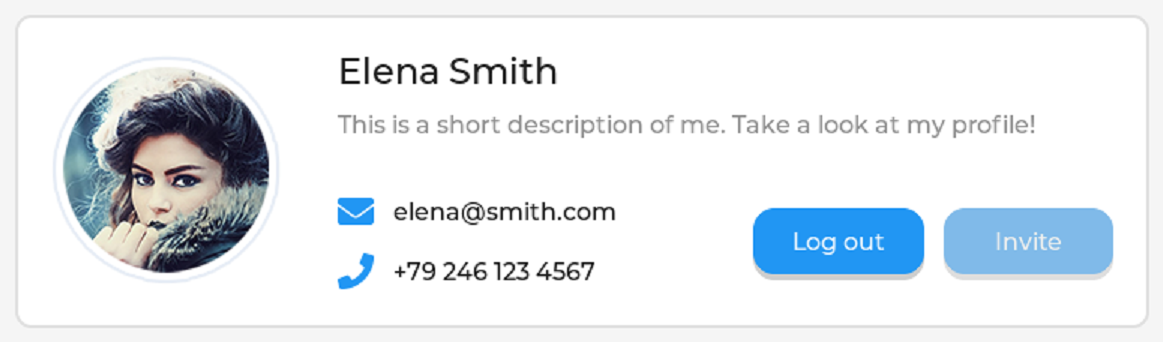
lv_obj_t * panel1 = lv_obj_create(parent);      // Create a panel under parent for placing widgets.
lv_obj_set_height(panel1, LV_SIZE_CONTENT);     // Set the panel's height

LV_IMAGE_DECLARE(img_demo_widgets_avatar);      // Declare the image data is live
lv_obj_t * avatar = lv_image_create(panel1);    // Create a image widget under 'panel1'
lv_image_set_src(avatar, &img_demo_widgets_avatar);     // Fill just now image data to 'avatar'

lv_obj_t * name = lv_demo_widgets_title_create(panel1, "Elena Smith");

lv_obj_t * dsc = lv_label_create(panel1);
lv_obj_add_style(dsc, &style_text_muted, 0);
lv_label_set_text_static(dsc, "This is a short description of me. Take a look at my profile!");
lv_label_set_long_mode(dsc, LV_LABEL_LONG_MODE_WRAP);

lv_obj_t * email_icn = lv_label_create(panel1);
lv_obj_add_style(email_icn, &style_icon, 0);
lv_label_set_text_static(email_icn, LV_SYMBOL_ENVELOPE);
lv_obj_t * email_label = lv_label_create(panel1);
lv_label_set_text_static(email_label, "elena@smith.com");

lv_obj_t * call_icn = lv_label_create(panel1);
lv_obj_add_style(call_icn, &style_icon, 0);
lv_label_set_text_static(call_icn, LV_SYMBOL_CALL);
lv_obj_t * call_label = lv_label_create(panel1);
lv_label_set_text_static(call_label, "+79 246 123 4567");

lv_obj_t * log_out_btn = lv_button_create(panel1);
lv_obj_set_height(log_out_btn, LV_SIZE_CONTENT);
lv_obj_t * label = lv_label_create(log_out_btn);
lv_label_set_text_static(label, "Log out");
lv_obj_center(label);

lv_obj_t * invite_btn = lv_button_create(panel1);
lv_obj_add_state(invite_btn, LV_STATE_DISABLED);
lv_obj_set_height(invite_btn, LV_SIZE_CONTENT);
label = lv_label_create(invite_btn);
lv_label_set_text_static(label, "Invite");
lv_obj_center(label);
LV_SIZE_CONTENT is used to auto adjust widget size.
if your text is too long, you can use lv_label_set_long_mode make label to auto new line.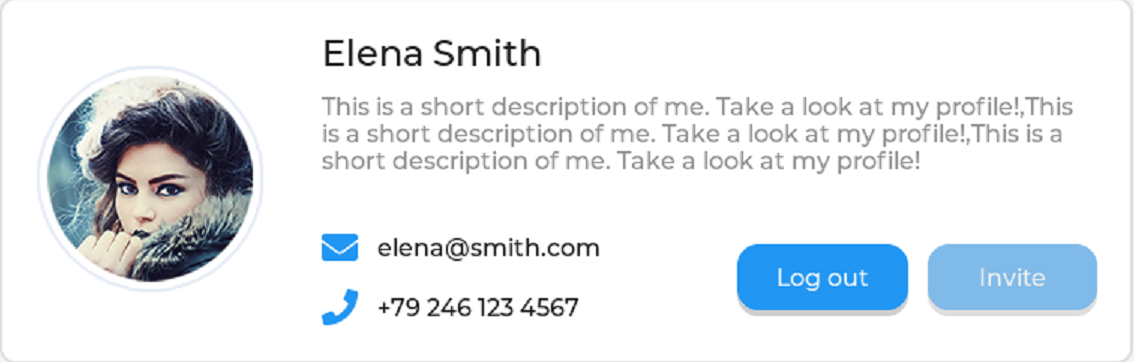
LVGL prepere some icon, you can find it in the file lv_symbol_def.h, you can use it in the label by lv_label_set_text_static(call_icn, LV_SYMBOL_CALL);. that's their name:
enum _lv_str_symbol_id_t {
    LV_STR_SYMBOL_BULLET,
    LV_STR_SYMBOL_AUDIO,
    LV_STR_SYMBOL_VIDEO,
    LV_STR_SYMBOL_LIST,
    LV_STR_SYMBOL_OK,
    LV_STR_SYMBOL_CLOSE,
    ...
    LV_STR_SYMBOL_DUMMY,
};
that's their image: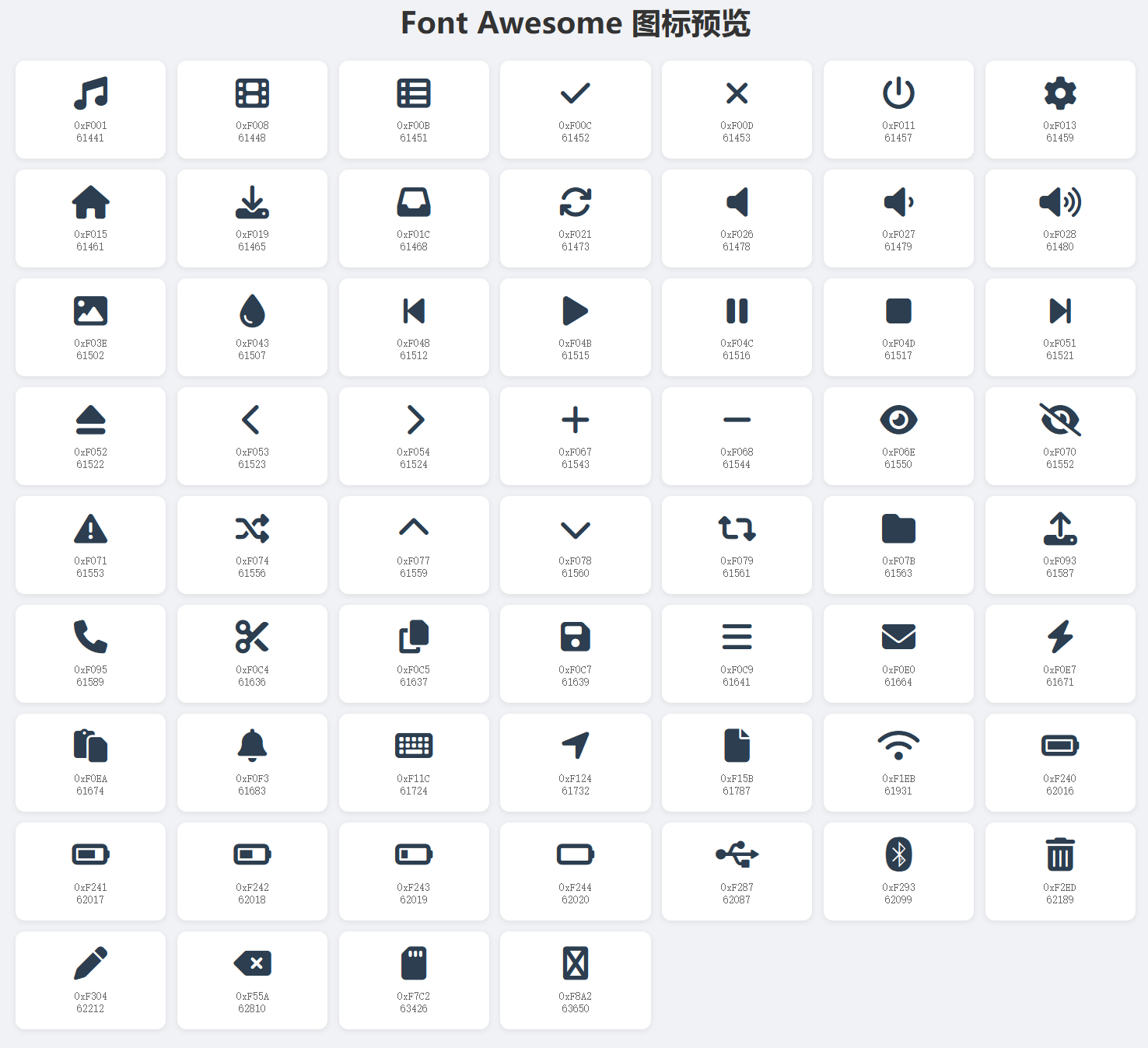
Just now, I explain how to create that widgets, but how dose LVGL konw how the widgets are arranged?
Layout that widgets by below code:
static int32_t grid_main_col_dsc[] = {LV_GRID_FR(1), LV_GRID_FR(1), LV_GRID_TEMPLATE_LAST};
static int32_t grid_main_row_dsc[] = {LV_GRID_CONTENT, LV_GRID_CONTENT, LV_GRID_TEMPLATE_LAST};

/*Create the top panel*/
static int32_t grid_1_col_dsc[] = {LV_GRID_CONTENT, 5, LV_GRID_CONTENT, LV_GRID_FR(2), LV_GRID_FR(1), LV_GRID_FR(1), LV_GRID_TEMPLATE_LAST};
static int32_t grid_1_row_dsc[] = {LV_GRID_CONTENT, LV_GRID_CONTENT, 10, LV_GRID_CONTENT, LV_GRID_CONTENT, LV_GRID_TEMPLATE_LAST};

static int32_t grid_2_col_dsc[] = {LV_GRID_FR(1), LV_GRID_FR(1), LV_GRID_TEMPLATE_LAST};
static int32_t grid_2_row_dsc[] = {
    LV_GRID_CONTENT,  /*Title*/
    5,                /*Separator*/
    LV_GRID_CONTENT,  /*Box title*/
    30,               /*Boxes*/
    5,                /*Separator*/
    LV_GRID_CONTENT,  /*Box title*/
    30,               /*Boxes*/
    LV_GRID_TEMPLATE_LAST
};
lv_obj_set_grid_dsc_array(parent, grid_main_col_dsc, grid_main_row_dsc);
lv_obj_set_grid_cell(panel1, LV_GRID_ALIGN_STRETCH, 0, 2, LV_GRID_ALIGN_CENTER, 0, 1);
lv_obj_set_grid_dsc_array(panel1, grid_1_col_dsc, grid_1_row_dsc);
lv_obj_set_grid_cell(avatar, LV_GRID_ALIGN_CENTER, 0, 1, LV_GRID_ALIGN_CENTER, 0, 5);
lv_obj_set_grid_cell(name, LV_GRID_ALIGN_START, 2, 2, LV_GRID_ALIGN_CENTER, 0, 1);
lv_obj_set_grid_cell(dsc, LV_GRID_ALIGN_STRETCH, 2, 4, LV_GRID_ALIGN_START, 1, 1);
lv_obj_set_grid_cell(email_icn, LV_GRID_ALIGN_CENTER, 2, 1, LV_GRID_ALIGN_CENTER, 3, 1);
lv_obj_set_grid_cell(email_label, LV_GRID_ALIGN_START, 3, 1, LV_GRID_ALIGN_CENTER, 3, 1);
lv_obj_set_grid_cell(call_icn, LV_GRID_ALIGN_CENTER, 2, 1, LV_GRID_ALIGN_CENTER, 4, 1);
lv_obj_set_grid_cell(call_label, LV_GRID_ALIGN_START, 3, 1, LV_GRID_ALIGN_CENTER, 4, 1);
lv_obj_set_grid_cell(log_out_btn, LV_GRID_ALIGN_STRETCH, 4, 1, LV_GRID_ALIGN_CENTER, 3, 2);
lv_obj_set_grid_cell(invite_btn, LV_GRID_ALIGN_STRETCH, 5, 1, LV_GRID_ALIGN_CENTER, 3, 2);
LVGL use 'descriptor array' to achieve layout.
//                                       1 column       1 column     the array's marked of end
static int32_t grid_main_col_dsc[] = {LV_GRID_FR(1), LV_GRID_FR(1), LV_GRID_TEMPLATE_LAST};     // each column's width is 50% space of t1
//                                      1 row           1 row        the array's marked of end
static int32_t grid_main_row_dsc[] = {LV_GRID_CONTENT, LV_GRID_CONTENT, LV_GRID_TEMPLATE_LAST}; // each row's height is decided by they context
So, you can see this: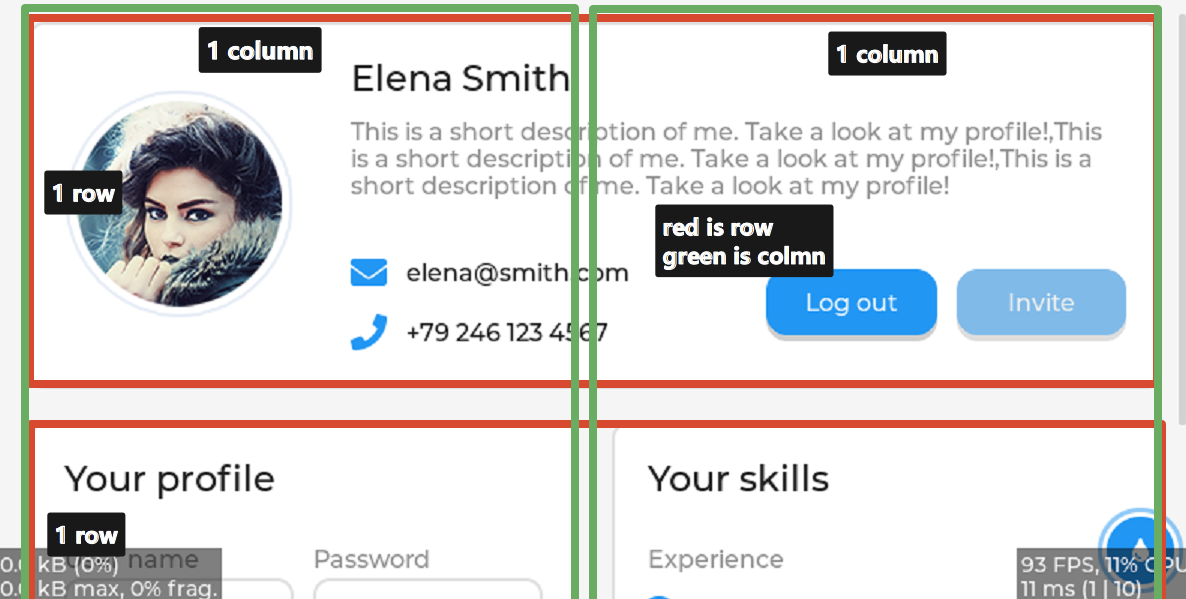
and this
/*Create the top panel*/
// 'LV_GRID_CONTENT' expresses the column's width is dicided by LVGL lib,'5' expreees the column's width is 5 pixels.
// 'LV_GRID_FR(2), LV_GRID_FR(1), LV_GRID_FR(1)' get the rest space, the allocation of ratio is 2:1:1
//                                  1 column      1 column  1 column       1 column       1 column     1 column          mark of end
static int32_t grid_1_col_dsc[] = {LV_GRID_CONTENT, 5, LV_GRID_CONTENT, LV_GRID_FR(2), LV_GRID_FR(1), LV_GRID_FR(1), LV_GRID_TEMPLATE_LAST};    // all is 6 column
static int32_t grid_1_row_dsc[] = {LV_GRID_CONTENT, LV_GRID_CONTENT, 10, LV_GRID_CONTENT, LV_GRID_CONTENT, LV_GRID_TEMPLATE_LAST};      // all is 5 row
so, you can see this: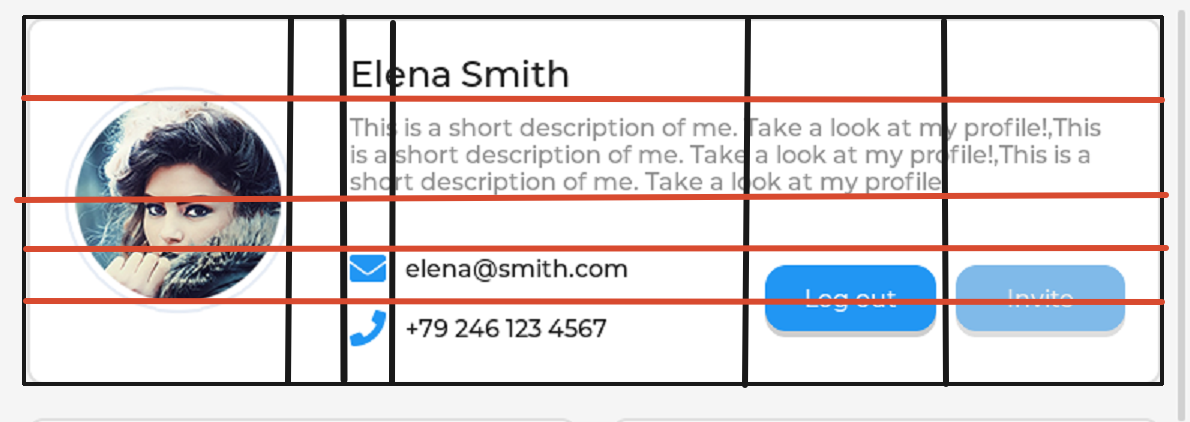
and below set each widget position
// setting t1 as 2 column and 2 row
lv_obj_set_grid_dsc_array(parent, grid_main_col_dsc, grid_main_row_dsc);
//            target widget   full the free space    start  span   the row' center    start span
lv_obj_set_grid_cell(panel1, LV_GRID_ALIGN_STRETCH,    0,    2, LV_GRID_ALIGN_CENTER,   0,   1);