
1/21/26About 1 min
01-ESP8266-TCP Communication
- TCP communication
- MQTT communication
- Connecting to a microcontroller
- Mobile APP development - communicating with STM32 - MQTT
Basic Info
The ESP8266 itself: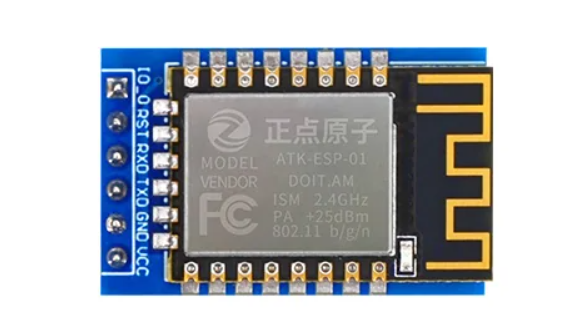
Wiring is as follows: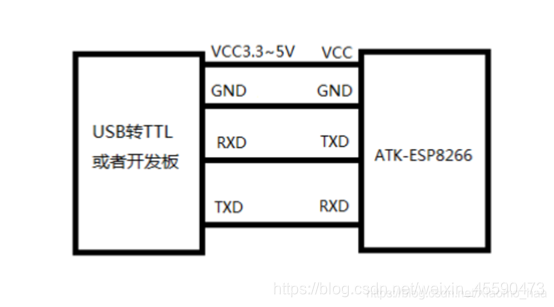
Connecting to WiFi
| Command | Response | Purpose |
|---|---|---|
AT+UART=115200,8,1,0,0 | OK | Set the baud rate |
AT | OK | Test whether AT commands are available |
AT+RST | OK, then init info | Restart the ESP8266 |
AT+GMR | Version info | Check the firmware version |
AT+CWMODE=1 | OK | Set the WiFi mode (STA mode) The ESP8266 can act as a client (STA), a hotspot (AP), or both at once (AP+STA). 0 turns WiFi off, 1 is STA mode, 2 is AP mode, 3 is AP+STA mode |
AT+CWJAP="name","password" | WIFI CONNECTED WIFI GOT IP OK | Connect to WiFi |
AT+CWJAP? | +CWJAP:"your WiFi name","xx:xx:xx:xx:xx:xx",channel,signal_strength | Check the connection status (verify the connection succeeded) |
AT+CIFSR | +CIFSR:STAIP,"192.168.1.100" +CIFSR:STAMAC,"a4:e5:7c:26:1a:3f" OK | Get the assigned IP |
AT+CWQAP | OK | Disconnect from WiFi |
- Set the WiFi mode (AT+CWMODE=1)
- Connect to WiFi with the name and password (AT+CWJAP="name","password")
TCP Communication
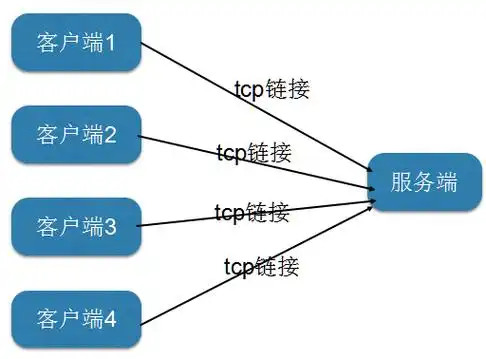
As a Client
Get the local IP:
Open CMD and type ipconfig
Find the IP under Wireless LAN adapter WLAN: — that is your local IP
| Command | Return value | Purpose |
|---|---|---|
AT+CIPSTART="TCP","192.168.1.200",8080 | CONNECT OK | Connect to the server as a TCP client |
AT+CIPSEND=5 | The ESP8266 returns >, at which point you enter 5 bytes of data in the serial assistant and send it; the ESP8266 will then receive the data | Send data to the server |
AT+CIPCLOSE | OK | Close the TCP connection |
- Connect to the server
- Send a message
- Close the connection
As a Server
| Command | Return value | Purpose |
|---|---|---|
| AT+CIPMUX=1 | OK | Enable multi-connection; 0 is single connection, 1 is multi-connection |
| AT+CIPSERVER=1,8080 | OK | Start the TCP server |
| AT+CIPSEND=0,5 | The ESP8266 returns >, sends 5 bytes of data for another port to receive | Send data to the client |
| AT+CIPSERVER=0 | OK | Shut down the server; it won't disconnect other already-connected devices, but it will block new devices from connecting |
Changelog
9/25/26, 12:44 PM
View All Changelog
0ca31-on