
Remote Download Walkthrough
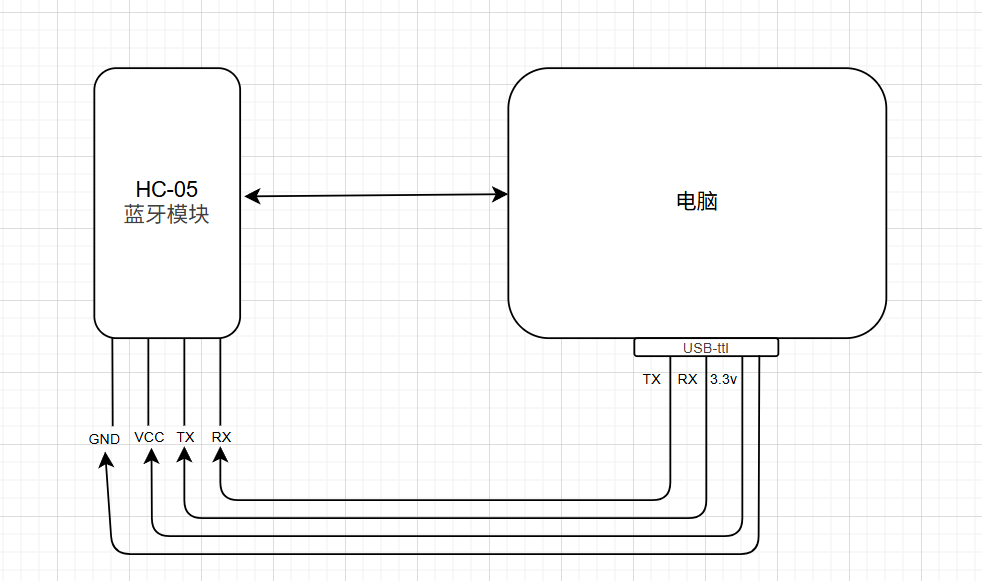
Heads up: connect HC-05's VCC to 3V3 — in practice 5V doesn't work.
The Bluetooth module only shows "connected" on the Bluetooth side when it's in a communication state. If you can't open the Bluetooth serial port, see: HC05和电脑蓝牙通讯
The HC05, the Python script, and the STM32 must all use the same baud rate — mine is 9600
Bluetooth Module Walkthrough
Bottom line: just treat it as a remote serial port.
Common AT Commands
The baud rate is 38400
| Command | Response | Meaning |
|---|---|---|
| AT | ok | Check whether the firmware is usable |
| AT+RESET | ok | Software reset the module |
| AT+VERSION? | +VERSION:<Param> OK | Get the firmware version |
| AT+NAME=name | ok | Set the module name |
| AT+NAME? | +NAME:<Param> OK | Return the module name |
| AT+PSWD="passwd" | OK | Set the module password |
| AT+PSWD? | +PSWD:<Param> OK | Get the module password |
| AT+UART=115200,0,0 | ok | Set the baud rate used for communication |
| AT+UART? | +UART:<Param1>,<Param2>,<Param3> OK | Get the serial parameters |
Module LED Indicators
- Blinks twice at a steady interval: Bluetooth is connected, in communication state
- Fast blink: not connected
- Slow blink: working mode, where AT commands can be used to adjust parameters (to enter: hold the button down, power on, then release it)
Test Procedure
- First enter working mode, and use
ATto check that it responds, - Set the module name:
AT+NAME=MyBluetooth - Get the password:
AT+PSWD? - Check the baud rate:
AT+UART?
Embedded Flash Operations
void Flash_Erase_App(void)
{
    FLASH_EraseInitTypeDef EraseInit;
    uint32_t PageError;
    // Unlock Flash protection
    HAL_FLASH_Unlock();

    // F407: starts at sector2 (Sector 2) = 0x08008000
    EraseInit.TypeErase    = FLASH_TYPEERASE_SECTORS;
    EraseInit.Sector       = FLASH_SECTOR_2;
    EraseInit.NbSectors    = 6;  // up to sector7 (Sector 7)
    EraseInit.VoltageRange = FLASH_VOLTAGE_RANGE_3;

    if (HAL_FLASHEx_Erase(&EraseInit, &PageError) != HAL_OK) {
        // Error handling
    }
    // Enable protection
    HAL_FLASH_Lock();
}

HAL_StatusTypeDef Flash_Write(uint32_t addr, uint8_t *data, uint32_t len)
{
    HAL_StatusTypeDef status;
    HAL_FLASH_Unlock();

    for(uint32_t i=0; i<len; i+=4) {
        uint32_t word = *(uint32_t*)(data+i);
        status = HAL_FLASH_Program(FLASH_TYPEPROGRAM_WORD, addr+i, word);
        if(status != HAL_OK) break;
    }

    HAL_FLASH_Lock();
    return status;
}
Main Logic
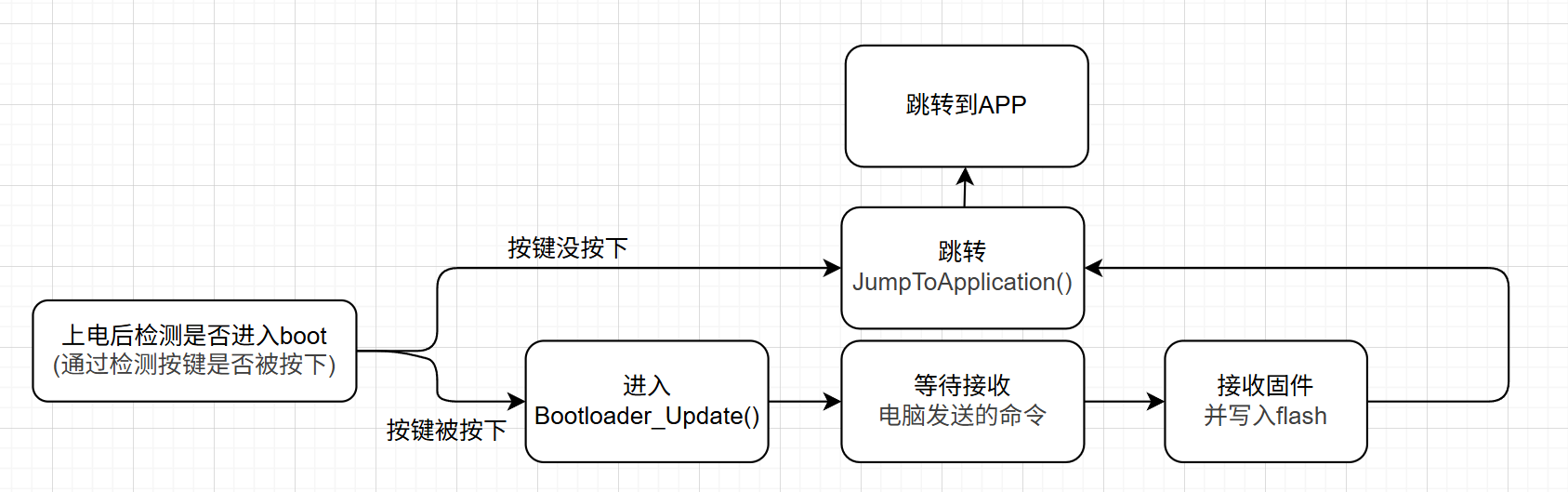
Sending and Receiving Firmware
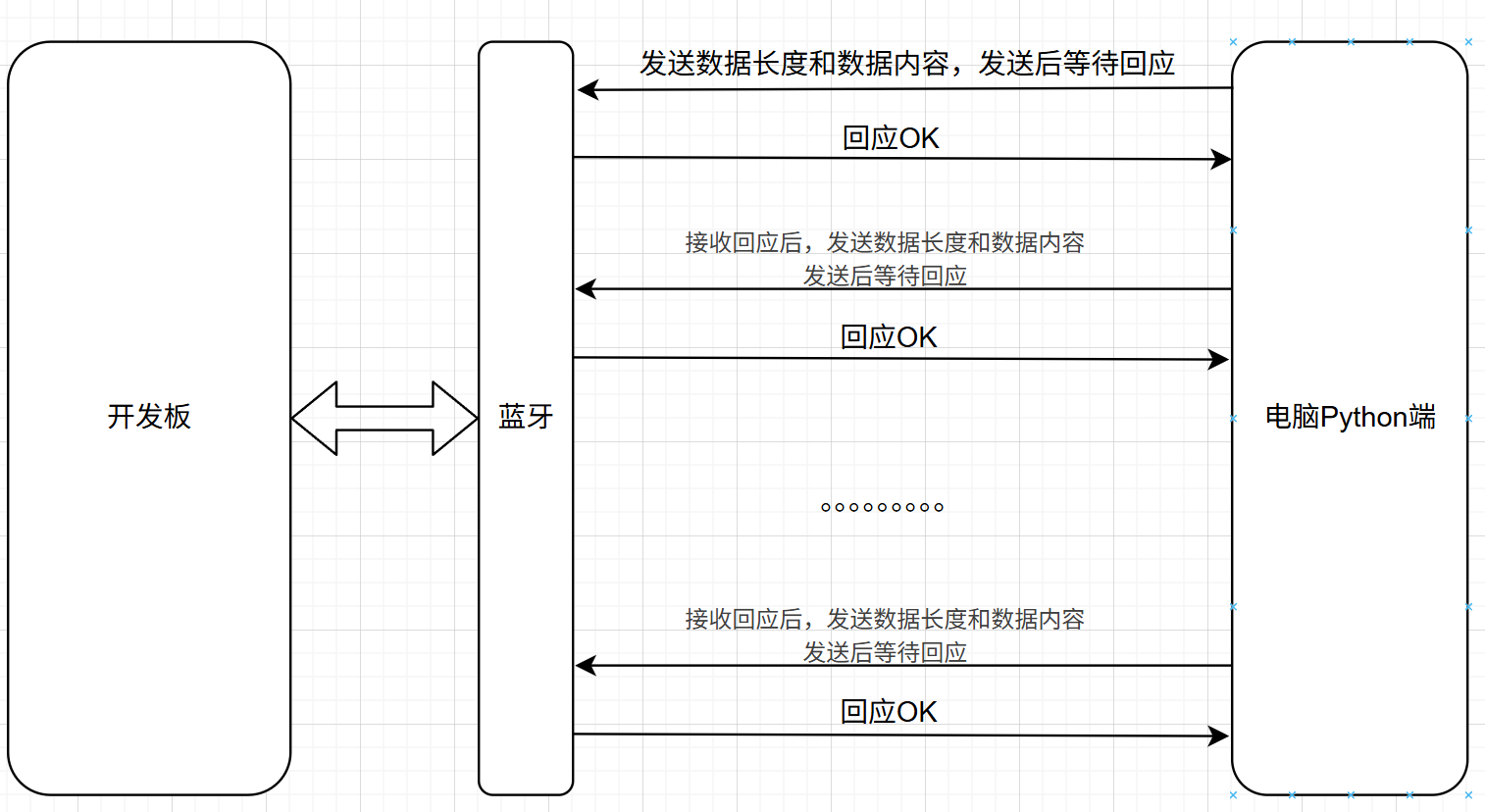
Bootloader Code Logic
void Bootloader_Update(void)
{
    uint8_t cmd;
    uint8_t buf[256];
    uint32_t addr = APP_ADDR;

    Flash_Erase_App();

    while(1)
    {
        HAL_UART_Receive(&huart1, &cmd, 1, HAL_MAX_DELAY);

        if(cmd == CMD_DATA) {
            uint16_t len;
            HAL_UART_Receive(&huart1, (uint8_t*)&len, 2, HAL_MAX_DELAY);
            HAL_UART_Receive(&huart1, buf, len, HAL_MAX_DELAY);

            Flash_Write(addr, buf, len);
            addr += len;

            HAL_UART_Transmit(&huart1, (uint8_t*)"OK", 2, HAL_MAX_DELAY);
        }
        else if(cmd == CMD_END) {
            HAL_UART_Transmit(&huart1, (uint8_t*)"DONE", 4, HAL_MAX_DELAY);
            break;
        }
    }
}
PC Side (Python) -- Sending
Install pyserial first and run: pip install pyserial
The firmware is sent in batches, using a Python script
In ser = serial.Serial("COM4", 9600), COM4 needs to be changed to your own COM port
import serial
import struct
# Initialize a serial port object
ser = serial.Serial("COM4", 9600)

def send_data(data):
    ser.write(b"\x02")  # CMD_DATA
    # Pack the length of the current data block into a two-byte unsigned integer (little-endian).
    # For example, if len(data) = 256, the result is b'\x00\x01', and the board can use it to know how long this packet is.

    ser.write(struct.pack("<H", len(data)))
    ser.write(data)
    # Blocking read of the message sent by the board to confirm whether the transfer succeeded
    print(ser.read(2))  # OK

with open("app.bin", "rb") as f:
    while True:
        # Read 256 bytes per iteration
        chunk = f.read(256)
        if not chunk:
            break
        send_data(chunk)

ser.write(b"\x03")  # CMD_END
print(ser.read(4))  # DONE
STM32 Bluetooth -- Receiving
#define APP_ADDR 0x08008000
#define CMD_START 0x01
#define CMD_DATA  0x02
#define CMD_END   0x03
void Bootloader_Update(void)
{
    uint8_t cmd;
    uint8_t buf[256];
    uint32_t addr = APP_ADDR;
    // Erase the old APP, ready to welcome the new king
    Flash_Erase_App();

    while(1)
    {
        // Blocking receive; decide what to do based on which command arrives first
        HAL_UART_Receive(&huart1, &cmd, 1, HAL_MAX_DELAY);
        // Data command, meaning what was received is data
        if(cmd == CMD_DATA) {
            uint16_t len;
            // Get the length
            HAL_UART_Receive(&huart1, (uint8_t*)&len, 2, HAL_MAX_DELAY);
            // Get the content
            HAL_UART_Receive(&huart1, buf, len, HAL_MAX_DELAY);
            // Write the content
            Flash_Write(addr, buf, len);
            // Advance the address, ready to write the following content
            addr += len;
            // Reply OK
            HAL_UART_Transmit(&huart1, (uint8_t*)"OK", 2, HAL_MAX_DELAY);
        }
        // End command, meaning reception is complete; exit this function
        else if(cmd == CMD_END) {
            HAL_UART_Transmit(&huart1, (uint8_t*)"DONE", 4, HAL_MAX_DELAY);
            break;
        }
    }
}
Adding Verification - CRC32
1. What Is CRC32
CRC stands for Cyclic Redundancy Check.CRC32 means it works on the result of a 32-bit polynomial operation.
It isn't a simple checksum like "add everything up" — it's based on the idea of binary polynomial division:
- Treat the entire data block as one very long binary number;
- Divide it by a fixed "generator polynomial" using modulo-2 division;
- You end up with a 32-bit remainder;
- That remainder is the CRC checksum.
🧠 Modulo-2 division: just like ordinary division, except every addition and subtraction is an XOR.
2. What CRC32 Does
CRC32 isn't meant to "stop hackers" or to encrypt anything — it's there to detect errors during transmission or storage.
For example:
- You send 100KB of firmware over the serial port;
- Somewhere along the way a byte gets dropped or flipped;
- The CRC computed from what the STM32 received doesn't match the CRC of the original file;
- -> That means the transfer was corrupted, so the update doesn't run.
It catches essentially all single-bit errors and burst errors, and it's very reliable.
PC Side - Adding Verification in Python
import serial
import struct
import binascii
from tqdm import tqdm   # pip install tqdm

# Open the serial port
ser = serial.Serial("COM4", 9600, timeout=2)

def send_data(data):
    # Send the data packet
    ser.write(b"\x02")                       # CMD_DATA
    ser.write(struct.pack("<H", len(data)))  # Length
    ser.write(data)                          # Data payload
    resp = ser.read(2)                       # Bootloader replies OK
    if resp != b"OK":
        raise Exception("Bootloader写入失败,返回: %s" % resp)

def send_end(crc32, total_size):
    # Notify the Bootloader that the firmware is finished + CRC
    ser.write(b"\x03")                       # CMD_END
    ser.write(struct.pack("<I", crc32))      # 4-byte CRC32
    ser.write(struct.pack("<I", total_size)) # Total firmware length (optional)
    resp = ser.read(4)
    if resp != b"DONE":
        raise Exception("Bootloader校验失败,返回: %s" % resp)

# ---------------- Main flow -----------------
with open("app.bin", "rb") as f:
    data = f.read()

# Compute CRC32 (kept consistent with the Bootloader)
crc32 = binascii.crc32(data) & 0xFFFFFFFF
total_size = len(data)
print(f"固件大小: {total_size} 字节, CRC32 = 0x{crc32:08X}")

# Send in chunks (with a progress bar)
chunk_size = 256
with tqdm(total=total_size, unit="B", unit_scale=True, desc="升级中") as pbar:
    for i in range(0, total_size, chunk_size):
        chunk = data[i:i+chunk_size]
        send_data(chunk)
        pbar.update(len(chunk))

# Notify the end
send_end(crc32, total_size)
print("固件升级完成 ✅")
STM32 Side - Adding Verification
In a CRC algorithm, the data is treated as one enormous binary number representing the coefficients of a polynomial. The generator polynomial (CRC32_POLY) is the divisor used to perform "modulo-2 division" against that data polynomial, and the remainder you get at the end is the CRC value.
// Polynomial (common to Ethernet, ZIP, etc.): 0x04C11DB7
#define CRC32_POLY 0xEDB88320UL
uint32_t crc32_calc(uint8_t *data, uint32_t length) {
    uint32_t crc = 0xFFFFFFFFUL;
    for (uint32_t i = 0; i < length; i++) {
        crc ^= data[i];
        for (uint8_t j = 0; j < 8; j++) {
            if (crc & 1) {
                crc = (crc >> 1) ^ CRC32_POLY;
            } else {
                crc >>= 1;
            }
        }
    }
    return ~crc;
}
bootloader logic changes
#define APP_ADDR 0x08008000
#define CMD_START 0x01
#define CMD_DATA  0x02
#define CMD_END   0x03
void Bootloader_Update(void)
{
    uint8_t cmd;
    uint8_t buf[256];
    uint32_t addr = APP_ADDR;

    Flash_Erase_App();

    while(1)
    {
        HAL_UART_Receive(&huart1, &cmd, 1, HAL_MAX_DELAY);

        if(cmd == CMD_DATA) {
            uint16_t len;
            HAL_UART_Receive(&huart1, (uint8_t*)&len, 2, HAL_MAX_DELAY);
            HAL_UART_Receive(&huart1, buf, len, HAL_MAX_DELAY);

            Flash_Write(addr, buf, len);
            addr += len;

            HAL_UART_Transmit(&huart1, (uint8_t*)"OK", 2, HAL_MAX_DELAY);
        }
        else if(cmd == CMD_END) {
            uint32_t host_crc, host_size;
			HAL_UART_Receive(&huart1, (uint8_t*)&host_crc, 4, HAL_MAX_DELAY);
			HAL_UART_Receive(&huart1, (uint8_t*)&host_size, 4, HAL_MAX_DELAY);

			// Compute CRC32 ourselves
			uint32_t calc_crc = crc32_calc((uint8_t*)APP_ADDR, host_size);

			if (calc_crc == host_crc) {
				HAL_UART_Transmit(&huart1, (uint8_t*)"DONE", 4, HAL_MAX_DELAY);
			} else {
				HAL_UART_Transmit(&huart1, (uint8_t*)"FAIL", 4, HAL_MAX_DELAY);
			}
            break;
        }
    }
}
Changelog
0ca31-onc2b48-on