
LVGL Study Notes
I've used LVGL a lot before and even ported it to microcontrollers, but I've never studied it systematically — I'm still at a superficial level. So I plan to study LVGL properly, though not all that properly. How should I put it — watch me learn, and you'll pick it up too.
Environment Setup
I used to learn LVGL on development boards, but the learning experience was a bit rough: the compile times are too long and it's hard to see the effect, and learning on different hardware means dealing with porting each time. For example, the stm32h7 series has LTDC and DMA2D and can drive RGB screens, but some MCUs don't. The porting and the best development approach differ from one piece of hardware to another, so I'll start a separate series on that later.
So I'm using the LVGL simulator instead. You need to download Visual Studio 2026, and use git clone --recurse-submodules https://github.com/lvgl/lv_port_pc_visual_studio.git to get the LVGL simulator officially adapted by LVGL. You can check which LVGL version the simulator uses right here: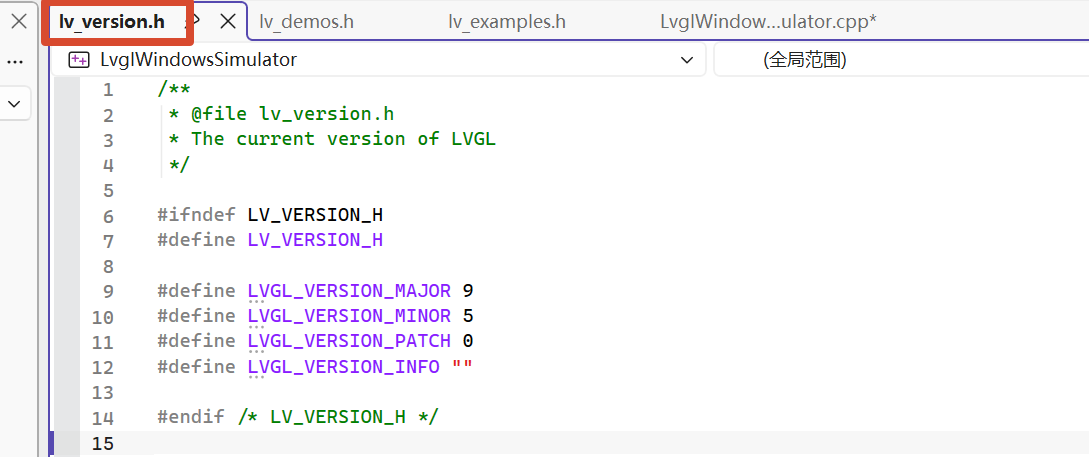
I decided to start with a newer version. Newer versions have lower frame rates on weak hardware, but considering that I'll be using LVGL on Linux-based boards later, I'll still learn the latest LVGL.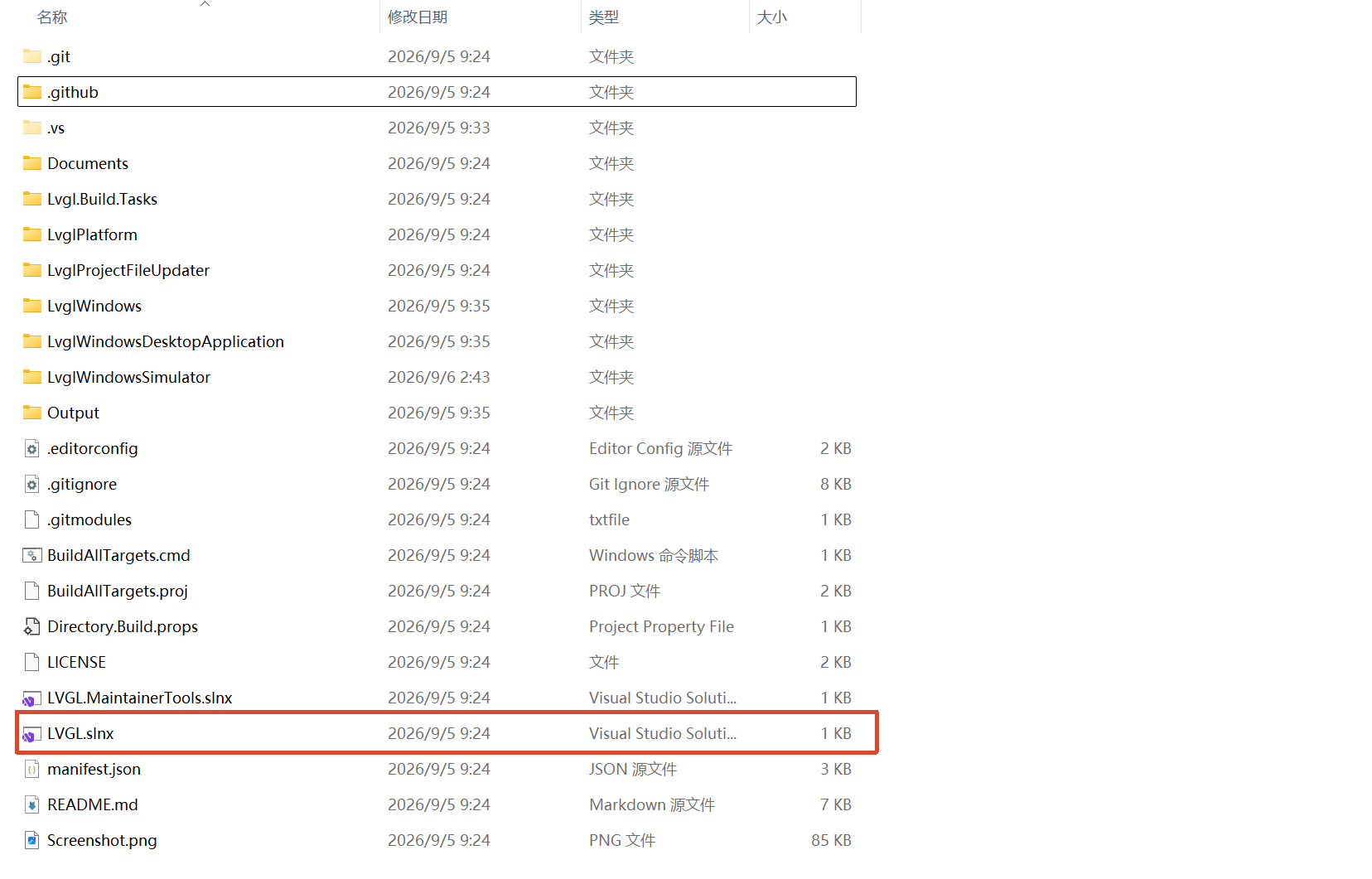
Double-click this LVGL.sin file, or open it through Visual Studio. The .sin file is a Visual Studio project file — you enter the project through it.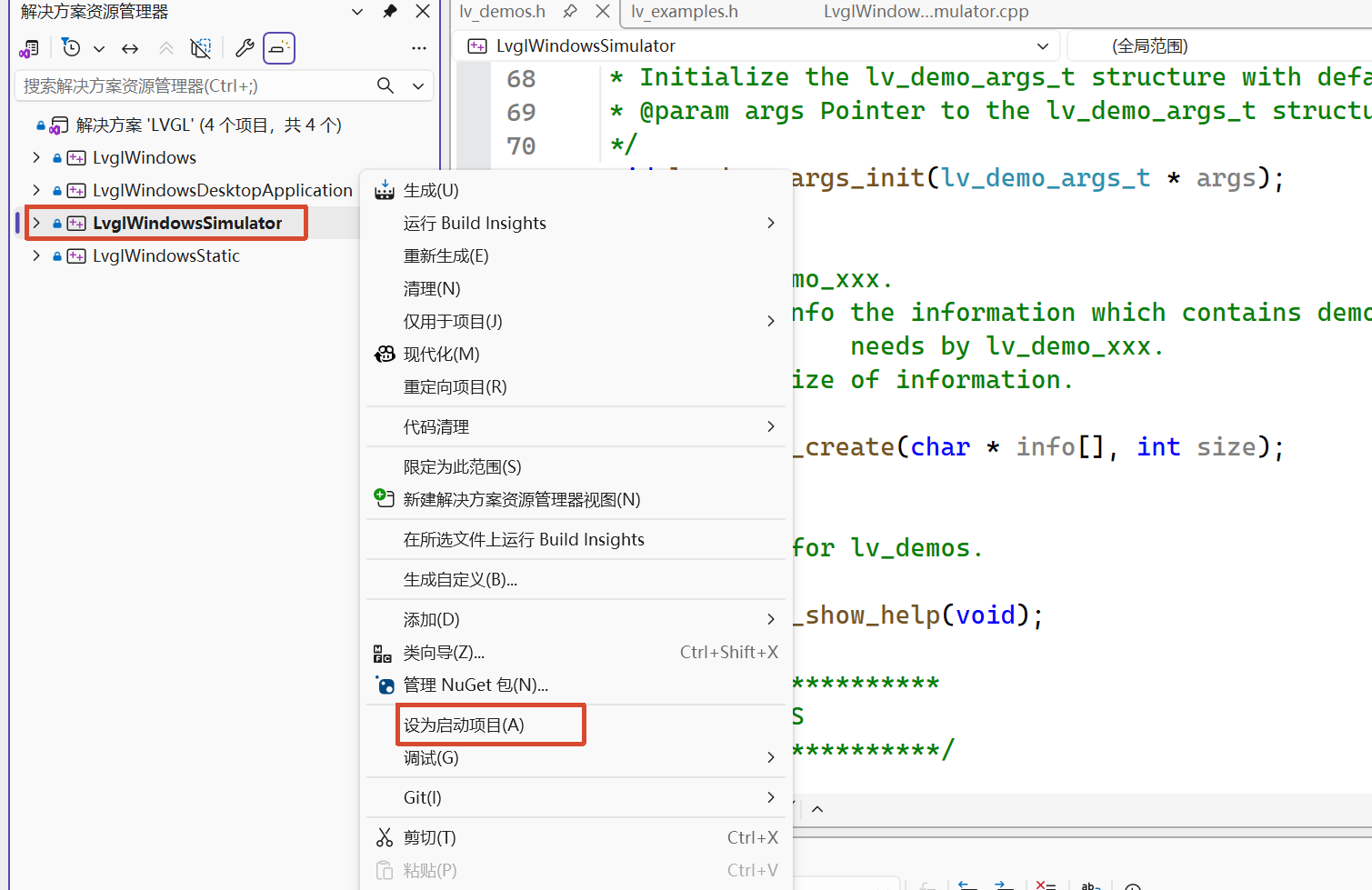
Set the third one as the startup project; after that, whether you click Debug or Run, the third one is what executes.
- The first is the driver library, providing the driver files for using LVGL on Windows
- The second is a real program that actually runs on Windows. You can resize the window freely like any other application, and you can type on the LVGL program with the keyboard, just as if it ran natively on Windows.
- The third is a simulator: the screen size is fixed, and you can't use the computer keyboard — only the mouse
- The fourth deals with the static library; it defines how to compile LVGL and its Windows drivers into a statically linked library (.lib)
From here on I'll explain everything based on the third one.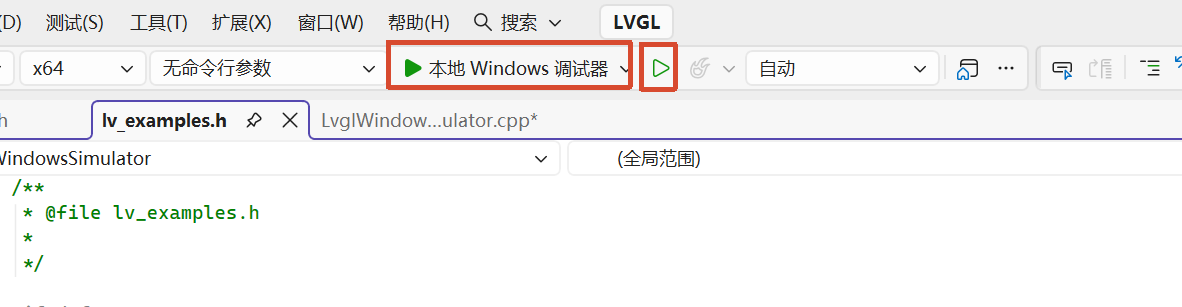
These two buttons are Debug and Run. Either one works, but later when you need to set breakpoints and debug, you'll need the first one.
Groundwork Before Learning
Learning LVGL is learning how to design a UI to achieve the effect you want. The focus is on how to use the existing APIs to design a screen, not on learning how to use the APIs — it's about learning to be a designer, not just someone who knows how to call library functions.
LVGL official site: https://lvgl.io/ — check the documentation here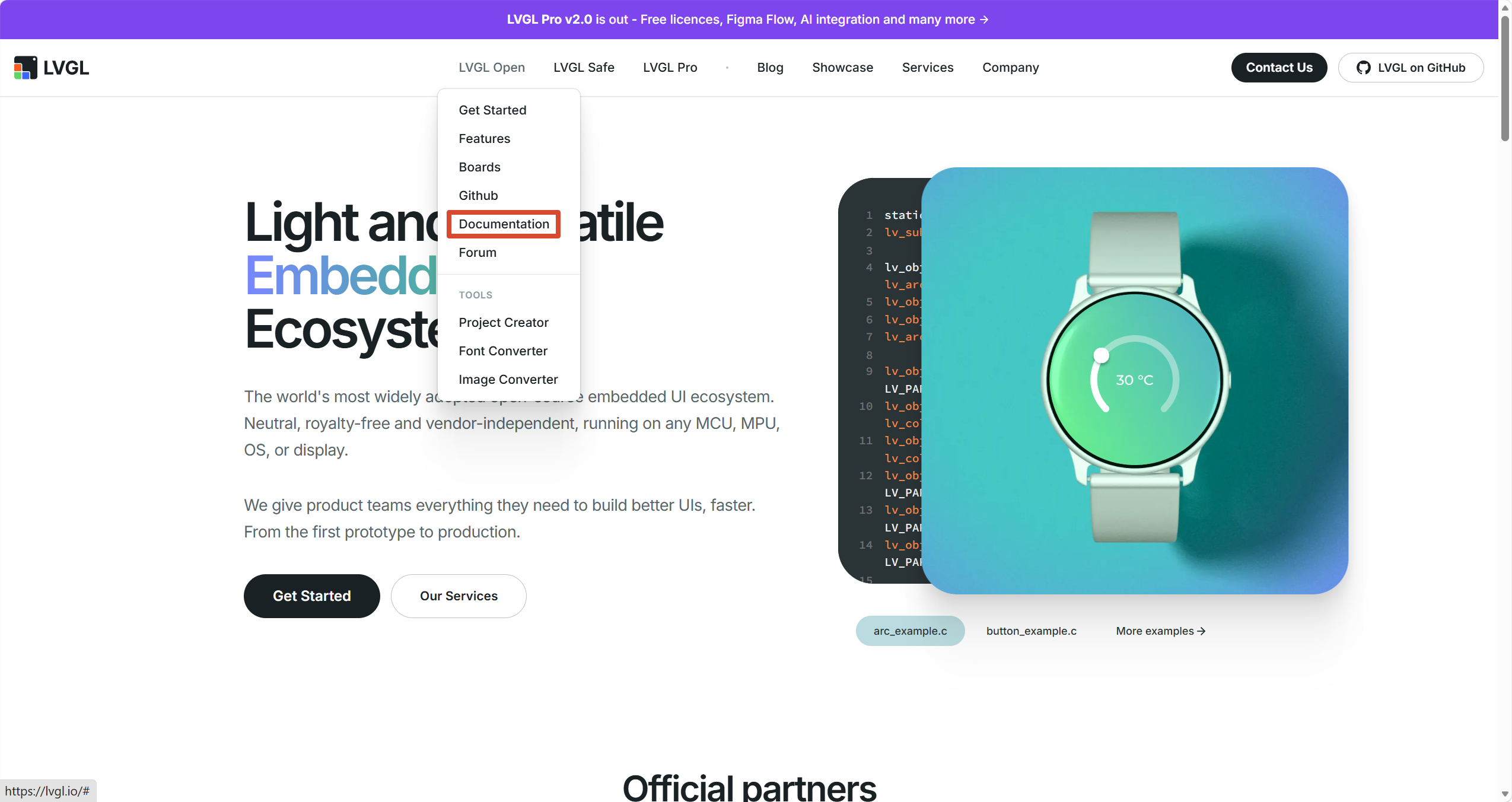
On the left you select the LVGL documentation version; on the right there's a Chinese version produced by Baiyewang, but I don't recommend it — it's not updated for long stretches and the version is old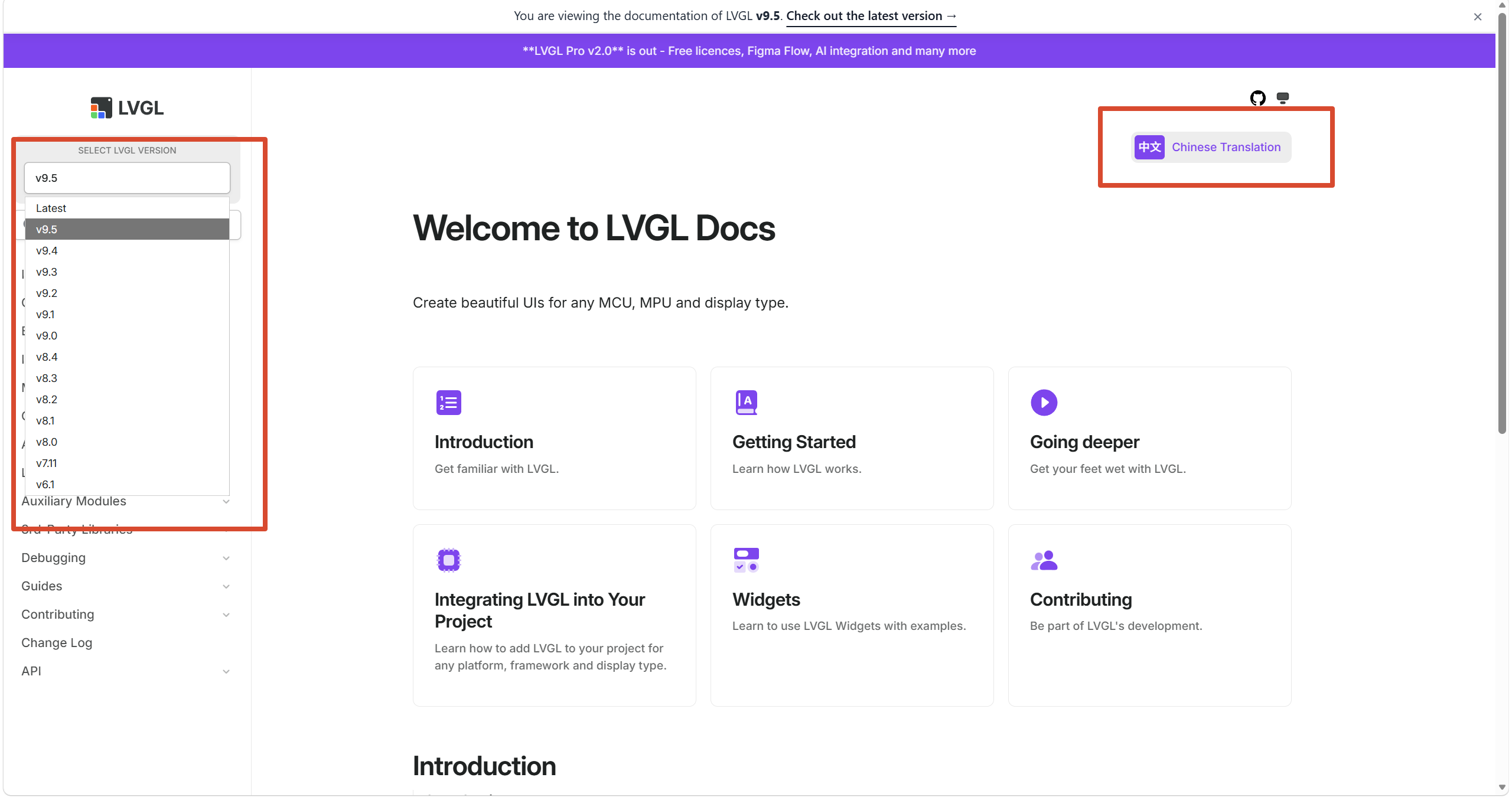
This file is the equivalent of main.c; it contains the main function, and we'll start our analysis from this file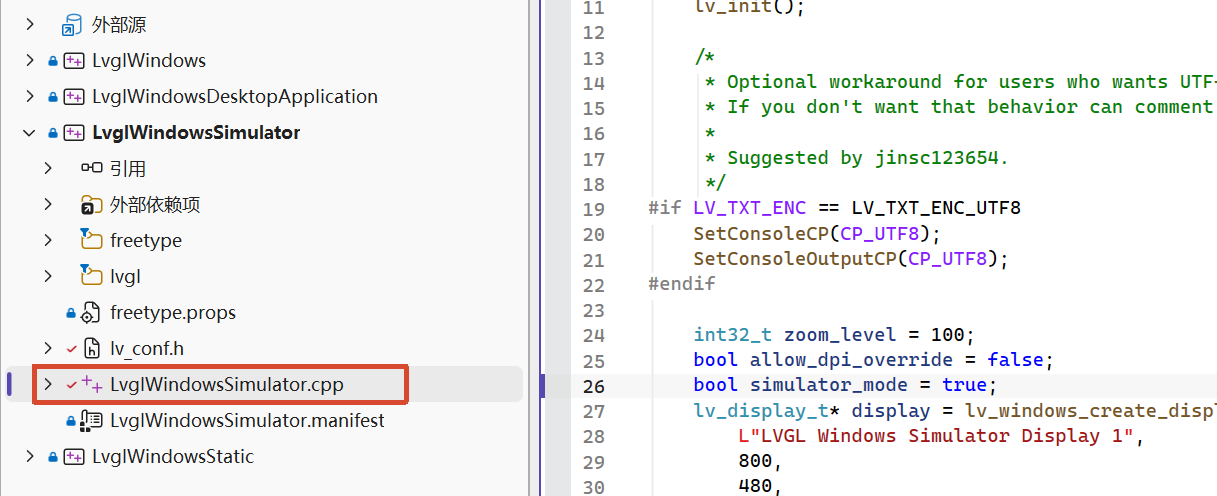
Learning from the Examples
The example code written by the official team is the easiest way to learn. The examples demonstrate the use of almost all the APIs and widgets.
The project's default example runs and shows the effect; the example can show almost every widget. We'll learn from it first.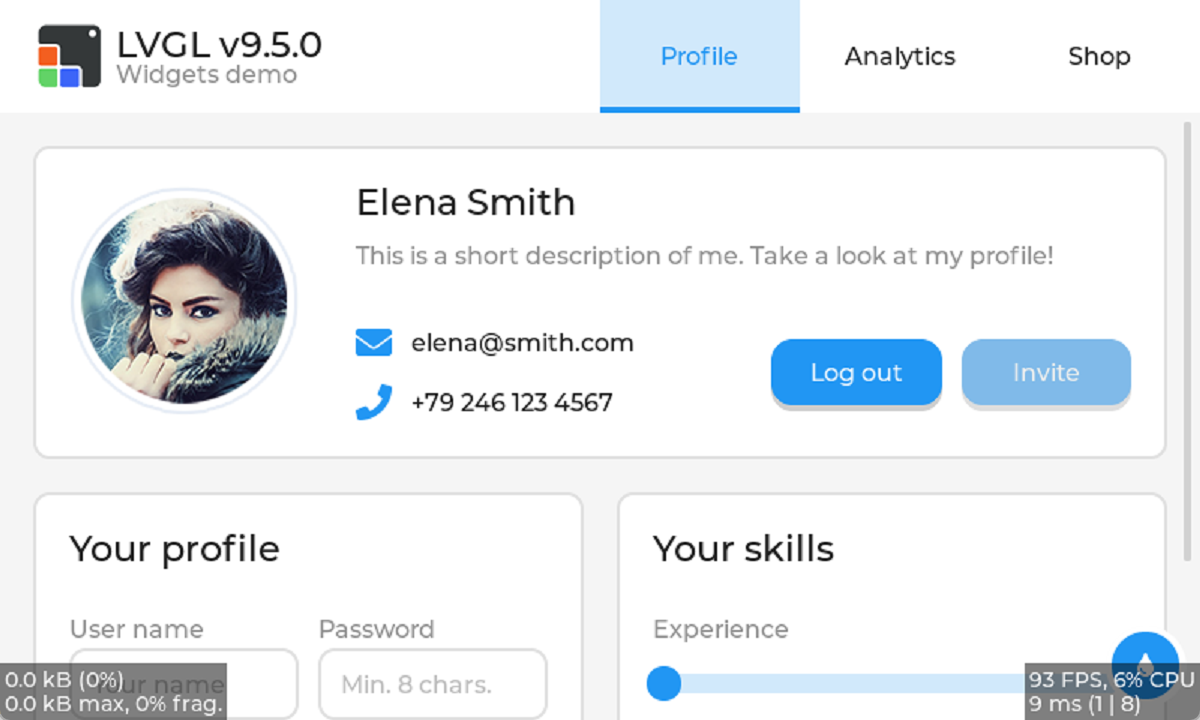
The example code's entry function is as follows:
void lv_demo_widgets(void)
{
    lv_demo_args_t args;
    lv_demo_args_init(&args);
    lv_demo_widgets_with_args(&args);
}
On the first line it initializes an args structure for the example to use, which makes the example code convenient to manage. On the second line it gives args its specific values. On the third and last line it creates the widgets with those args.
In the function lv_demo_widgets_with_args, it sets the font from args and so on. After that, it creates a tabview, and all the widgets go into the tabview. lv_tabview_add_tab creates 3 tabs.
At the top of the tabview it places an image and some text. What we're mainly learning here is how to create a layout.
void lv_demo_widgets_with_args(const lv_demo_args_t * args)
{
    LV_ASSERT_NULL(args);

    lv_demo_widgets_components_init();
    tv = lv_tabview_create(args->parent);
    lv_tabview_set_tab_bar_size(tv, disp_size == DISP_LARGE ? 75 : 45);
    lv_obj_add_event_cb(tv, tabview_delete_event_cb, LV_EVENT_DELETE, NULL);


    lv_obj_t * t1 = lv_tabview_add_tab(tv, "Profile");
    lv_obj_t * t2 = lv_tabview_add_tab(tv, "Analytics");
    lv_obj_t * t3 = lv_tabview_add_tab(tv, "Shop");

    if(disp_size == DISP_LARGE) {
        lv_obj_t * tab_bar = lv_tabview_get_tab_bar(tv);
        lv_obj_set_style_pad_left(tab_bar, LV_HOR_RES / 2, 0);
        lv_obj_t * logo = lv_image_create(tab_bar);             // creating a image widget in the tar.
        lv_obj_add_flag(logo, LV_OBJ_FLAG_IGNORE_LAYOUT);       // avoiding was move by auto layout
        LV_IMAGE_DECLARE(img_lvgl_logo);                        // declarating the image data exist.
        lv_image_set_src(logo, &img_lvgl_logo);                 // set loge's context to img_lvgl_logo
        lv_obj_align(logo, LV_ALIGN_LEFT_MID, -LV_HOR_RES / 2 + 25, 0);     // layout for it alone

        lv_obj_t * label = lv_demo_widgets_title_create(tab_bar, "");
        lv_obj_add_flag(label, LV_OBJ_FLAG_IGNORE_LAYOUT);
        lv_label_set_text_fmt(label, "LVGL v%d.%d.%d", lv_version_major(), lv_version_minor(), lv_version_patch());
        lv_obj_align_to(label, logo, LV_ALIGN_OUT_RIGHT_TOP, 10, 0);

        label = lv_label_create(tab_bar);
        lv_label_set_text_static(label, "Widgets demo");
        lv_obj_add_flag(label, LV_OBJ_FLAG_IGNORE_LAYOUT);
        lv_obj_add_style(label, &style_text_muted, 0);          // Setting the label's style, the mean of '0' is 'LV_PART_MAIN | LV_STATE_DEFAULT'
        lv_obj_align_to(label, logo, LV_ALIGN_OUT_RIGHT_BOTTOM, 10, 0);
    }

    lv_demo_widgets_profile_create(t1);
    lv_demo_widgets_analytics_create(t2);
    lv_demo_widgets_shop_create(t3);

    color_changer_create(tv);
}
lv_obj_t * tab_bar = lv_tabview_get_tab_bar(tv); gets the tabview's tab_bar. lv_obj_set_style_pad_left is used to set the target widget's left padding; if it's set to 0, you get the following. The three tabs would fill the whole screen, so we have to leave some blank space to place the image and text.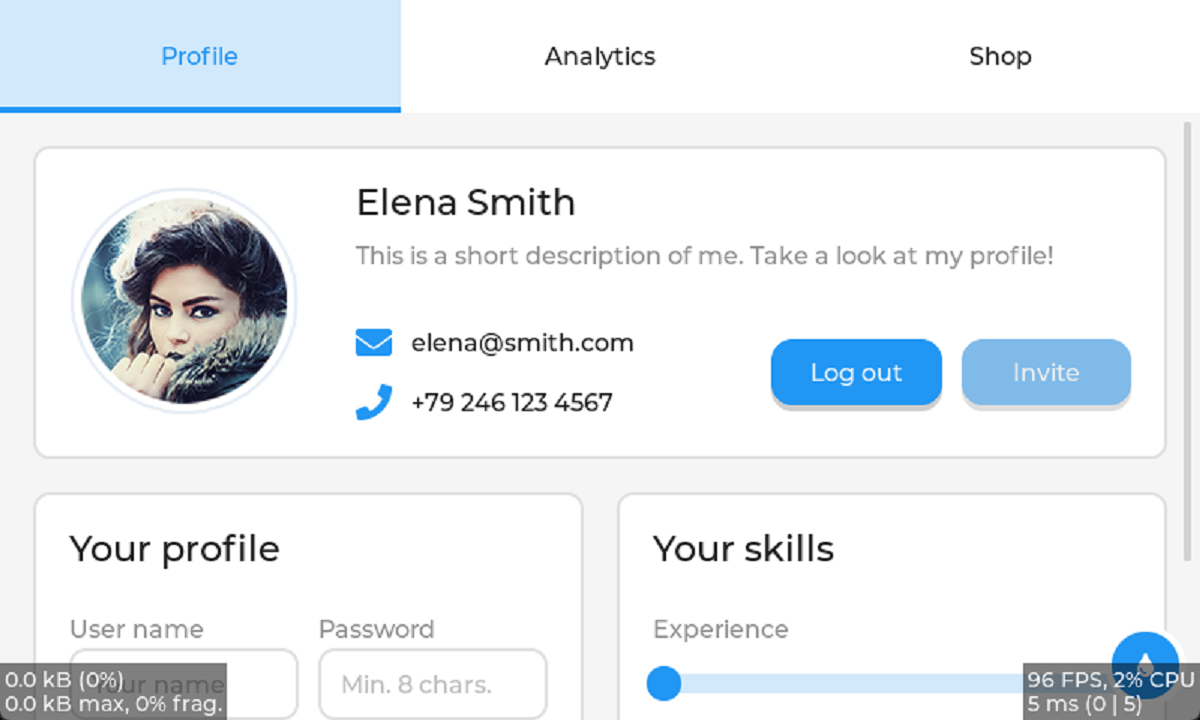
As we all know, the LVGL library can auto-layout your widgets. But what do you do if you don't want a widget to be moved by the auto layout? You can use lv_obj_add_flag(logo, LV_OBJ_FLAG_IGNORE_LAYOUT);, so it stays at a fixed position relative to its parent and isn't moved by the auto layout.
Next up is creating the widgets in the three tabs. The first is t1; I'll write my explanation in the code.
void lv_demo_widgets_profile_create(lv_obj_t * parent)
{

    lv_obj_t * panel1 = lv_obj_create(parent);
    lv_obj_set_height(panel1, LV_SIZE_CONTENT);

    LV_IMAGE_DECLARE(img_demo_widgets_avatar);
    lv_obj_t * avatar = lv_image_create(panel1);
    lv_image_set_src(avatar, &img_demo_widgets_avatar);     // set the image source

    lv_obj_t * name = lv_demo_widgets_title_create(panel1, "Elena Smith");

    lv_obj_t * dsc = lv_label_create(panel1);   // dsc = description
    lv_obj_add_style(dsc, &style_text_muted, 0);
    lv_label_set_text_static(dsc, "This is a short description of me. Take a look at my profile!");
    lv_label_set_long_mode(dsc, LV_LABEL_LONG_MODE_WRAP);

    lv_obj_t * email_icn = lv_label_create(panel1);
    lv_obj_add_style(email_icn, &style_icon, 0);
    lv_label_set_text_static(email_icn, LV_SYMBOL_ENVELOPE);
    lv_obj_t * email_label = lv_label_create(panel1);
    lv_label_set_text_static(email_label, "elena@smith.com");

    lv_obj_t * call_icn = lv_label_create(panel1);
    lv_obj_add_style(call_icn, &style_icon, 0);
    lv_label_set_text_static(call_icn, LV_SYMBOL_CALL);
    lv_obj_t * call_label = lv_label_create(panel1);
    lv_label_set_text_static(call_label, "+79 246 123 4567");

    lv_obj_t * log_out_btn = lv_button_create(panel1);
    lv_obj_set_height(log_out_btn, LV_SIZE_CONTENT);
    lv_obj_t * label = lv_label_create(log_out_btn);
    lv_label_set_text_static(label, "Log out");
    lv_obj_center(label);

    lv_obj_t * invite_btn = lv_button_create(panel1);
    lv_obj_add_state(invite_btn, LV_STATE_DISABLED);
    lv_obj_set_height(invite_btn, LV_SIZE_CONTENT);
    label = lv_label_create(invite_btn);
    lv_label_set_text_static(label, "Invite");
    lv_obj_center(label);

    /*Create a keyboard*/
    lv_obj_t * kb = lv_keyboard_create(lv_screen_active());
    lv_obj_add_flag(kb, LV_OBJ_FLAG_HIDDEN);

    /*Create the second panel*/
    lv_obj_t * panel2 = lv_obj_create(parent);
    lv_obj_set_height(panel2, LV_SIZE_CONTENT);

    lv_obj_t * panel2_title = lv_demo_widgets_title_create(panel2, "Your profile");

    lv_obj_t * user_name_label = lv_label_create(panel2);
    lv_label_set_text_static(user_name_label, "User name");
    lv_obj_add_style(user_name_label, &style_text_muted, 0);

    lv_obj_t * user_name = lv_textarea_create(panel2);
    lv_textarea_set_one_line(user_name, true);
    lv_textarea_set_placeholder_text(user_name, "Your name");
    lv_obj_add_event_cb(user_name, ta_event_cb, LV_EVENT_ALL, kb);

    lv_obj_t * password_label = lv_label_create(panel2);
    lv_label_set_text_static(password_label, "Password");
    lv_obj_add_style(password_label, &style_text_muted, 0);

    lv_obj_t * password = lv_textarea_create(panel2);
    lv_textarea_set_one_line(password, true);
    lv_textarea_set_password_mode(password, true);
    lv_textarea_set_placeholder_text(password, "Min. 8 chars.");
    lv_obj_add_event_cb(password, ta_event_cb, LV_EVENT_ALL, kb);

    lv_obj_t * gender_label = lv_label_create(panel2);
    lv_label_set_text_static(gender_label, "Gender");
    lv_obj_add_style(gender_label, &style_text_muted, 0);

    lv_obj_t * gender = lv_dropdown_create(panel2);
    lv_dropdown_set_options_static(gender, "Male\nFemale\nOther");

    lv_obj_t * birthday_label = lv_label_create(panel2);
    lv_label_set_text_static(birthday_label, "Birthday");
    lv_obj_add_style(birthday_label, &style_text_muted, 0);

    lv_obj_t * birthdate = lv_textarea_create(panel2);
    lv_textarea_set_one_line(birthdate, true);
    lv_obj_add_event_cb(birthdate, birthday_event_cb, LV_EVENT_ALL, NULL);

    /*Create the third panel*/
    lv_obj_t * panel3 = lv_obj_create(parent);
    lv_obj_t * panel3_title = lv_demo_widgets_title_create(panel3, "Your skills");

    lv_obj_t * experience_label = lv_label_create(panel3);
    lv_label_set_text_static(experience_label, "Experience");
    lv_obj_add_style(experience_label, &style_text_muted, 0);

    lv_obj_t * slider1 = lv_slider_create(panel3);
    lv_obj_set_width(slider1, LV_PCT(95));
    lv_obj_add_event_cb(slider1, slider_event_cb, LV_EVENT_ALL, NULL);
    lv_obj_add_flag(slider1, LV_OBJ_FLAG_SEND_DRAW_TASK_EVENTS);
    lv_obj_refresh_ext_draw_size(slider1);

    lv_obj_t * team_player_label = lv_label_create(panel3);
    lv_label_set_text_static(team_player_label, "Team player");
    lv_obj_add_style(team_player_label, &style_text_muted, 0);

    lv_obj_t * sw1 = lv_switch_create(panel3);

    lv_obj_t * hard_working_label = lv_label_create(panel3);
    lv_label_set_text_static(hard_working_label, "Hard-working");
    lv_obj_add_style(hard_working_label, &style_text_muted, 0);

    lv_obj_t * sw2 = lv_switch_create(panel3);

    if(disp_size == DISP_LARGE) {
        static int32_t grid_main_col_dsc[] = {LV_GRID_FR(1), LV_GRID_FR(1), LV_GRID_TEMPLATE_LAST};
        static int32_t grid_main_row_dsc[] = {LV_GRID_CONTENT, LV_GRID_CONTENT, LV_GRID_TEMPLATE_LAST};

        /*Create the top panel*/
        static int32_t grid_1_col_dsc[] = {LV_GRID_CONTENT, 5, LV_GRID_CONTENT, LV_GRID_FR(2), LV_GRID_FR(1), LV_GRID_FR(1), LV_GRID_TEMPLATE_LAST};
        static int32_t grid_1_row_dsc[] = {LV_GRID_CONTENT, LV_GRID_CONTENT, 10, LV_GRID_CONTENT, LV_GRID_CONTENT, LV_GRID_TEMPLATE_LAST};

        static int32_t grid_2_col_dsc[] = {LV_GRID_FR(1), LV_GRID_FR(1), LV_GRID_TEMPLATE_LAST};
        static int32_t grid_2_row_dsc[] = {
            LV_GRID_CONTENT,  /*Title*/
            5,                /*Separator*/
            LV_GRID_CONTENT,  /*Box title*/
            30,               /*Boxes*/
            5,                /*Separator*/
            LV_GRID_CONTENT,  /*Box title*/
            30,               /*Boxes*/
            LV_GRID_TEMPLATE_LAST
        };
        lv_obj_set_grid_dsc_array(parent, grid_main_col_dsc, grid_main_row_dsc);
        lv_obj_set_grid_cell(panel1, LV_GRID_ALIGN_STRETCH, 0, 2, LV_GRID_ALIGN_CENTER, 0, 1);
        lv_obj_set_grid_dsc_array(panel1, grid_1_col_dsc, grid_1_row_dsc);
        lv_obj_set_grid_cell(avatar, LV_GRID_ALIGN_CENTER, 0, 1, LV_GRID_ALIGN_CENTER, 0, 5);
        lv_obj_set_grid_cell(name, LV_GRID_ALIGN_START, 2, 2, LV_GRID_ALIGN_CENTER, 0, 1);
        lv_obj_set_grid_cell(dsc, LV_GRID_ALIGN_STRETCH, 2, 4, LV_GRID_ALIGN_START, 1, 1);
        lv_obj_set_grid_cell(email_icn, LV_GRID_ALIGN_CENTER, 2, 1, LV_GRID_ALIGN_CENTER, 3, 1);
        lv_obj_set_grid_cell(email_label, LV_GRID_ALIGN_START, 3, 1, LV_GRID_ALIGN_CENTER, 3, 1);
        lv_obj_set_grid_cell(call_icn, LV_GRID_ALIGN_CENTER, 2, 1, LV_GRID_ALIGN_CENTER, 4, 1);
        lv_obj_set_grid_cell(call_label, LV_GRID_ALIGN_START, 3, 1, LV_GRID_ALIGN_CENTER, 4, 1);
        lv_obj_set_grid_cell(log_out_btn, LV_GRID_ALIGN_STRETCH, 4, 1, LV_GRID_ALIGN_CENTER, 3, 2);
        lv_obj_set_grid_cell(invite_btn, LV_GRID_ALIGN_STRETCH, 5, 1, LV_GRID_ALIGN_CENTER, 3, 2);

        lv_obj_set_grid_cell(panel2, LV_GRID_ALIGN_STRETCH, 0, 1, LV_GRID_ALIGN_START, 1, 1);
        lv_obj_set_grid_dsc_array(panel2, grid_2_col_dsc, grid_2_row_dsc);
        lv_obj_set_grid_cell(panel2_title, LV_GRID_ALIGN_START, 0, 2, LV_GRID_ALIGN_CENTER, 0, 1);
        lv_obj_set_grid_cell(user_name, LV_GRID_ALIGN_STRETCH, 0, 1, LV_GRID_ALIGN_CENTER, 3, 1);
        lv_obj_set_grid_cell(user_name_label, LV_GRID_ALIGN_START, 0, 1, LV_GRID_ALIGN_START, 2, 1);
        lv_obj_set_grid_cell(password, LV_GRID_ALIGN_STRETCH, 1, 1, LV_GRID_ALIGN_CENTER, 3, 1);
        lv_obj_set_grid_cell(password_label, LV_GRID_ALIGN_START, 1, 1, LV_GRID_ALIGN_START, 2, 1);
        lv_obj_set_grid_cell(birthdate, LV_GRID_ALIGN_STRETCH, 1, 1, LV_GRID_ALIGN_CENTER, 6, 1);
        lv_obj_set_grid_cell(birthday_label, LV_GRID_ALIGN_START, 1, 1, LV_GRID_ALIGN_START, 5, 1);
        lv_obj_set_grid_cell(gender, LV_GRID_ALIGN_STRETCH, 0, 1, LV_GRID_ALIGN_CENTER, 6, 1);
        lv_obj_set_grid_cell(gender_label, LV_GRID_ALIGN_START, 0, 1, LV_GRID_ALIGN_START, 5, 1);

        lv_obj_set_grid_cell(panel3, LV_GRID_ALIGN_STRETCH, 1, 1, LV_GRID_ALIGN_STRETCH, 1, 1);
        lv_obj_set_grid_dsc_array(panel3, grid_2_col_dsc, grid_2_row_dsc);
        lv_obj_set_grid_cell(panel3_title, LV_GRID_ALIGN_START, 0, 2, LV_GRID_ALIGN_CENTER, 0, 1);
        lv_obj_set_grid_cell(slider1, LV_GRID_ALIGN_CENTER, 0, 2, LV_GRID_ALIGN_CENTER, 3, 1);
        lv_obj_set_grid_cell(experience_label, LV_GRID_ALIGN_START, 0, 1, LV_GRID_ALIGN_START, 2, 1);
        lv_obj_set_grid_cell(sw2, LV_GRID_ALIGN_START, 1, 1, LV_GRID_ALIGN_CENTER, 6, 1);
        lv_obj_set_grid_cell(hard_working_label, LV_GRID_ALIGN_START, 0, 1, LV_GRID_ALIGN_START, 5, 1);
        lv_obj_set_grid_cell(sw1, LV_GRID_ALIGN_START, 0, 1, LV_GRID_ALIGN_CENTER, 6, 1);
        lv_obj_set_grid_cell(team_player_label, LV_GRID_ALIGN_START, 1, 1, LV_GRID_ALIGN_START, 5, 1);
    }
    else if(disp_size == DISP_MEDIUM) {
        static int32_t grid_main_col_dsc[] = {LV_GRID_FR(1), LV_GRID_FR(1), LV_GRID_TEMPLATE_LAST};
        static int32_t grid_main_row_dsc[] = {LV_GRID_CONTENT, LV_GRID_CONTENT, LV_GRID_TEMPLATE_LAST};

        /*Create the top panel*/
        static int32_t grid_1_col_dsc[] = {LV_GRID_CONTENT, 1, LV_GRID_CONTENT, LV_GRID_FR(1), LV_GRID_TEMPLATE_LAST};
        static int32_t grid_1_row_dsc[] = {
            LV_GRID_CONTENT, /*Name*/
            LV_GRID_CONTENT, /*Description*/
            LV_GRID_CONTENT, /*Email*/
            -20,
            LV_GRID_CONTENT, /*Phone*/
            LV_GRID_CONTENT, /*Buttons*/
            LV_GRID_TEMPLATE_LAST
        };

        static int32_t grid_2_col_dsc[] = {LV_GRID_FR(1), LV_GRID_FR(1), LV_GRID_TEMPLATE_LAST};
        static int32_t grid_2_row_dsc[] = {
            LV_GRID_CONTENT,  /*Title*/
            5,                /*Separator*/
            LV_GRID_CONTENT,  /*Box title*/
            40,               /*Box*/
            LV_GRID_CONTENT,  /*Box title*/
            40,               /*Box*/
            LV_GRID_CONTENT,  /*Box title*/
            40,               /*Box*/
            LV_GRID_CONTENT,  /*Box title*/
            40,               /*Box*/
            LV_GRID_TEMPLATE_LAST
        };

        lv_obj_set_grid_dsc_array(parent, grid_main_col_dsc, grid_main_row_dsc);
        lv_obj_set_grid_cell(panel1, LV_GRID_ALIGN_STRETCH, 0, 2, LV_GRID_ALIGN_CENTER, 0, 1);

        lv_obj_set_width(log_out_btn, 110);
        lv_obj_set_width(invite_btn, 110);

        lv_obj_set_grid_dsc_array(panel1, grid_1_col_dsc, grid_1_row_dsc);
        lv_obj_set_grid_cell(avatar, LV_GRID_ALIGN_CENTER, 0, 1, LV_GRID_ALIGN_START, 0, 4);
        lv_obj_set_grid_cell(name, LV_GRID_ALIGN_START, 2, 2, LV_GRID_ALIGN_CENTER, 0, 1);
        lv_obj_set_grid_cell(dsc, LV_GRID_ALIGN_STRETCH, 2, 2, LV_GRID_ALIGN_START, 1, 1);
        lv_obj_set_grid_cell(email_label, LV_GRID_ALIGN_START, 3, 1, LV_GRID_ALIGN_CENTER, 2, 1);
        lv_obj_set_grid_cell(email_icn, LV_GRID_ALIGN_CENTER, 2, 1, LV_GRID_ALIGN_CENTER, 2, 1);
        lv_obj_set_grid_cell(call_icn, LV_GRID_ALIGN_CENTER, 2, 1, LV_GRID_ALIGN_CENTER, 4, 1);
        lv_obj_set_grid_cell(call_label, LV_GRID_ALIGN_START, 3, 1, LV_GRID_ALIGN_CENTER, 4, 1);
        lv_obj_set_grid_cell(log_out_btn, LV_GRID_ALIGN_START, 1, 1, LV_GRID_ALIGN_CENTER, 5, 1);
        lv_obj_set_grid_cell(invite_btn, LV_GRID_ALIGN_END, 3, 1, LV_GRID_ALIGN_CENTER, 5, 1);

        lv_obj_set_grid_cell(panel2, LV_GRID_ALIGN_STRETCH, 0, 1, LV_GRID_ALIGN_START, 1, 1);
        lv_obj_set_grid_dsc_array(panel2, grid_2_col_dsc, grid_2_row_dsc);
        lv_obj_set_grid_cell(panel2_title, LV_GRID_ALIGN_START, 0, 2, LV_GRID_ALIGN_CENTER, 0, 1);
        lv_obj_set_grid_cell(user_name_label, LV_GRID_ALIGN_START, 0, 2, LV_GRID_ALIGN_START, 2, 1);
        lv_obj_set_grid_cell(user_name, LV_GRID_ALIGN_STRETCH, 0, 2, LV_GRID_ALIGN_START, 3, 1);
        lv_obj_set_grid_cell(password_label, LV_GRID_ALIGN_START, 0, 2, LV_GRID_ALIGN_START, 4, 1);
        lv_obj_set_grid_cell(password, LV_GRID_ALIGN_STRETCH, 0, 2, LV_GRID_ALIGN_START, 5, 1);
        lv_obj_set_grid_cell(birthday_label, LV_GRID_ALIGN_START, 0, 2, LV_GRID_ALIGN_START, 6, 1);
        lv_obj_set_grid_cell(birthdate, LV_GRID_ALIGN_STRETCH, 0, 2, LV_GRID_ALIGN_START, 7, 1);
        lv_obj_set_grid_cell(gender_label, LV_GRID_ALIGN_START, 0, 2, LV_GRID_ALIGN_START, 8, 1);
        lv_obj_set_grid_cell(gender, LV_GRID_ALIGN_STRETCH, 0, 2, LV_GRID_ALIGN_START, 9, 1);

        lv_obj_set_grid_cell(panel3, LV_GRID_ALIGN_STRETCH, 1, 1, LV_GRID_ALIGN_STRETCH, 1, 1);
        lv_obj_set_grid_dsc_array(panel3, grid_2_col_dsc, grid_2_row_dsc);
        lv_obj_set_grid_cell(panel3_title, LV_GRID_ALIGN_START, 0, 2, LV_GRID_ALIGN_CENTER, 0, 1);
        lv_obj_set_grid_cell(slider1, LV_GRID_ALIGN_CENTER, 0, 2, LV_GRID_ALIGN_CENTER, 3, 1);
        lv_obj_set_grid_cell(experience_label, LV_GRID_ALIGN_START, 0, 1, LV_GRID_ALIGN_START, 2, 1);
        lv_obj_set_grid_cell(hard_working_label, LV_GRID_ALIGN_START, 0, 1, LV_GRID_ALIGN_START, 4, 1);
        lv_obj_set_grid_cell(sw2, LV_GRID_ALIGN_START, 0, 1, LV_GRID_ALIGN_START, 5, 1);
        lv_obj_set_grid_cell(team_player_label, LV_GRID_ALIGN_START, 0, 1, LV_GRID_ALIGN_START, 6, 1);
        lv_obj_set_grid_cell(sw1, LV_GRID_ALIGN_START, 0, 1, LV_GRID_ALIGN_START, 7, 1);
    }
    else if(disp_size == DISP_SMALL) {
        static int32_t grid_main_col_dsc[] = {LV_GRID_FR(1), LV_GRID_TEMPLATE_LAST};
        static int32_t grid_main_row_dsc[] = {LV_GRID_CONTENT, LV_GRID_CONTENT, LV_GRID_CONTENT, LV_GRID_TEMPLATE_LAST};
        lv_obj_set_grid_dsc_array(parent, grid_main_col_dsc, grid_main_row_dsc);

        /*Create the top panel*/
        static int32_t grid_1_col_dsc[] = {LV_GRID_CONTENT, LV_GRID_FR(1), LV_GRID_TEMPLATE_LAST};
        static int32_t grid_1_row_dsc[] = {LV_GRID_CONTENT, /*Avatar*/
                                           LV_GRID_CONTENT, /*Name*/
                                           LV_GRID_CONTENT, /*Description*/
                                           LV_GRID_CONTENT, /*Email*/
                                           LV_GRID_CONTENT, /*Phone number*/
                                           LV_GRID_CONTENT, /*Button1*/
                                           LV_GRID_CONTENT, /*Button2*/
                                           LV_GRID_TEMPLATE_LAST
                                          };

        lv_obj_set_grid_dsc_array(panel1, grid_1_col_dsc, grid_1_row_dsc);

        static int32_t grid_2_col_dsc[] = {LV_GRID_FR(1), LV_GRID_FR(1), LV_GRID_TEMPLATE_LAST};
        static int32_t grid_2_row_dsc[] = {
            LV_GRID_CONTENT,  /*Title*/
            5,                /*Separator*/
            LV_GRID_CONTENT,  /*Box title*/
            40,               /*Box*/
            LV_GRID_CONTENT,  /*Box title*/
            40,               /*Box*/
            LV_GRID_CONTENT,  /*Box title*/
            40,               /*Box*/
            LV_GRID_CONTENT,  /*Box title*/
            40, LV_GRID_TEMPLATE_LAST               /*Box*/
        };

        lv_obj_set_grid_dsc_array(panel2, grid_2_col_dsc, grid_2_row_dsc);
        lv_obj_set_grid_dsc_array(panel3, grid_2_col_dsc, grid_2_row_dsc);

        lv_obj_set_grid_cell(panel1, LV_GRID_ALIGN_STRETCH, 0, 1, LV_GRID_ALIGN_CENTER, 0, 1);

        lv_obj_set_style_text_align(dsc, LV_TEXT_ALIGN_CENTER, 0);

        lv_obj_set_grid_cell(avatar, LV_GRID_ALIGN_CENTER, 0, 2, LV_GRID_ALIGN_CENTER, 0, 1);
        lv_obj_set_grid_cell(name, LV_GRID_ALIGN_CENTER, 0, 2, LV_GRID_ALIGN_CENTER, 1, 1);
        lv_obj_set_grid_cell(dsc, LV_GRID_ALIGN_STRETCH, 0, 2, LV_GRID_ALIGN_START, 2, 1);
        lv_obj_set_grid_cell(email_icn, LV_GRID_ALIGN_CENTER, 0, 1, LV_GRID_ALIGN_CENTER, 3, 1);
        lv_obj_set_grid_cell(email_label, LV_GRID_ALIGN_START, 1, 1, LV_GRID_ALIGN_CENTER, 3, 1);
        lv_obj_set_grid_cell(call_icn, LV_GRID_ALIGN_CENTER, 0, 1, LV_GRID_ALIGN_CENTER, 4, 1);
        lv_obj_set_grid_cell(call_label, LV_GRID_ALIGN_START, 1, 1, LV_GRID_ALIGN_CENTER, 4, 1);
        lv_obj_set_grid_cell(log_out_btn, LV_GRID_ALIGN_STRETCH, 0, 2, LV_GRID_ALIGN_CENTER, 5, 1);
        lv_obj_set_grid_cell(invite_btn, LV_GRID_ALIGN_STRETCH, 0, 2, LV_GRID_ALIGN_CENTER, 6, 1);

        lv_obj_set_grid_cell(panel2, LV_GRID_ALIGN_STRETCH, 0, 1, LV_GRID_ALIGN_START, 1, 1);
        lv_obj_set_grid_cell(panel2_title, LV_GRID_ALIGN_START, 0, 2, LV_GRID_ALIGN_CENTER, 0, 1);
        lv_obj_set_grid_cell(user_name_label, LV_GRID_ALIGN_START, 0, 2, LV_GRID_ALIGN_START, 2, 1);
        lv_obj_set_grid_cell(user_name, LV_GRID_ALIGN_STRETCH, 0, 2, LV_GRID_ALIGN_START, 3, 1);
        lv_obj_set_grid_cell(password_label, LV_GRID_ALIGN_START, 0, 2, LV_GRID_ALIGN_START, 4, 1);
        lv_obj_set_grid_cell(password, LV_GRID_ALIGN_STRETCH, 0, 2, LV_GRID_ALIGN_START, 5, 1);
        lv_obj_set_grid_cell(birthday_label, LV_GRID_ALIGN_START, 0, 2, LV_GRID_ALIGN_START, 6, 1);
        lv_obj_set_grid_cell(birthdate, LV_GRID_ALIGN_STRETCH, 0, 2, LV_GRID_ALIGN_START, 7, 1);
        lv_obj_set_grid_cell(gender_label, LV_GRID_ALIGN_START, 0, 2, LV_GRID_ALIGN_START, 8, 1);
        lv_obj_set_grid_cell(gender, LV_GRID_ALIGN_STRETCH, 0, 2, LV_GRID_ALIGN_START, 9, 1);

        lv_obj_set_height(panel3, LV_SIZE_CONTENT);
        lv_obj_set_grid_cell(panel3, LV_GRID_ALIGN_STRETCH, 0, 1, LV_GRID_ALIGN_START, 2, 1);
        lv_obj_set_grid_cell(panel3_title, LV_GRID_ALIGN_START, 0, 2, LV_GRID_ALIGN_CENTER, 0, 1);
        lv_obj_set_grid_cell(experience_label, LV_GRID_ALIGN_START, 0, 1, LV_GRID_ALIGN_START, 2, 1);
        lv_obj_set_grid_cell(slider1, LV_GRID_ALIGN_CENTER, 0, 2, LV_GRID_ALIGN_CENTER, 3, 1);
        lv_obj_set_grid_cell(hard_working_label, LV_GRID_ALIGN_START, 0, 1, LV_GRID_ALIGN_START, 4, 1);
        lv_obj_set_grid_cell(sw1, LV_GRID_ALIGN_START, 0, 1, LV_GRID_ALIGN_START, 5, 1);
        lv_obj_set_grid_cell(team_player_label, LV_GRID_ALIGN_START, 1, 1, LV_GRID_ALIGN_START, 4, 1);
        lv_obj_set_grid_cell(sw2, LV_GRID_ALIGN_START, 1, 1, LV_GRID_ALIGN_START, 5, 1);
    }
}
The code below achieves this effect.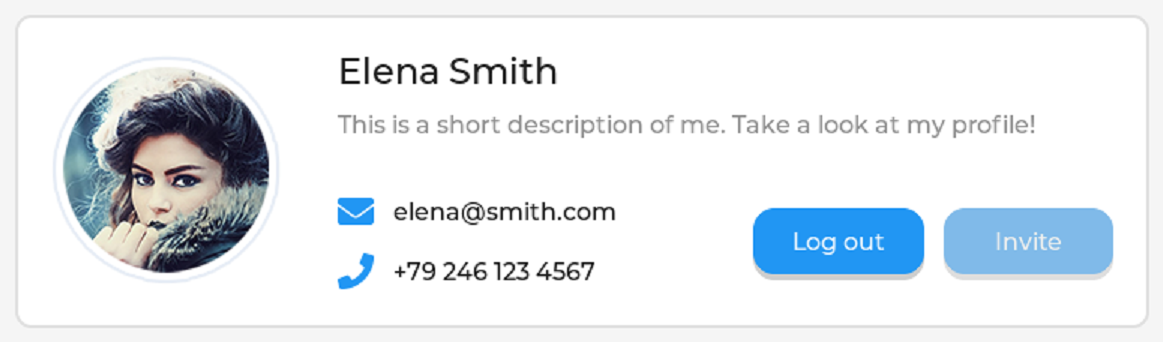
lv_obj_t * panel1 = lv_obj_create(parent);      // Create a panel under parent for placing widgets.
lv_obj_set_height(panel1, LV_SIZE_CONTENT);     // Set the panel's height

LV_IMAGE_DECLARE(img_demo_widgets_avatar);      // Declare the image data is live
lv_obj_t * avatar = lv_image_create(panel1);    // Create a image widget under 'panel1'
lv_image_set_src(avatar, &img_demo_widgets_avatar);     // Fill just now image data to 'avatar'

lv_obj_t * name = lv_demo_widgets_title_create(panel1, "Elena Smith");

lv_obj_t * dsc = lv_label_create(panel1);
lv_obj_add_style(dsc, &style_text_muted, 0);
lv_label_set_text_static(dsc, "This is a short description of me. Take a look at my profile!");
lv_label_set_long_mode(dsc, LV_LABEL_LONG_MODE_WRAP);

lv_obj_t * email_icn = lv_label_create(panel1);
lv_obj_add_style(email_icn, &style_icon, 0);
lv_label_set_text_static(email_icn, LV_SYMBOL_ENVELOPE);
lv_obj_t * email_label = lv_label_create(panel1);
lv_label_set_text_static(email_label, "elena@smith.com");

lv_obj_t * call_icn = lv_label_create(panel1);
lv_obj_add_style(call_icn, &style_icon, 0);
lv_label_set_text_static(call_icn, LV_SYMBOL_CALL);
lv_obj_t * call_label = lv_label_create(panel1);
lv_label_set_text_static(call_label, "+79 246 123 4567");

lv_obj_t * log_out_btn = lv_button_create(panel1);
lv_obj_set_height(log_out_btn, LV_SIZE_CONTENT);
lv_obj_t * label = lv_label_create(log_out_btn);
lv_label_set_text_static(label, "Log out");
lv_obj_center(label);

lv_obj_t * invite_btn = lv_button_create(panel1);
lv_obj_add_state(invite_btn, LV_STATE_DISABLED);
lv_obj_set_height(invite_btn, LV_SIZE_CONTENT);
label = lv_label_create(invite_btn);
lv_label_set_text_static(label, "Invite");
lv_obj_center(label);
LV_SIZE_CONTENT is used to auto adjust widget size.
If your text is too long, you can use lv_label_set_long_mode to make the label wrap to a new line automatically.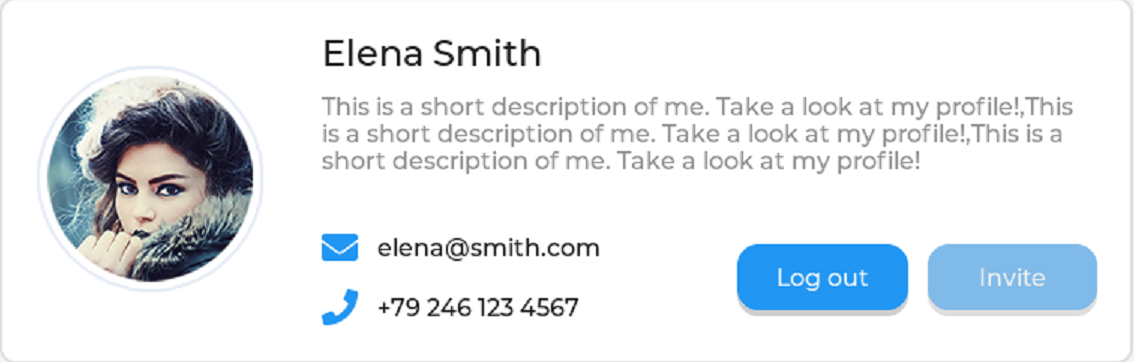
LVGL prepares some icons; you can find them in the file lv_symbol_def.h, and you can use them in a label with lv_label_set_text_static(call_icn, LV_SYMBOL_CALL);. These are their names:
enum _lv_str_symbol_id_t {
    LV_STR_SYMBOL_BULLET,
    LV_STR_SYMBOL_AUDIO,
    LV_STR_SYMBOL_VIDEO,
    LV_STR_SYMBOL_LIST,
    LV_STR_SYMBOL_OK,
    LV_STR_SYMBOL_CLOSE,
    ...
    LV_STR_SYMBOL_DUMMY,
};
And this is what they look like: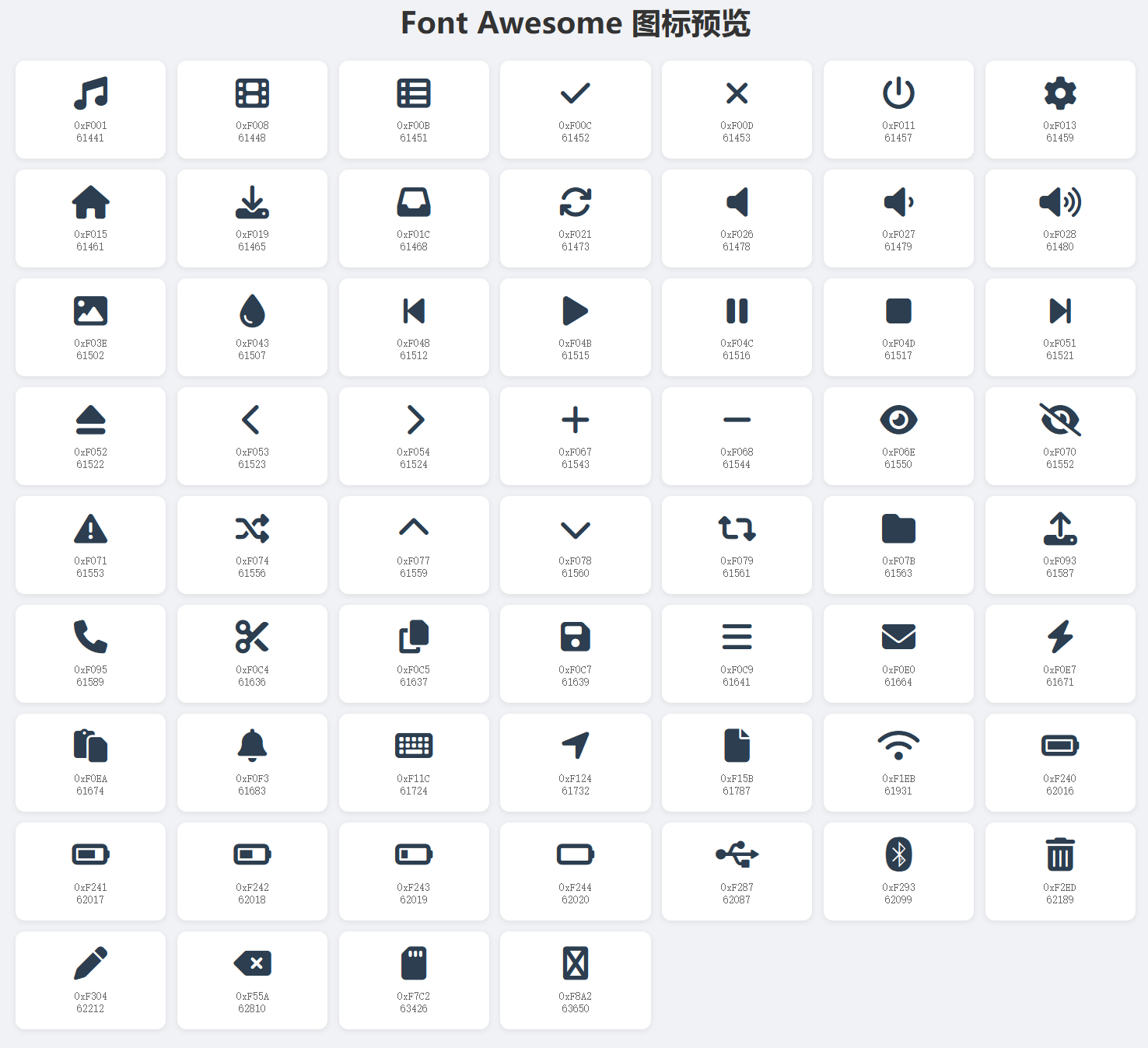
Just now I explained how to create those widgets, but how does LVGL know how the widgets are arranged?
The widgets are laid out by the code below:
static int32_t grid_main_col_dsc[] = {LV_GRID_FR(1), LV_GRID_FR(1), LV_GRID_TEMPLATE_LAST};
static int32_t grid_main_row_dsc[] = {LV_GRID_CONTENT, LV_GRID_CONTENT, LV_GRID_TEMPLATE_LAST};

/*Create the top panel*/
static int32_t grid_1_col_dsc[] = {LV_GRID_CONTENT, 5, LV_GRID_CONTENT, LV_GRID_FR(2), LV_GRID_FR(1), LV_GRID_FR(1), LV_GRID_TEMPLATE_LAST};
static int32_t grid_1_row_dsc[] = {LV_GRID_CONTENT, LV_GRID_CONTENT, 10, LV_GRID_CONTENT, LV_GRID_CONTENT, LV_GRID_TEMPLATE_LAST};

static int32_t grid_2_col_dsc[] = {LV_GRID_FR(1), LV_GRID_FR(1), LV_GRID_TEMPLATE_LAST};
static int32_t grid_2_row_dsc[] = {
    LV_GRID_CONTENT,  /*Title*/
    5,                /*Separator*/
    LV_GRID_CONTENT,  /*Box title*/
    30,               /*Boxes*/
    5,                /*Separator*/
    LV_GRID_CONTENT,  /*Box title*/
    30,               /*Boxes*/
    LV_GRID_TEMPLATE_LAST
};
lv_obj_set_grid_dsc_array(parent, grid_main_col_dsc, grid_main_row_dsc);
lv_obj_set_grid_cell(panel1, LV_GRID_ALIGN_STRETCH, 0, 2, LV_GRID_ALIGN_CENTER, 0, 1);
lv_obj_set_grid_dsc_array(panel1, grid_1_col_dsc, grid_1_row_dsc);
lv_obj_set_grid_cell(avatar, LV_GRID_ALIGN_CENTER, 0, 1, LV_GRID_ALIGN_CENTER, 0, 5);
lv_obj_set_grid_cell(name, LV_GRID_ALIGN_START, 2, 2, LV_GRID_ALIGN_CENTER, 0, 1);
lv_obj_set_grid_cell(dsc, LV_GRID_ALIGN_STRETCH, 2, 4, LV_GRID_ALIGN_START, 1, 1);
lv_obj_set_grid_cell(email_icn, LV_GRID_ALIGN_CENTER, 2, 1, LV_GRID_ALIGN_CENTER, 3, 1);
lv_obj_set_grid_cell(email_label, LV_GRID_ALIGN_START, 3, 1, LV_GRID_ALIGN_CENTER, 3, 1);
lv_obj_set_grid_cell(call_icn, LV_GRID_ALIGN_CENTER, 2, 1, LV_GRID_ALIGN_CENTER, 4, 1);
lv_obj_set_grid_cell(call_label, LV_GRID_ALIGN_START, 3, 1, LV_GRID_ALIGN_CENTER, 4, 1);
lv_obj_set_grid_cell(log_out_btn, LV_GRID_ALIGN_STRETCH, 4, 1, LV_GRID_ALIGN_CENTER, 3, 2);
lv_obj_set_grid_cell(invite_btn, LV_GRID_ALIGN_STRETCH, 5, 1, LV_GRID_ALIGN_CENTER, 3, 2);
LVGL uses a 'descriptor array' to achieve layout.
//                                       1 column       1 column     the array's marked of end
static int32_t grid_main_col_dsc[] = {LV_GRID_FR(1), LV_GRID_FR(1), LV_GRID_TEMPLATE_LAST};     // each column's width is 50% space of t1
//                                      1 row           1 row        the array's marked of end
static int32_t grid_main_row_dsc[] = {LV_GRID_CONTENT, LV_GRID_CONTENT, LV_GRID_TEMPLATE_LAST}; // each row's height is decided by they context
So, you can see this: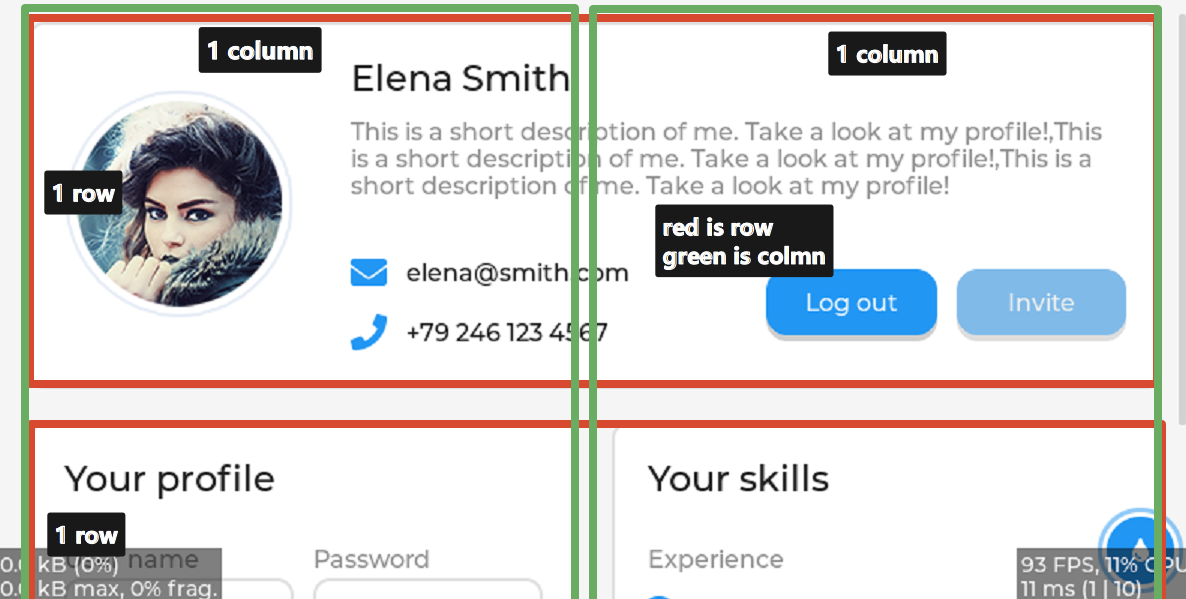
and this
/*Create the top panel*/
// 'LV_GRID_CONTENT' expresses the column's width is dicided by LVGL lib,'5' expreees the column's width is 5 pixels.
// 'LV_GRID_FR(2), LV_GRID_FR(1), LV_GRID_FR(1)' get the rest space, the allocation of ratio is 2:1:1
//                                  1 column      1 column  1 column       1 column       1 column     1 column          mark of end
static int32_t grid_1_col_dsc[] = {LV_GRID_CONTENT, 5, LV_GRID_CONTENT, LV_GRID_FR(2), LV_GRID_FR(1), LV_GRID_FR(1), LV_GRID_TEMPLATE_LAST};    // all is 6 column
static int32_t grid_1_row_dsc[] = {LV_GRID_CONTENT, LV_GRID_CONTENT, 10, LV_GRID_CONTENT, LV_GRID_CONTENT, LV_GRID_TEMPLATE_LAST};      // all is 5 row
so, you can see this: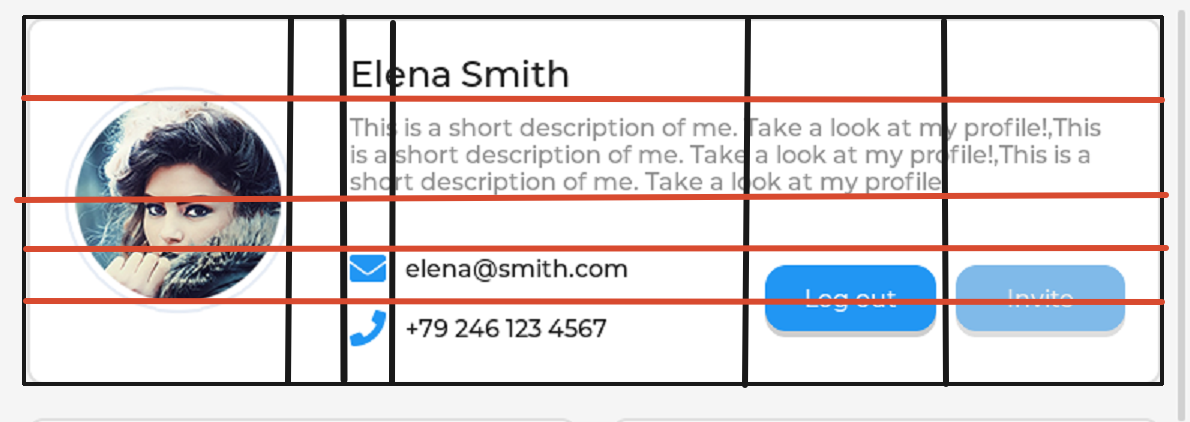
and below sets each widget's position
// setting t1 as 2 column and 2 row
lv_obj_set_grid_dsc_array(parent, grid_main_col_dsc, grid_main_row_dsc);
//            target widget   full the free space    start  span   the row' center    start span
lv_obj_set_grid_cell(panel1, LV_GRID_ALIGN_STRETCH,    0,    2, LV_GRID_ALIGN_CENTER,   0,   1);
Changelog
0ca31-ond54fb-on