
00-bootloader Prerequisites
Microcomputer Fundamentals
Stack Pointer SP (Stack Pointer)
"Picture this, everyone: a microcontroller running code is just like you reading an incredibly thick novel (and that novel is the Flash memory).
Your eyes can't take in a whole page at once — you have to read it line by line. To keep from losing your place, you'd use your index finger to point at whatever line you're reading right now. Finish a line, and the finger slides down one line.
That index finger used for pointing the way is the PC (Program Counter)!
What the PC holds is always an address, which is basically telling you: 'Boss CPU, which line of code should be executed next?'
What if a phone call suddenly comes in (an interrupt)? What do you do? You'd write down where your finger is currently pointing on a slip of paper (saving the context), then run off to answer the call. When you're back, you glance at the slip of paper, point your finger back at that line, and keep reading! But if you forcibly bend that finger over to a blank page full of gibberish (say, pointing it at 0x00000000), you'll instantly freeze up and the whole thing dies — that's a HardFault!"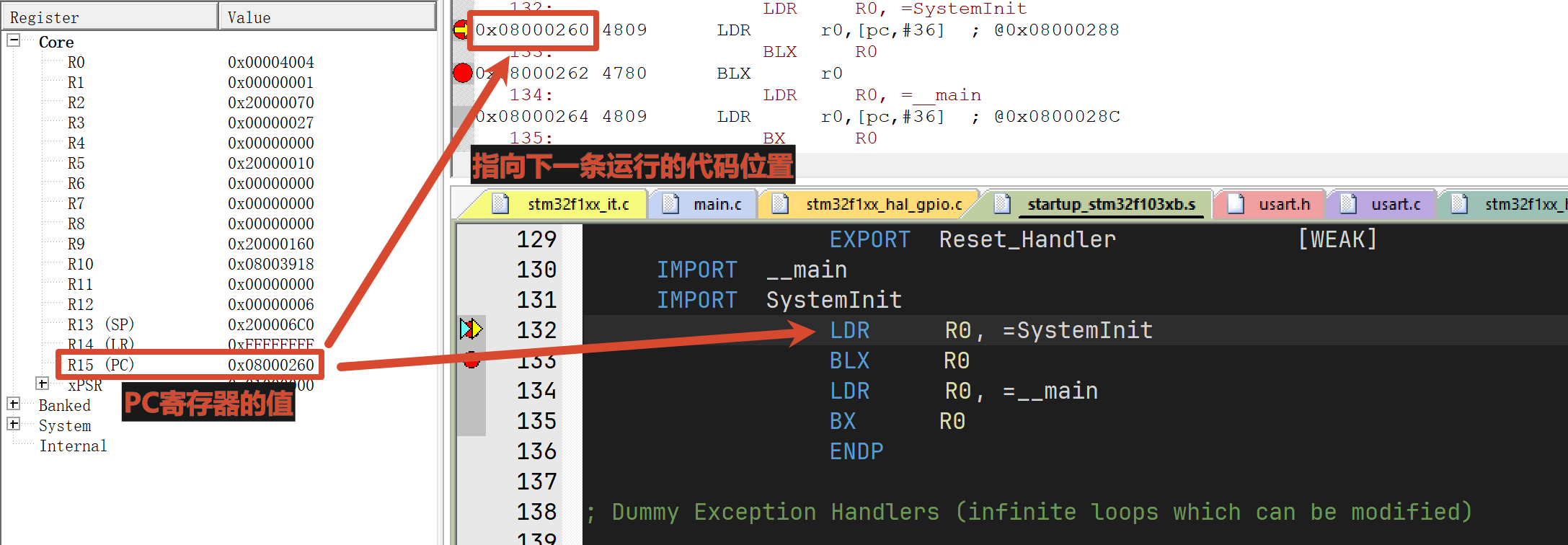
Summary: the value of the PC register is the location of the next piece of code to be executed — extremely important!!
Program Counter PC (Program Counter)
"When reading a book, you'll occasionally hit a few math problems (calling a function). To work them out, you have to pull out a scratch pad (and that's the SRAM memory).
While working things out on the scratch pad, you write down temporary variables (local variables) one after another: a=1, b=2.
To know which line of the scratch pad you're currently on — and to keep newly written data from clobbering the old data — you'd take a red pen and draw a horizontal line just below the last line of data.
That red line marking the boundary of the scratch pad is the SP (Stack Pointer)!
Every time you enter a new function and define new local variables, that SP red line moves down (pushing onto the stack, carving out new space). Every time you finish a problem and exit the function, that scratch data is useless, so the SP red line snaps right back up (popping the stack, reclaiming the space).
So why does the system die if we send the SP flying in a Bootloader? Because the CPU is just about to go fetch the variable a from its scratch pad, and you suddenly yank that scratch pad away and swap in a brand-new blank diary! It can't find its data, and it crashes on the spot!"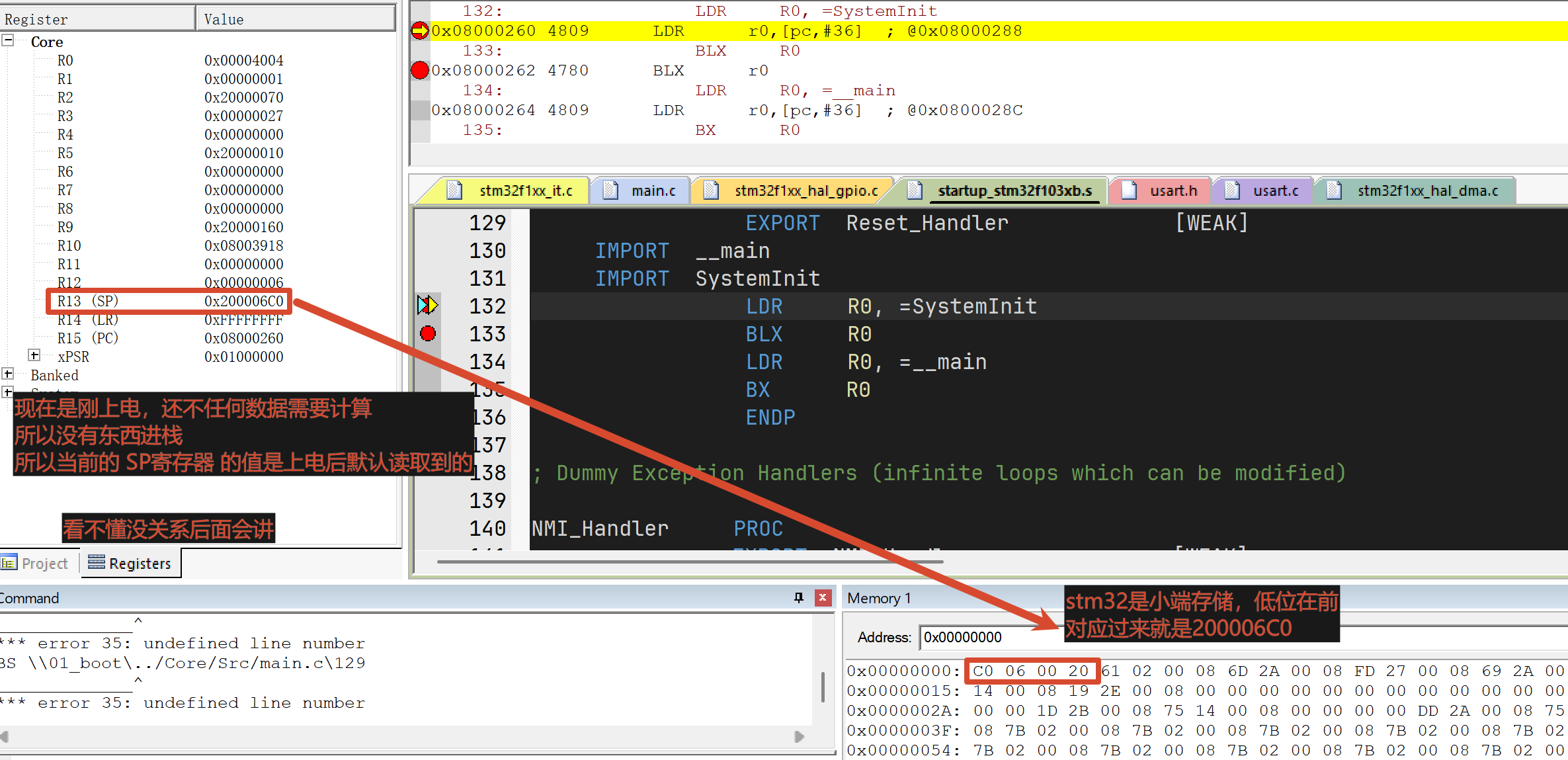
Summary: the value of the SP register points to the current location of the stack — only by knowing it does the CPU know where to put its data
Question 1
Q: Memory (SRAM) is so big, can't we just toss stuff anywhere? Why does it have to go on the stack?
A: It's about making full use of memory. For instance, once certain functions finish running, you can't let them hog memory forever — that memory needs to be freed. But how do you know which ones should be freed? So you use a stack, a last-in-first-out structure, where the function that ran last gets its memory freed first.
Question 2
Q: What even is the stack? Where is it on the microcontroller?
A: The stack is just a region of memory (SRAM) on the microcontroller. It's just that it's the CPU's darling, so we call it the stack.
Question 3
Q: I never need it in daily life, I've never even touched it — where can I actually see it?
A: The stack and heap get configured for you in the startup file: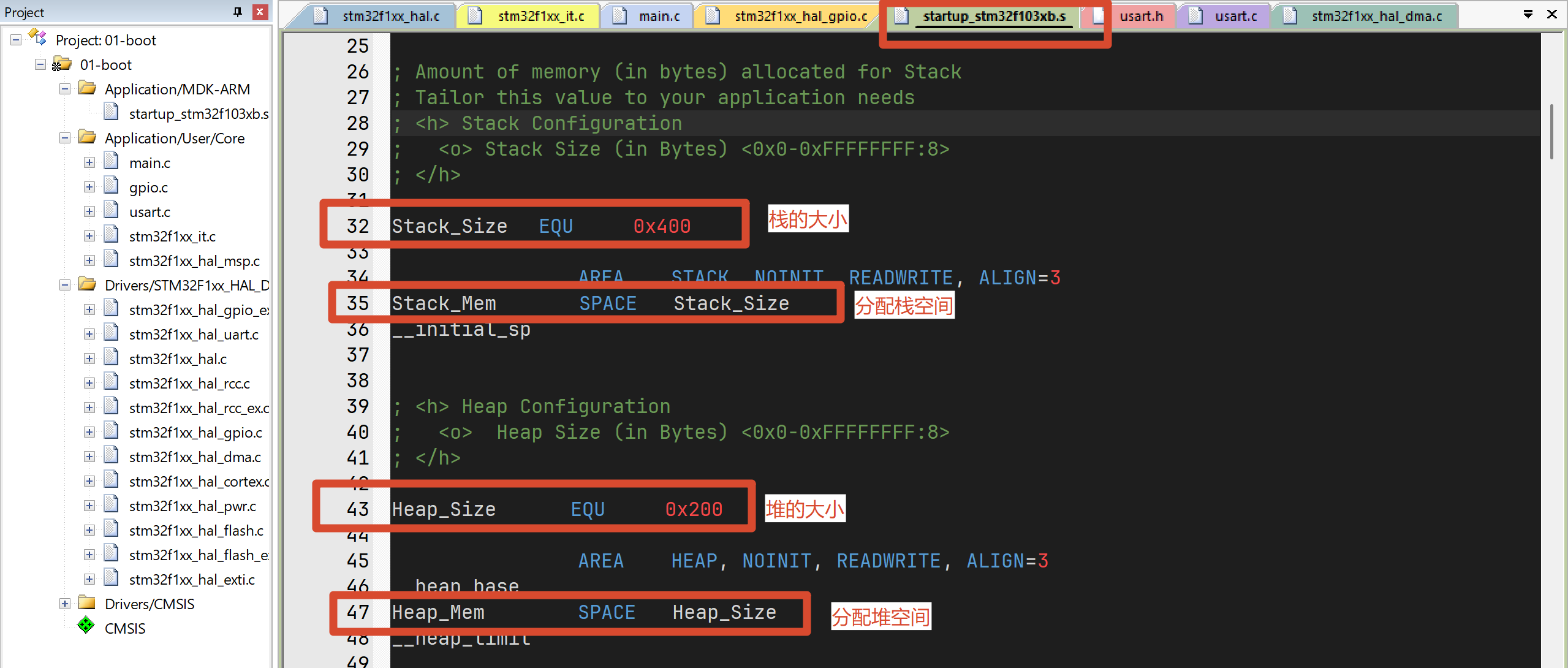
You can set the size here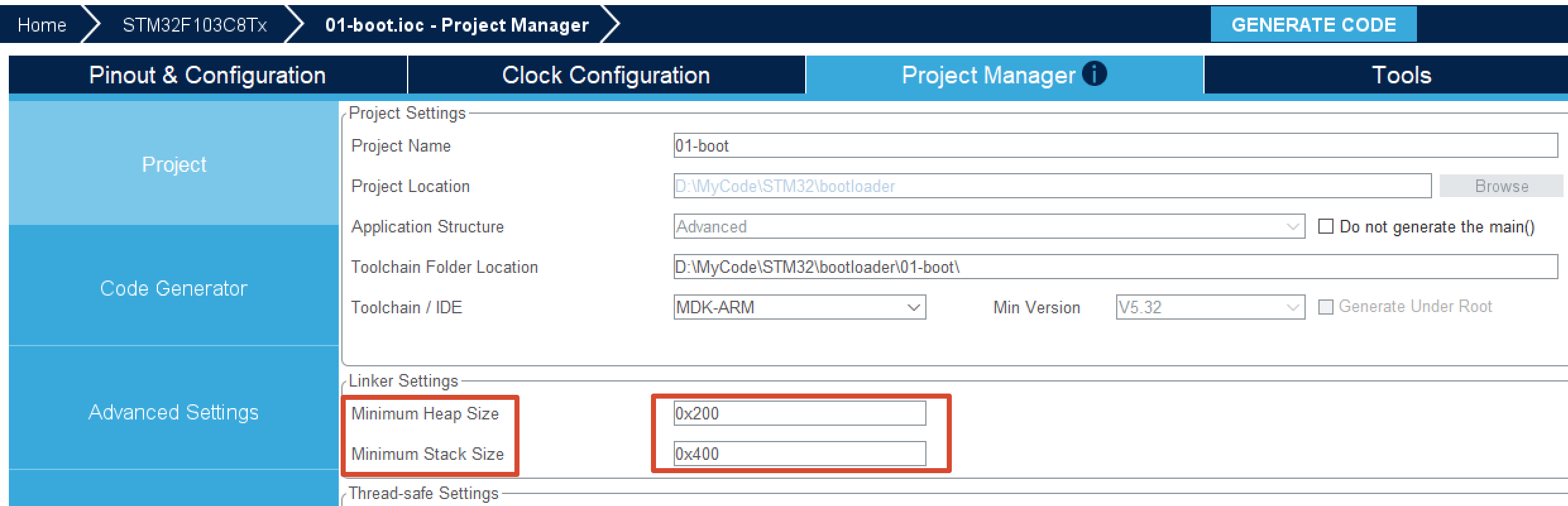
Keil Debugging Basics
Always use -O0 optimization when debugging
The circled places are a must-read — you'll use every single one of them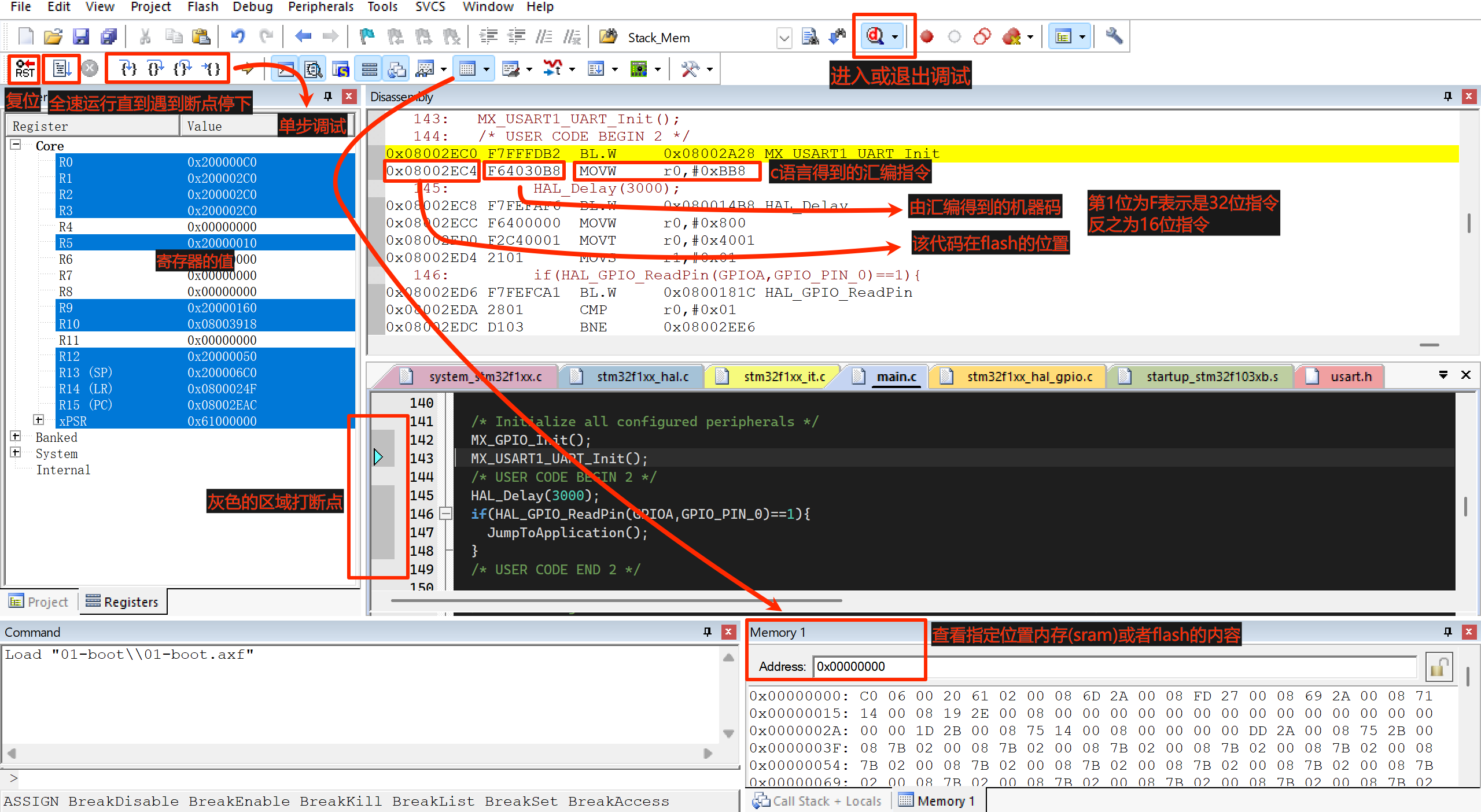
Keil Menu Walkthrough
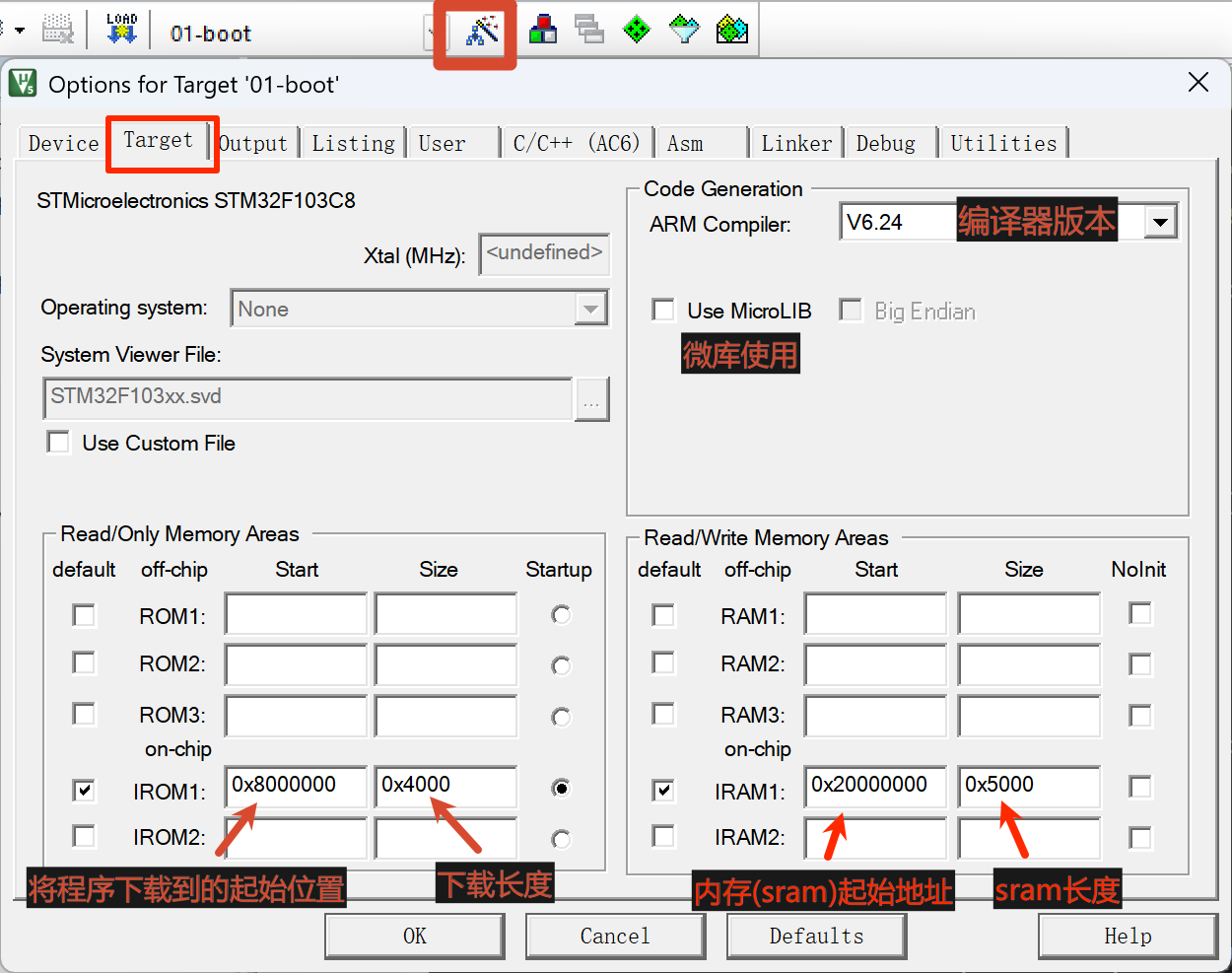
Setting the Program Download Location
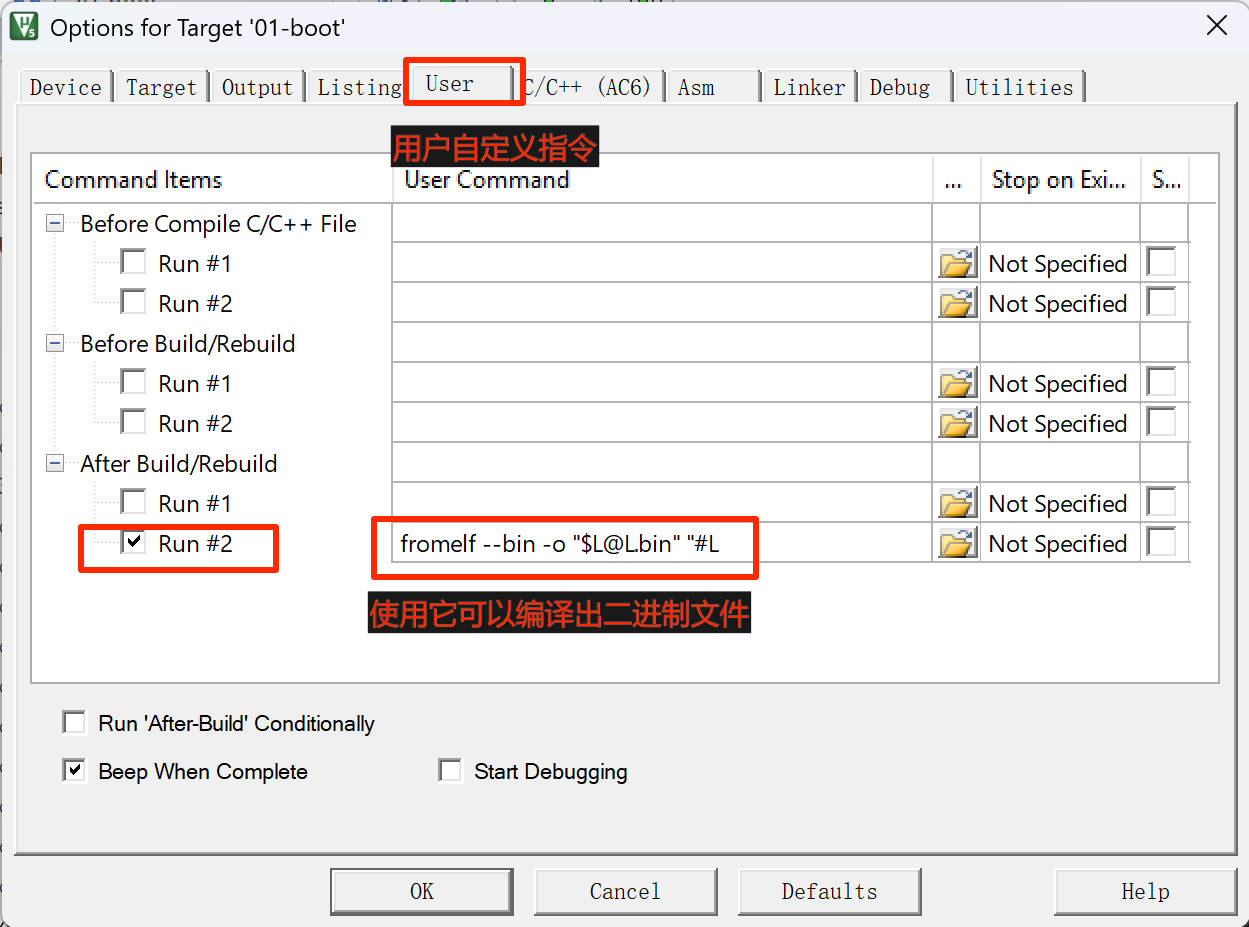
Getting the Binary File
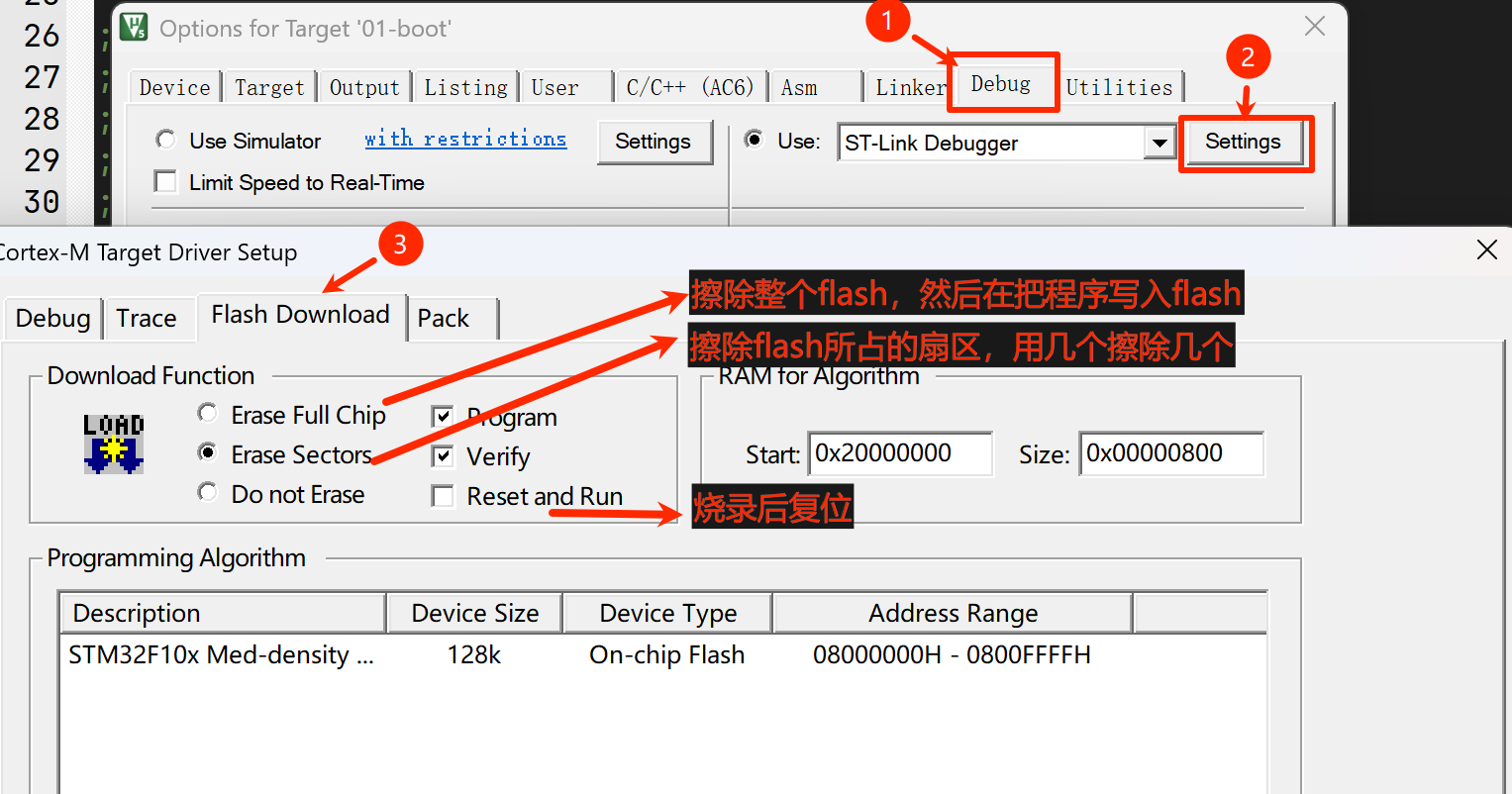
Flash Erase
Compiler Optimization
-O0: No Optimization (the Freshly Hired Intern)
- Its behavior: Absolutely obedient, extremely rigid. However you write your C, it translates line by line into assembly. Define a variable, and it dutifully carves out space in memory (the stack), even if that variable is only used once.
- Pros: The undisputed king of debugging. Because the code is a 1:1 translation, everything lines up perfectly when you set breakpoints, single-step, or inspect local variables. You'll never see "variable optimized away" or "breakpoints jumping all over the place."
- Cons: The generated Bin file is gigantic, and execution speed is the slowest.
- When to use: Day-to-day development and the Debug phase.
-O1: Basic Optimization (the Skilled Production Line Worker)
- Its behavior: It starts using its brain. It deletes obvious filler (dead code that can never execute); more importantly, it starts making heavy use of CPU registers to hold local variables instead of slowly reading and writing memory (the stack) every time.
- Pros: Code size starts shrinking and execution speed improves noticeably. At the same time, it retains basic debugging capability.
- Cons: Not as good as the best, better than the rest.
- When to use: The in-between state where you want code to run a bit faster but still need to Debug now and then.
-O2: Standard High-Level Optimization (the Workshop Foreman) — Industry's Favorite
- Its behavior: The compiler completely lets loose. It performs instruction reordering (shuffling the order of the code you wrote to cater to the CPU's pipeline) and constant folding (compile-time evaluating your
3 * 24 * 60directly into4320and stuffing that in). If it thinks some approach executes faster, it will rewrite your logic that way (while guaranteeing the final result is the same). - Pros: Extremely fast execution, and size stays nicely under control too.
- Cons: A debugging nightmare. If you single-step under O2, you'll find breakpoints hopping up and down between lines, and every local variable displaying
<optimized out>(optimized away, never put in memory). - When to use: The default standard for product Release.
-O3: Performance Maniac (the Mad Scientist)
- Its behavior: For the sake of ultimate execution speed, it will sacrifice anything (including code size). It does two crazy things:
- Function Inlining: It takes the small functions you wrote and copy-pastes them, macro-style, directly into the call sites, eliminating the jump overhead of a function call — but code size balloons.
- Loop Unrolling: It takes your
for(i=0; i<4; i++) { do_something(); }and forcibly expands it into fourdo_something();statements, saving the time ofi++and the condition check.
- Pros: The highest execution speed a microcontroller can achieve.
- Cons: The Bin file balloons noticeably (trading space for time).
- When to use: Dedicated core code sections that need to run extremely complex algorithms (like motor FOC control, DSP audio processing, FFT computation).
-Ofast: Outlaw (the Reckless Race Car Driver)
- Its behavior: On top of
-O3, it breaks the C language and IEEE international standards. Especially for floating-point (float/double) math, it ignores all safety checks in pursuit of speed (for example, ignoring illegalNaNand infiniteInfvalues and forcibly changing the associativity of mathematical operations). - Pros: Floating-point math runs absurdly fast.
- Cons: Extremely dangerous. If your math formulas can ever divide by zero or overflow, the program will produce bizarre results.
- When to use: Pure digital signal processing, where you are 100% certain the input data is legitimate.
🌟 The Ultimate Space-Saving Trick: The Battle of Size
For those of us writing a Bootloader, speed doesn't matter at all (a jump takes a few microseconds), size is king. That's when you reach for size-oriented optimization:
-Os: Space Magician (the Frugal Butler)
- Its behavior: Enables all
-O2-level optimizations, but firmly refuses any optimization that would increase code size (for example, it will absolutely not unroll loops or inline large functions the way O3 does). - Pros: Shrinks the Bin file as much as possible while maintaining fairly high execution speed.
- When to use: Regular App projects where Flash space is tight.
-Oz / -Omax: Black-Hole-Level Compression (Squeezing Out the Last Drop of Blood)
(Note: -Oz is the extreme space optimization exclusive to the Keil AC6 / Clang compiler; -Omax is usually what the Keil GUI calls it, representing the extreme state with LTO cross-module optimization enabled)
- Its behavior: To shrink size, it will sacrifice execution speed. It forcibly extracts all the similar-looking code sections into one shared function that everyone calls (even if the jumps waste a little time). And it replaces ordinary instructions with every obscure, tiny assembly instruction it can find.
- Pros: The smallest Bin file in the microcontroller world, bar none.
- Cons: Code execution gets slower, and it is absolutely impossible to Debug.
- When to use: Your Bootloader! Because the dedicated Flash sector for a Bootloader is often only 8KB to 16KB, you have to squeeze it down to the extreme with
-Oz
Summary
| Optimization Level | Core Goal | Size | Speed | Debug Difficulty | One-Line Summary |
|---|---|---|---|---|---|
| -O0 | Easy debugging | Huge | Slowest | ⭐ (Very easy) | The nanny of the development phase |
| -O1 | Balanced transition | Medium | Medium | ⭐⭐ | A slightly smarter nanny |
| -O2 | Global balance | Fairly small | Extremely fast | ⭐⭐⭐⭐ | The industry release standard |
| -O3 | Space for time | Bloated | Blazing | ⭐⭐⭐⭐⭐ | The algorithm maniac's favorite |
| -Os | Size-conscious | Very small | Fairly fast | ⭐⭐⭐⭐ | The savior when Flash runs out |
| -Oz | Time for space | Tiny | Fairly slow | ⭐⭐⭐⭐⭐ (Hell) | The Bootloader's dedicated juicer |
- o0: no optimization, the generated Bin file is gigantic and execution speed is the slowest; used during day-to-day development and the Debug phase.
- o1: basic optimization, the in-between state where you want code to run a bit faster but still need to Debug now and then; not recommended.
- o2: shuffles the order of the code you wrote to cater to the CPU's pipeline, and evaluates your
3 * 24 * 60at compile time directly into4320and stuffs that in. If it thinks some approach executes faster, it will rewrite your logic that way; extremely fast execution and well-controlled size, but you can't Debug. - o3: for the sake of ultimate execution speed, it can sacrifice anything (including code size); can't debug, don't use it for a Bootloader.
- ofast: on top of
-O3, it breaks the C language and IEEE international standards; errors may show up at runtime, but floating-point math runs absurdly fast. - oz/omax: to shrink size, it will sacrifice execution speed; can't Debug, but the size is small, suitable for a Bootloader.
Boot Process
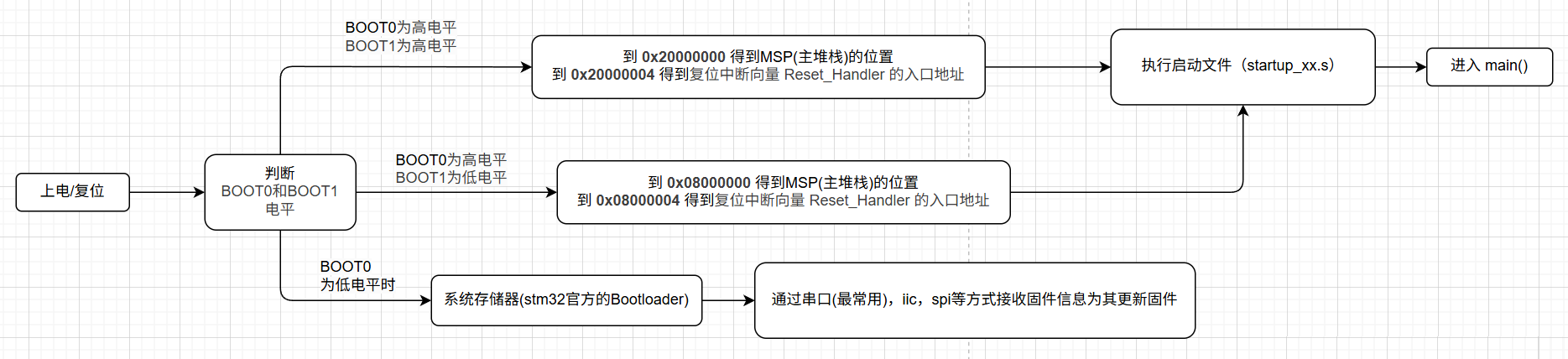
The brain inside an STM32 is an ARM Cortex-M core (for example, the F103 is an M3). ARM officially laid down an extremely rigid "factory iron law" for this core: every time the chip powers up and resets, the CPU's eyes are locked dead onto the address 0x00000000!
It does two things, always the same:
2. Read a 32-bit value from 0x00000000 and assign it to SP (the Main Stack Pointer).
3. Read a 32-bit value from 0x00000004 and assign it to PC (the Program Counter, which is the entry point of the Reset_Handler reset function).
ARM mandates that startup code must be found at 0x00000000, but ST (STMicroelectronics), when building the STM32, soldered the physical Flash chip that stores the code onto the bus at 0x08000000. Awkward: the CPU insists on finding code at 0x00000000, but the code actually lives at 0x08000000. So how do you fool the CPU?
ST invented a mechanism called memory remapping (Aliasing). You can picture it as a "mirror." When your board is configured to boot from Flash, the hardware places a mirror at 0x00000000 that directly reflects the contents of 0x08000000.
- The CPU thinks it's reading
0x00000000, but what it's actually reading is the stack pointer stored at0x08000000. - The CPU thinks it's reading
0x00000004, but what it's actually reading is the function address stored at0x08000004.
That's why flashing your code to0x08000000still lets the microcontroller boot perfectly.
Why go to all this trouble with a "mirror"?
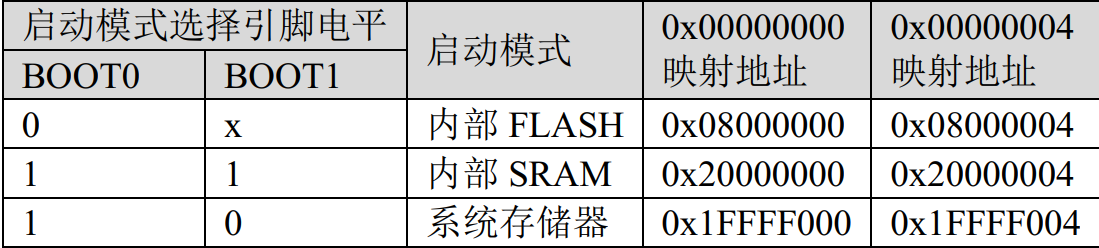
ST went to the pains of building this "mirror" so that you could freely decide where the microcontroller boots from, using hardware pins (BOOT0 and BOOT1)!
This "mirror" sitting at0x00000000can be redirected at any time: - When BOOT0 = 0 (normal mode): The mirror points at
0x08000000(main Flash). The microcontroller powers up and runs the code you wrote. - When BOOT0 = 1, BOOT1 = 0 (UART download mode): The mirror points at
0x1FFFF000(System Memory). This region has a Bootloader hard-wired into it at the ST factory, specifically for receiving code sent from your PC over the serial port (ISP) and flashing it into Flash. (This is why you can flash code over UART even with a blank board), and it can also rescue a locked-up board. - When BOOT0 = 1, BOOT1 = 1 (debug mode): The mirror points at
0x20000000(internal SRAM). Code boots straight from memory, commonly used to unlock Flash read/write protection or for maximum-speed simulation debugging.
Changelog
0ca31-on