
03-STM32-ESP8266-MQTT Communication
The previous video covered how to use the ESP8266 for MQTT communication, but it used a computer to send the serial data to the ESP8266;
In this video, let's talk about how to use an STM32 to send data to the ESP8266 to achieve serial communication.
STM32 to ESP8266 Wiring Diagram
The OLED is used to display debug info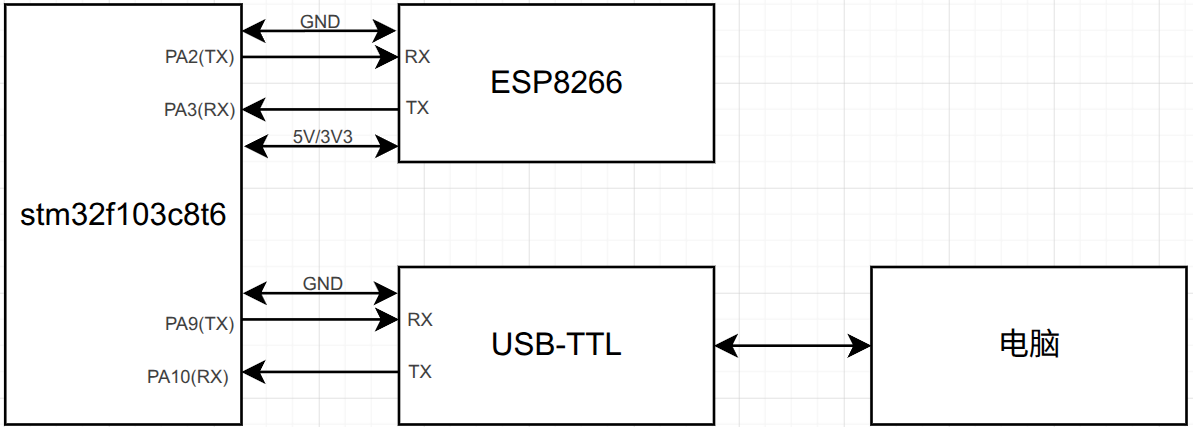
Code Approach
In the last video, we used a computer to send serial data to the ESP8266, so we could clearly see what the computer sent to the ESP8266 and what it got back. But now we're letting the STM32 do the sending — the STM32 doesn't know how fast it should send. Too fast, and the ESP8266 can't parse it in time and sends back busy...; too slow, and the user experience is bad. What's more, only the STM32 knows what it received from the ESP8266 — we don't. So:
- Step one is to manage how the STM32 sends data to the ESP8266 — not too fast, not too slow. Too fast, and the ESP8266 can't parse it in time and sends back
busy...; too slow, and the user experience is bad. - Step two is to know what the ESP8266 returned after the command was sent. For that, we need to use UART1 (PA9, PA10) to forward what's received on UART2 (PA2, PA3) to the serial assistant so that we know it too.
Step One
Simple Version
We can send using the STM32's HAL library functions, like this:
void uart_print(UART_HandleTypeDef *huart,char* format,...) {
    char buf[128]={0};
    va_list ap;
    va_start(ap,format);
    vsprintf(buf,format,ap);
    va_end(ap);
    HAL_UART_Transmit(huart,(uint8_t*)buf,strlen(buf),HAL_MAX_DELAY);
}
uart_print(&huart2,"AT+MQTTCLEAN=0\r\n");
HAL_Delay(5000);
uart_print(&huart2,"AT+CWJAP=\"aaa\",\"aaaaaaaa\"\r\n");
HAL_Delay(5000);
uart_print(&huart2,"AT+MQTTUSERCFG=0,1,\"fs\",\"111111\",\"272935657\",0,0,\"\"\r\n");
HAL_Delay(5000);
uart_print(&huart2,"AT+MQTTCONN=0,\"45.192.110.61\",1883,1\r\n");
HAL_Delay(5000);
uart_print(&huart2,"AT+MQTTSUB=0,\"topic1\",1\r\n");
Advanced Version
The simple version above can't control timing — every send has to wait 5s for the ESP8266 to process the data, which wastes a lot of time and is hard to debug; you're writing code purely on gut feel. Next we'll use a serial ring buffer to handle serial reception, and wait for a response after sending before processing the send.
The principle of the serial buffer:
- Define a buffer array
- Define a read flag and a write flag
- Write data into the buffer via DMA and update the write flag (advance it)
- When pulling data out, update the read flag (advance it); if the read flag equals the write flag, that means there's no data
- The system main loop and initialization flow (
mycode_loop)
- The low-level data extraction and parsing flow (
Process_ESP8266_Data)
- The non-blocking AT command send mechanism (
ESP8266_Send_Cmd)
volatile uint8_t uart_rx_byte;       // holds the received character
char uart_rx_buf[512];               // holds the data received so far
volatile uint16_t uart_rx_len = 0;   // length of data received so far
void HAL_UART_RxCpltCallback(UART_HandleTypeDef *huart){
    if (huart->Instance == USART1){
        if (uart_rx_len < (sizeof(uart_rx_buf) - 1)){
            uart_rx_buf[uart_rx_len++] = (char)uart_rx_byte;
            uart_rx_buf[uart_rx_len] = '\0';
        }
        HAL_UART_Receive_IT(&huart1, (uint8_t *)&uart_rx_byte, 1);
    }
}- Formatted serial printing is still needed too
void uart_print(UART_HandleTypeDef *huart,char* format,...) {
    char buf[128]={0};
    va_list ap;
    va_start(ap,format);
    vsprintf(buf,format,ap);
    va_end(ap);
    HAL_UART_Transmit(huart,(uint8_t*)buf,strlen(buf),HAL_MAX_DELAY);
}- Define the function
Send_ESP8266(UART_HandleTypeDef *huart,uint8_t timeout_ms,uint8_t max_retries,char* expected_resp,char* cmd,...){
    uint8_t retry_count = 0;
    uint32_t start_time = 0;
    while (retry_count < max_retries)
    {
        memset(uart_rx_buf, 0, sizeof(uart_rx_buf));
        uart_rx_len = 0;

        uart_print(huart, "%s", cmd);
        start_time = HAL_GetTick();

        while ((HAL_GetTick() - start_time) < timeout_ms)
        {
            if (uart_rx_len > 0 && strstr(uart_rx_buf, expected_resp) != NULL)
            {
                uart_print(&huart2, "%s", uart_rx_buf);
                memset(uart_rx_buf, 0, sizeof(uart_rx_buf));
                uart_rx_len = 0;
                return 0;
            }
            HAL_Delay(10);
        }

        if (uart_rx_len > 0) {
            uart_print(&huart2, "%s", uart_rx_buf);
        }

        retry_count++;
        HAL_Delay(500);
    }
    return -1;
}- Example
Code Details
Formatted Serial Printing
void uart_print(UART_HandleTypeDef *huart,char* format,...) {
    char buf[128]={0};
    va_list ap;
    va_start(ap,format);
    vsprintf(buf,format,ap);
    va_end(ap);
    HAL_UART_Transmit(huart,(uint8_t*)buf,strlen(buf),HAL_MAX_DELAY);
}
Interrupt-Based Variable-Length Reception
// Initialize serial reception
HAL_UART_Receive_IT(&huart2,uart_buffer,1);
// Interrupt receive handler
void HAL_UART_RxCpltCallback(UART_HandleTypeDef *huart){
    if(huart==&huart2){
        uart_time = uwTick;
        uart_index++;
        HAL_UART_Receive_IT(&huart2,(uint8_t *)&uart_buffer[uart_index],1);
    }
}

void uart_process(void){
    if(uart_index==0)return;
    if(uwTick>uart_time+100){
        memset(&uart_buffer,0,uart_index);
        uart_index=0;
        huart2.pRxBuffPtr = uart_buffer;
    }
}
MQTT Message Parsing
An MQTT received message looks like this:
AT+MQTTPUB=0,"aaa","Hello from ESP8266",0,0

OK
+MQTTSUBRECV:0,"aaa",18,Hello from ESP8266
+MQTTSUBRECV:0,"aaa",18,Hello from ESP8266 is the data we need to parse.
Given the characteristics of this data, aaa is wrapped in double quotes, the data length is between the 2nd and 3rd commas, and the data follows the 3rd comma — so we parse it in a targeted way.
void extract_mqtt_info(const char *str, char *info1, char *info_b) {
    const char *p1 = strchr(str, '"');  // first quote
    if (!p1) return;
    const char *p2 = strchr(p1 + 1, '"'); // second quote
    if (!p2) return;

    // extract info1
    size_t len1 = p2 - p1 - 1;
    strncpy(info1, p1 + 1, len1);
    info1[len1] = '\0';

    // look forward for a comma to find the numeric part
    const char *p_comma = strchr(p2 + 1, ',');
    if (!p_comma) return;
    int length = atoi(p_comma + 1);  // extract the length value

    // find another comma to locate where the message body starts
    const char *msg_start = strchr(p_comma + 1, ',');
    if (!msg_start) return;
    msg_start++;  // skip the comma

    // extract info_b
    strncpy(info_b, msg_start, length);
    info_b[length] = '\0';
}
MQTT Connection
uart_print(&huart2,"AT+MQTTCLEAN=0\r\n");
uart_print(&huart2,"AT+CWJAP=\"aaa\",\"aaaaaaaa\"\r\n");
uart_print(&huart2,"AT+MQTTUSERCFG=0,1,\"fs\",\"111111\",\"272935657\",0,0,\"\"\r\n");
uart_print(&huart2,"AT+MQTTCONN=0,\"45.192.110.61\",1883,1\r\n");
uart_print(&huart2,"AT+MQTTSUB=0,\"topic1\",1\r\n");
MQTT Sending a Message
uart_print(&huart2,"AT+MQTTPUB=0,\"topic1\",\"Ha\",0,0\r\n");Main Approach
- Initialize first, connect to the MQTT server
- Implement variable-length serial reception
- After receiving a message, parse it and print it
Changelog
0ca31-on